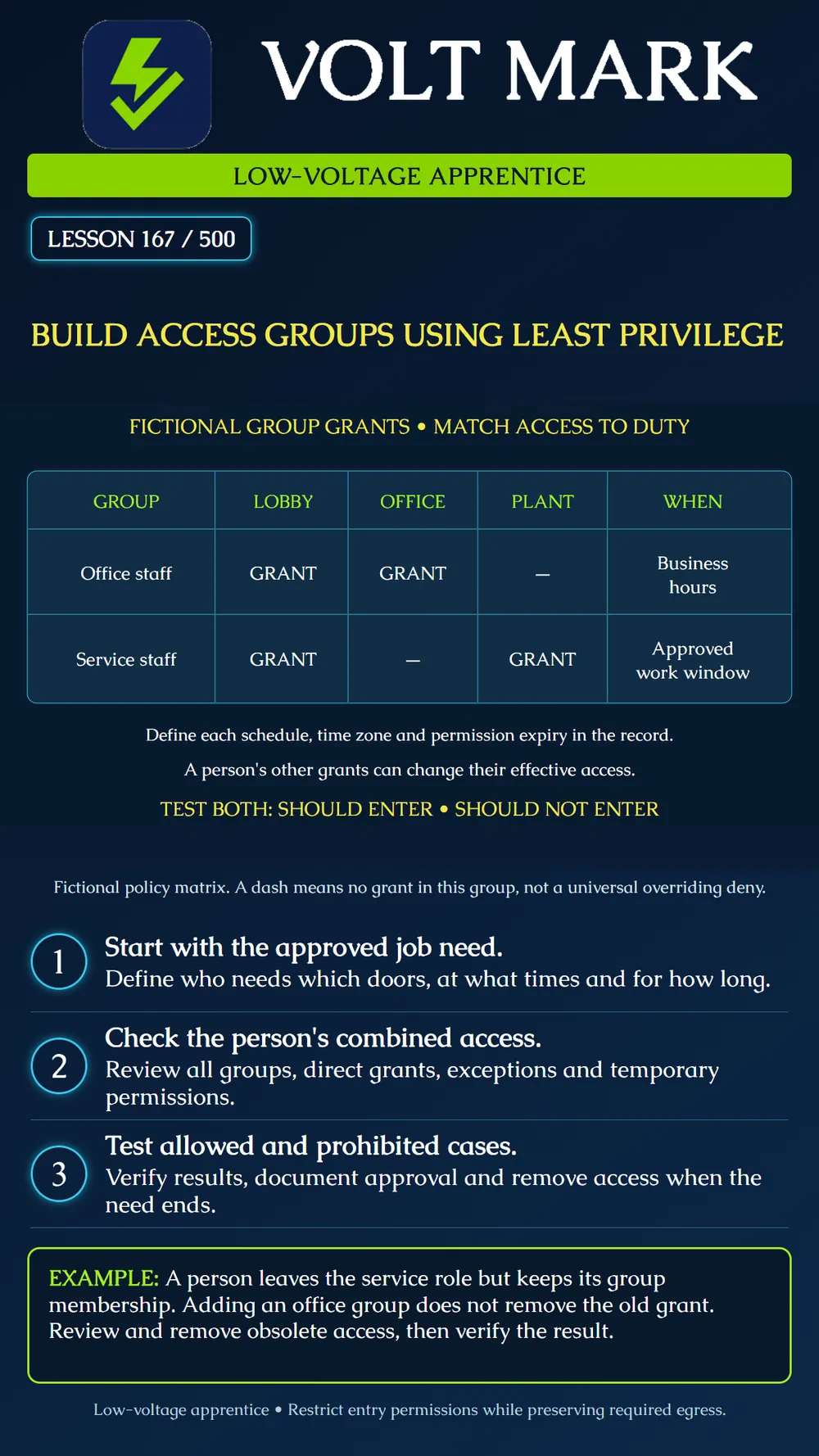
Create a small, understandable access-group plan from approved job needs, check each person's effective access and verify both permitted and prohibited cases on an isolated trainer.
Least privilege means granting only the access needed for an assigned purpose. NIST describes this principle in terms of limiting authorizations and resources to what a function requires. This lesson applies that reasoning to physical entry permissions; it does not claim that a particular NIST computer-security control is a universal door-code rule. [1]
Begin with the owner-approved task and access policy. Identify the person or role, required doors or zones, schedule, start and end of the need, and approving party. A job title alone may not establish every required door. Include legitimate circulation routes so that a narrow permission set still supports the approved task. Restricting credential-based entry does not authorize restricting required egress.
An access group organizes people with shared requirements. An access rule connects people or groups to the doors or zones and schedules where access is granted. Axis Secure Entry documentation illustrates this relationship and offers reports linking cardholders, groups, rules and openings. Use the actual product's supported structure rather than assuming every platform uses these words identically. [2]
The poster shows two group grants: Office staff: lobby and office, during the defined business-hours schedule. Service staff: lobby and plant, during the defined approved work window. A dash means this group supplies no grant for that destination. It is not an explicit deny that necessarily overrides another group. The poster's schedule names are placeholders: the full record must define actual days, times, time zone, holidays, start/end validity and any approved exceptions before implementation.
A person may belong to several groups or have direct permissions. Adding a narrow group does not automatically cancel broader existing access. Inspect every applicable source of permission and the product's conflict-resolution behavior. Do not assume deny precedence, schedule intersection or additive behavior without documentation for the actual system. Distinguish membership from an active credential. A person can have a valid credential but no permission for a particular opening; conversely, a group assignment may exist while its credential is expired or disabled. Keep these conditions separate when diagnosing a denial.
A technician transfers from service work to office duties. The administrator adds the office group but forgets the service membership. The intended policy no longer includes plant access. Review the complete assignment, obtain the appropriate approval for the change, remove the obsolete grant and verify the revised result. Do not treat the presence of the new group as proof that the old access disappeared.
Use a dedicated test system with no live locks or production identities. Write a simple policy worksheet before editing software. Give groups descriptive names that identify their purpose and scope. Link the approved schedule and openings, then add only the intended test cardholders. Record the reason, approver and review or expiration date for temporary access. Avoid an all-doors, all-times group as a troubleshooting shortcut. If a needed action fails, compare the credential, group, rule, opening assignment and time basis before changing policy. An emergency or operational exception must follow the owner's approved process; an apprentice does not invent one during testing.
For an office-only test identity, verify lobby and office entry during its defined schedule. Verify that plant entry is not granted and that an outside-schedule attempt is not granted, assuming no other grant or override exists. For a service-only test identity, perform the corresponding plant and lobby checks and the office negative check. Record test identity label, opening, exact test time and time zone, expected result, observed result and event evidence. Do not infer physical locking from an access-denied log alone; the trainer's output and the actual door's mechanical condition are different subjects. Live-opening acceptance would require its own coordinated procedure.
Inspect overlapping memberships, direct exceptions and the controller's current configuration state. Verify that changes have reached the intended training controller, especially if it was offline. Remove temporary test permissions according to the lesson plan. Retain the approved matrix and actual results without exposing real credential secrets. For an operating site, access review also needs a defined owner and process for changed roles, completed contracts and departures. The lesson teaches the technical record; the organization sets authorization and retention rules.
Answer: Access sufficient for the approved task without unnecessary grants.
Answer: No; it means no grant from this group.
Answer: Other memberships or direct rules may still supply permission.
Answer: No; test representative prohibited doors and times too.
Answer: No.
[1] NIST CSRC Glossary, least privilege. https://csrc.nist.gov/glossary/term/least_privilege [2] Axis Communications, AXIS Camera Station Pro Secure Entry, Access management and reports. https://help.axis.com/en-us/axis-camera-station-secure-entry
Free study material for low-voltage apprentices. This is a national foundation course: requirements differ by state and by local jurisdiction, and a practice that is common in one place is not a rule everywhere. Nothing here is a licence, a certification, or authority to work unsupervised, and completing it does not count as apprenticeship hours or continuing-education credit. Check the codes adopted where you are working, the licensing authority for that work, and your employer's safety programme. VoltMark is not affiliated with, endorsed by, or sponsored by NFPA, OSHA, NICET, BICSI, FOA, or any state or local licensing authority.

Electrician licensing exam prep: practice questions, timed exam simulations, and step-by-step help finding every answer in the NEC.