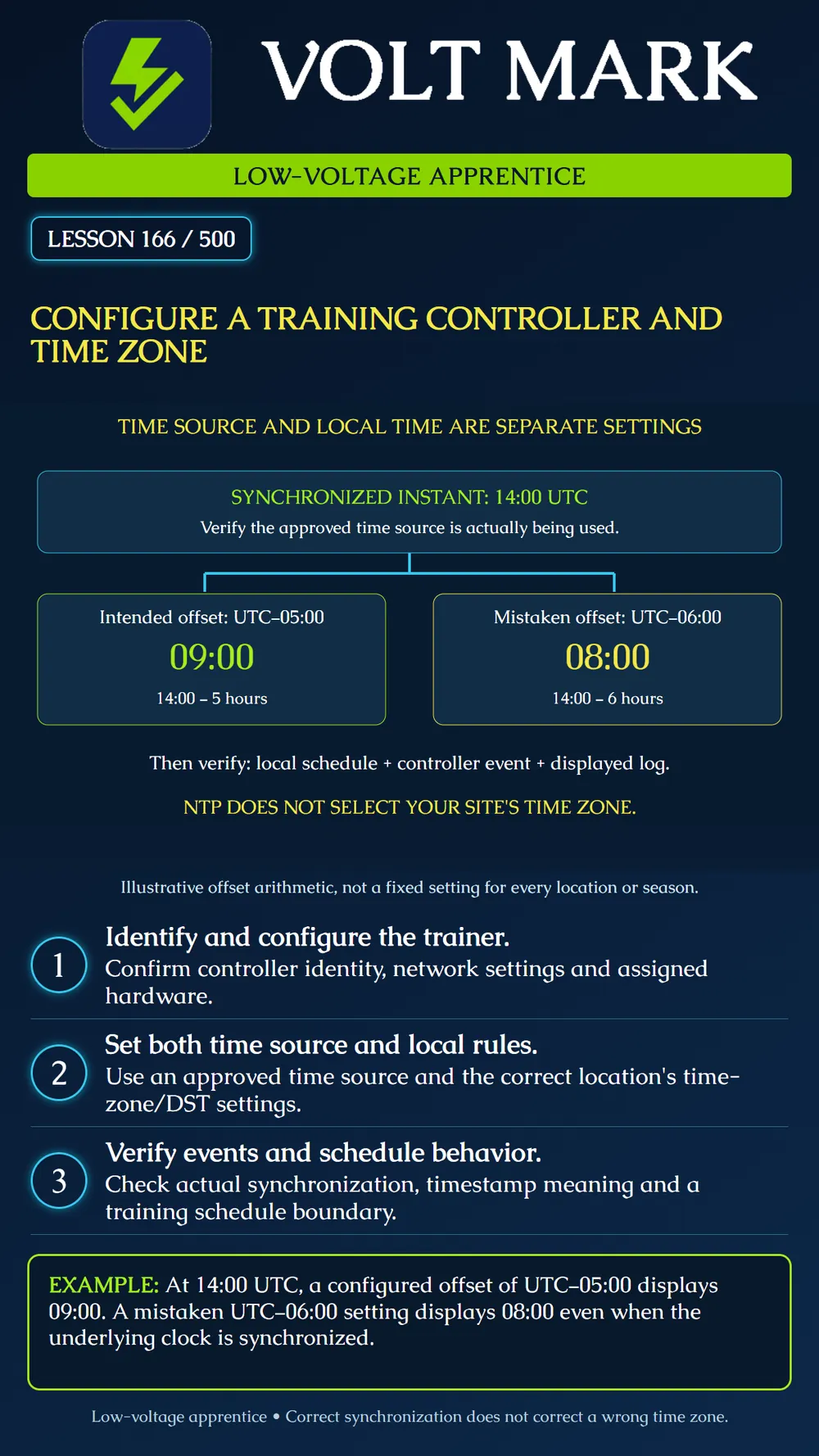
Set up an isolated training controller, configure its clock source and local time rules, and verify that event records and a training schedule behave as intended.
Use a dedicated trainer and test credentials, with no production door or building release circuit attached. The instructor authorizes network access, accounts, hardware assignments and any restart. Do not join a production controller group or alter a site's time service during this exercise.
Identify the controller before configuring it. Record model, serial number or trainer inventory ID, firmware version and document revision. Use the approved bench network plan for addressing, gateway and DNS. Establish authorized administrator access through the supported secure management method. Keep passwords out of the lesson worksheet. Assign a clear trainer name and match the software's hardware configuration to the devices actually present.
The AXIS A1001 documentation provides a bounded setup example: date/time, network configuration, hardware mapping and connection verification are distinct setup tasks. Its date/time section offers NTP synchronization, manual entry or a one-time copy from the computer. It also notes that time settings can propagate to other controllers in the same system. That is why this exercise must stay on the isolated training system. Its menus and behavior are not universal to every controller. [1]
Treat three questions separately: What instant does the clock represent? What local time zone and daylight-saving rules apply? How does a particular schedule or log use or display that time? An accurate clock can still display the wrong local time when the zone is incorrect.
NIST explains that its time services provide UTC and that ordinary NTP information does not supply local daylight-saving rules. Local conversion is handled by the receiving system. Select the actual site's supported geographic zone and applicable rules rather than choosing a neighboring city merely because its offset matches today. A fixed offset is not a substitute for a location's seasonal rule set. Some locations do not observe daylight saving time. [2]
Use an approved, reachable time source supplied by the training network administrator. If its address is a hostname, resolve the required DNS configuration. Saving an NTP-server address does not prove synchronization succeeded. Check the available synchronization evidence and compare the controller's time with the approved reference. A one-time computer-clock copy is not continuing synchronization. [1]
At an instant of 14:00 UTC, an intended offset of UTC minus five hours gives 09:00 local time: 14 minus 5 equals 9. A mistaken offset of minus six hours gives 08:00. Both displays could come from the same accurate UTC clock. This example does not designate a city, season or nationwide default. Correct the zone/rules rather than deliberately shifting the synchronized clock to hide the error.
Create a temporary training-only access window using the controller's documented schedule time basis. Record the zone in which the window is defined. Confirm the outcome just before and just after the selected boundary with authorized test credentials and no live locking output. Generate a known training event and record the reference time. Compare the controller event, management display and any export. Determine whether each is UTC, controller local time or client-local display. Preserve the original timestamp and offset when analyzing differences. Two displays of the same instant can legitimately differ when their time bases differ.
Ask how the selected product handles daylight-saving transitions, missing or repeated local times, holiday exceptions and loss of time synchronization. Do not assume a timer advances identically across a clock change or that every product resolves repeated local times the same way. Obtain documented behavior for the actual platform and keep unsupported conclusions pending.
The reader's test access is denied even though the learner believes the training window has begun. The worksheet shows a synchronized controller but the wrong local zone. Record the denied event and the intended schedule, then compare time settings before expanding access permissions. Changing the group to all-day access would conceal the configuration problem.
Complete the model-specific setup checklist, then document time source, zone, DST behavior, observed synchronization and a known event. Use an instructor-approved short test schedule around the current time rather than changing the host computer clock. If the training plan includes a controlled restart, check that settings persist and synchronization returns as documented. Remove temporary test schedules and accounts as directed, and retain a protected configuration backup if required. Record actual observations; a saved setting or successful restart alone is not evidence for every time-related function.
Answer: No.
Answer: No.
Answer: Yes, if they use different documented time bases.
Answer: 09:00.
Answer: The intended permissions, actual time basis, controller settings and event evidence.
[1] Axis Communications, AXIS A1001 and AXIS Entry Manager, Configuration and Set the Date and Time. Legacy product used as an example, not a purchasing recommendation. https://help.axis.com/en-us/axis-a1001 [2] NIST, Daylight Saving Time Rules. https://www.nist.gov/pml/time-and-frequency-division/popular-links/daylight-saving-time-dst
Free study material for low-voltage apprentices. This is a national foundation course: requirements differ by state and by local jurisdiction, and a practice that is common in one place is not a rule everywhere. Nothing here is a licence, a certification, or authority to work unsupervised, and completing it does not count as apprenticeship hours or continuing-education credit. Check the codes adopted where you are working, the licensing authority for that work, and your employer's safety programme. VoltMark is not affiliated with, endorsed by, or sponsored by NFPA, OSHA, NICET, BICSI, FOA, or any state or local licensing authority.

Electrician licensing exam prep: practice questions, timed exam simulations, and step-by-step help finding every answer in the NEC.