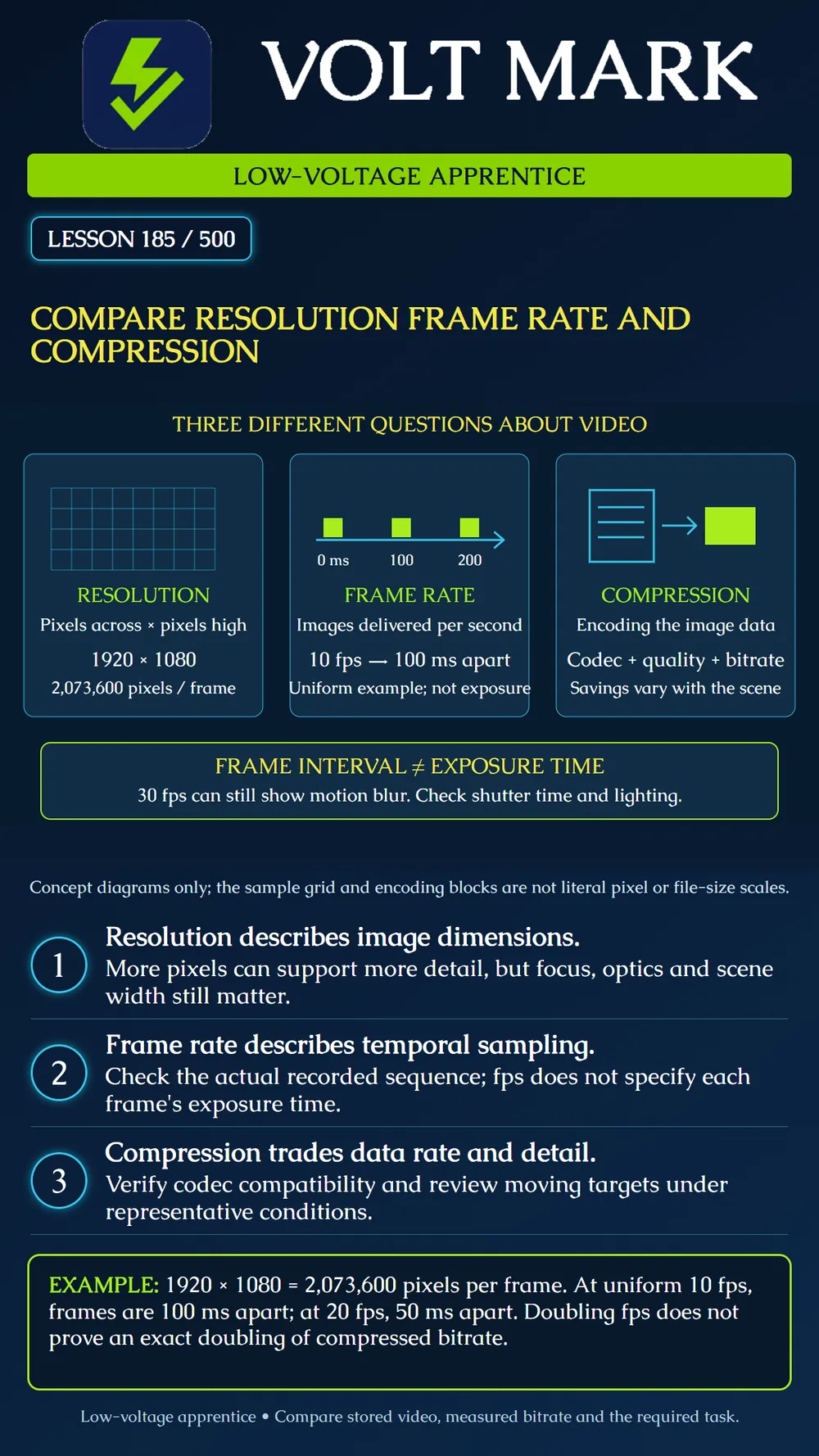
Explain three independent video settings, recognize their interaction and compare actual recordings against a stated task. No single setting proves that a surveillance system delivers useful evidence.
Resolution: how many pixels are in each delivered image? Frame rate: how many images are delivered per second? Compression: how is image information encoded to reduce the data that must be transported and stored? Do not use these terms interchangeably. Also distinguish codec choice, quality settings and bitrate control. They are related settings, not three names for the same value.
A 1920 × 1080 frame contains 2,073,600 pixel positions, about 2.07 million. A 3840 × 2160 frame contains 8,294,400, four times as many. That arithmetic does not prove four times the optical detail, four times the encoded bitrate or four times the storage. At uniform 10 fps, the nominal interval between frame starts is 1 / 10 second = 100 ms. At 20 fps it is 50 ms; at 30 fps it is approximately 33.3 ms. Count frame starts carefully. In a one-second interval defined as 0 inclusive to 1 second exclusive, a uniform 10 fps sequence starting at zero has starts at 0, 0.1, ..., 0.9. A timeline that also includes 1.0 shows the next interval's first frame.
Frame interval is the time between frames. Exposure time is how long light is collected for an image. A 30 fps setting does not mean every exposure is 1/30 second. Actual limits and automatic behavior depend on the camera and mode. The Axis Q1647 manual links longer exposure to motion blur and discusses lighting and gain tradeoffs. Its controls are model-specific examples, not a setting recipe for every camera. For a purely mathematical example, assume a target moves laterally at 1 m/s. During a 1/30 s exposure it travels about 33.3 mm; during 1/250 s it travels 4 mm. This describes target travel, not a prediction of exact blur pixels. Geometry, optical projection and camera processing still matter. A shorter exposure also changes the light available for the image.
Axis explains that encoded bitrate responds to scene complexity and settings. A restrictive bitrate limit can remove useful detail. Its bitrate-control strategies have distinct purposes and behaviors; the configured number is not automatically the measured rate at every instant. Do not promise a fixed saving from changing codecs or halving frame rate. Keep camera, recorder, playback client and export compatibility in the comparison. A recording can have the expected image dimensions yet show damaged fine detail from aggressive encoding. Conversely, a low measured bitrate during a quiet scene does not alone prove unacceptable quality.
Create a worksheet for a fictional loading-area camera; no live configuration is changed by this lesson. Profile A: 1920 × 1080, requested 10 fps, compatible codec and documented quality setting. Profile B: same dimensions and codec, requested 20 fps. Profile C: same dimensions and requested fps as B, changed compression setting. For A versus B, compare temporal continuity of the same moving target. For B versus C, compare fine edges and motion artifacts while recording measured bitrate. Do not change lens placement, scene lighting and exposure silently between trials. The worksheet has columns for requested settings, observed output, actual target task, scene condition and exceptions. It has no prefilled "pass" column.
The Axis controlled-frame-rate paper notes that recording the requested frame rate depends on the entire processing and transport path. A camera setting alone is insufficient evidence. Check the actual stored recording rather than relying only on a smooth live preview. Distinguish camera output limitations, transport loss, recording configuration and playback performance. If a player stutters, investigate before concluding that frames are missing from the stored file.
A sharp still target and a blurred moving target do not automatically justify buying a higher-resolution camera. Examine exposure and conditions. Smooth motion with unreadable fine markings suggests a different question from large temporal jumps between otherwise clear frames. The same camera consumes more data in a busy scene than an empty scene. Do not label that a fault merely because a quiet-scene estimate was lower. If the recorder stores a lower-resolution secondary stream, a high-resolution camera preview does not prove the stored result has that resolution.
Axis, Bitrate control for IP video: https://whitepapers.axis.com/en-us/bitrate-control-for-ip-video Basis: encoding, scene-dependent bitrate and bitrate-control tradeoffs; no universal fixed savings claimed. Axis, Controlled full frame rate: https://whitepapers.axis.com/en-us/controlled-full-frame-rate Basis: end-to-end frame-rate limitations. Product-specific configuration suggestions are not adopted as a universal checklist. Axis Q1647 Network Camera manual: https://help.axis.com/en-us/axis-q1647 Basis: exposure, motion blur and stream-setting examples.
Free study material for low-voltage apprentices. This is a national foundation course: requirements differ by state and by local jurisdiction, and a practice that is common in one place is not a rule everywhere. Nothing here is a licence, a certification, or authority to work unsupervised, and completing it does not count as apprenticeship hours or continuing-education credit. Check the codes adopted where you are working, the licensing authority for that work, and your employer's safety programme. VoltMark is not affiliated with, endorsed by, or sponsored by NFPA, OSHA, NICET, BICSI, FOA, or any state or local licensing authority.

Electrician licensing exam prep: practice questions, timed exam simulations, and step-by-step help finding every answer in the NEC.