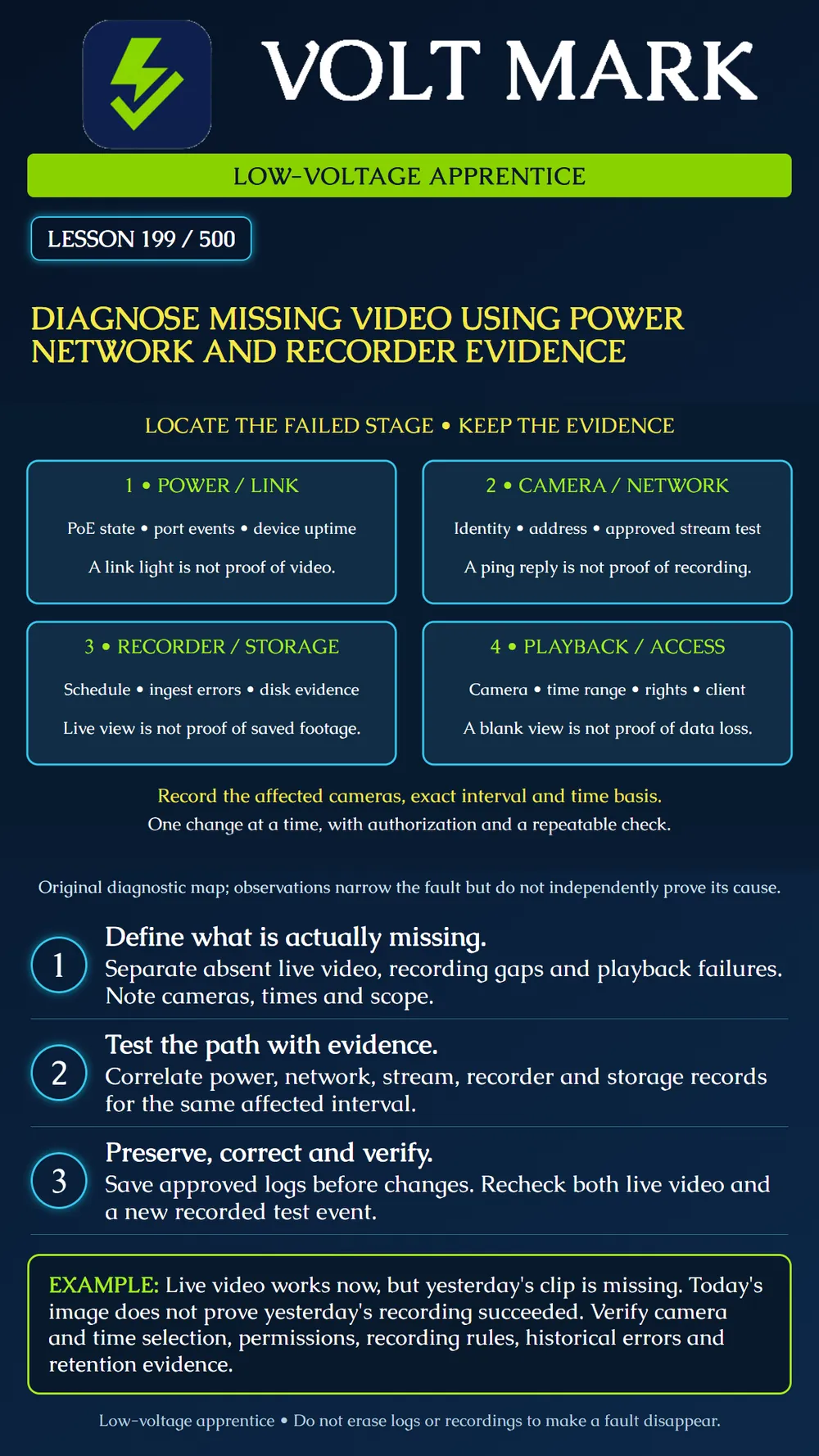
Use a structured evidence record to distinguish a live-view problem, a recording failure and an access or playback problem. This lesson uses fictional cases; it does not authorize changes to a production surveillance system.
"Video is missing" is not a diagnosis. Record the camera identifier, affected date and time interval, displayed error, viewing client and account role. State the time zone or UTC offset. Ask whether the issue affects one camera, cameras sharing a switch, every camera on a recorder or only one viewing station.
Separate what is happening now from what happened earlier. A live image at noon does not prove that footage was saved at midnight. Conversely, a client that cannot display live video does not by itself prove the recorder has stopped writing.
The AXIS Camera Station Pro troubleshooting guide checks camera power and network connection for contact problems. It identifies server, network, camera and disk overload among possible recording-gap causes and recommends comparing affected cameras and gap timing. It also separates recording configuration/storage problems from live-view and client performance issues. These categories inform this lesson; they do not establish the cause of a particular installation's fault. Source: https://help.axis.com/download/um_camera_station_pro_troubleshooting_guide_t10207671_2604.pdf Sections: Devices in the video management system; Recordings; Live view. Accessed 2026-09-30. Product-specific recovery actions must be checked against the actual installed version and approved change process.
The fictional camera C-199 is unavailable. The assigned switch port shows a recent PoE denial event. That observation makes the power path relevant, but it does not prove the camera is defective. Record the port identity, event time, configured power mode and budget evidence. Compare the required device power with the approved supply design. Refer unsafe access or electrical supply work to the appropriate qualified person.
Do not attach an arbitrary power injector or assume a passive supply matches a standards-based PoE device. Do not unplug neighboring cameras to free power without authorization. A later successful link does not erase the original event; preserve the history and document the authorized correction and its result.
A link indicator is on. That only supplies limited evidence about the physical connection. Confirm the device identity and expected address using approved records and tools. A reply from an address might belong to the wrong device if addressing has changed or conflicts exist. A failed ping also does not prove a powered device is absent; the relevant network policy may block that type of response.
An authorized direct-camera stream test can help separate camera operation from recorder ingestion, but record the test's location, account and stream profile. A stream accessible from the technician's laptop is not automatically accessible from the recorder's network path or identity. Do not disable firewalls or broaden network access just to make the test succeed.
First confirm the camera, date, time basis and user's playback rights. Then compare the expected recording method with the approved schedule or trigger. An event-only system is not expected to produce continuous footage merely because its live view is continuous.
Inspect recorder connection history, recording alarms and storage status for the affected interval. Compare other cameras that share the recorder or storage. Several simultaneous gaps suggest investigating shared dependencies, but correlation alone does not identify the failed component. A healthy disk status today does not prove historical writes succeeded. Preserve available historical evidence.
Check whether the clip should still exist under the approved retention rules and any preservation instructions. Do not format a disk, delete recordings, shorten retention or rebuild a database as a first diagnostic step. Such actions may destroy evidence or introduce a second fault.
An approved comparison client can display the same authorized stream, while the first client cannot. That narrows the investigation toward differences in client path, permissions, decoding or display behavior; it does not prove a particular graphics component has failed. Record the exact comparison. Avoid changing camera quality or recording settings simply because one viewing workstation struggles.
Collect approved logs and settings before a change. Use a specific hypothesis: "Recorder credentials appear invalid" is more testable than "network is broken." Have the authorized person perform the approved correction and record the before/after state. Change one variable at a time where practical.
Do not factory-reset a camera merely because it is unreachable. Resetting can remove configuration and complicate recovery. Where manufacturer support ultimately recommends a disruptive action, use the approved backup, preservation and recovery process for that site.
In an authorized training environment, observe a harmless identifiable event in live view and then play back its newly saved recording. Confirm camera identity, time basis and the intended account. If the original failure was intermittent, state the observation period and the conditions actually tested. A five-minute check cannot establish that a daily midnight failure is resolved.
Restoring current recording does not recreate a lost historical clip. If edge or failover storage might contain it, follow the product's documented retrieval and evidence-preservation process; do not promise recovery without finding and verifying the recording.
Symptom and affected cameras: Interval, time basis and last known good evidence: Expected recording behavior: Power/link observations: Endpoint/stream observations and test location: Recorder/storage observations: Playback account/client observations: Hypothesis and evidence against it: Authorized change: Repeat test and observation period: Historical footage status and unresolved issue:
Free study material for low-voltage apprentices. This is a national foundation course: requirements differ by state and by local jurisdiction, and a practice that is common in one place is not a rule everywhere. Nothing here is a licence, a certification, or authority to work unsupervised, and completing it does not count as apprenticeship hours or continuing-education credit. Check the codes adopted where you are working, the licensing authority for that work, and your employer's safety programme. VoltMark is not affiliated with, endorsed by, or sponsored by NFPA, OSHA, NICET, BICSI, FOA, or any state or local licensing authority.

Electrician licensing exam prep: practice questions, timed exam simulations, and step-by-step help finding every answer in the NEC.