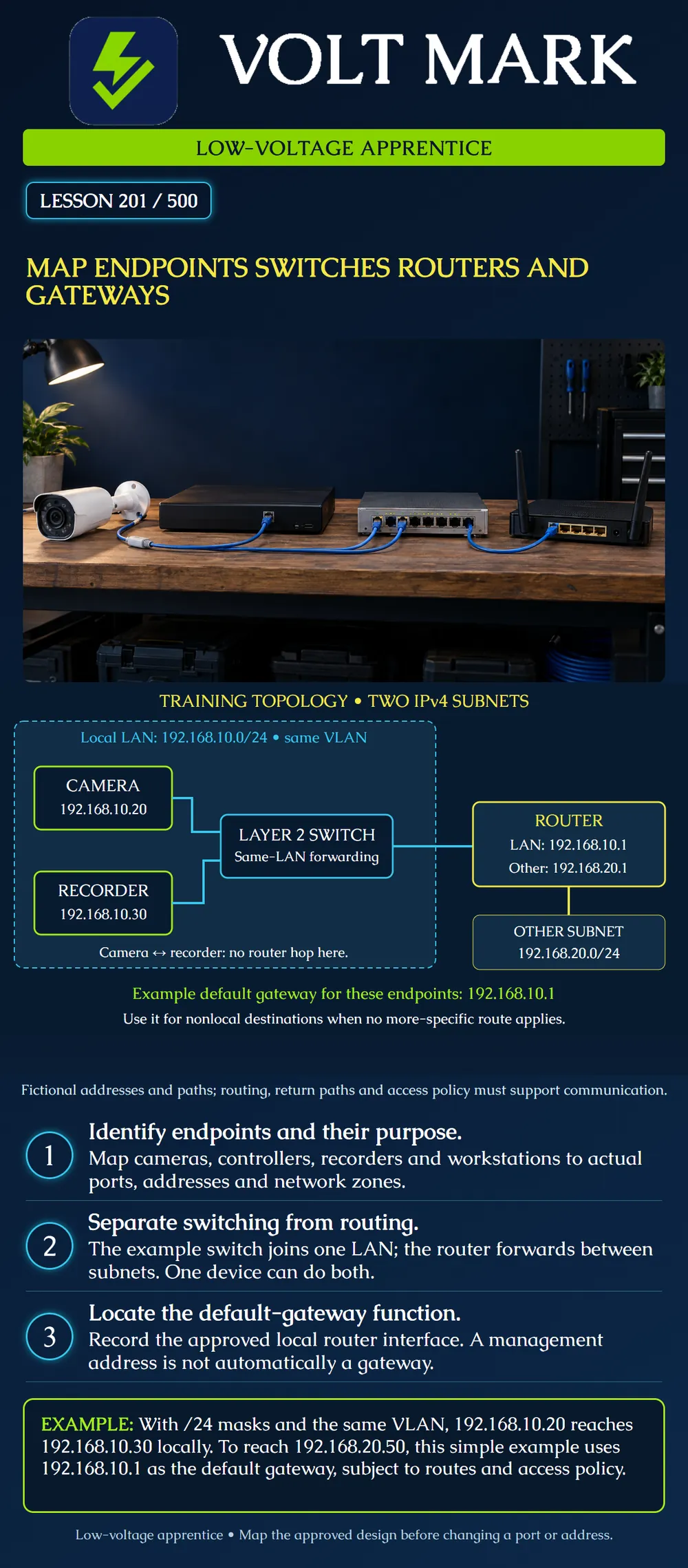
Draw a small low-voltage network showing endpoints, switching and routing functions. Identify the default gateway without assuming every physical box has only one function. This lesson is an original fictional IPv4 exercise; it is not an instruction to reconfigure a site.
An endpoint originates or receives the application traffic of interest. Examples include an IP camera, an access-control panel, a recorder and a technician workstation. A device can serve several roles, so describe the function being mapped rather than relying only on its product name.
On a physical map, record device ID, location, cable ID, patch-panel position and switch port. On a logical map, record the approved IP address/prefix, VLAN or network zone, gateway and relevant application relationships. A neat physical line between two boxes does not prove they have compatible logical settings or permission to communicate.
Mistake: Drawing the switch management IP as every endpoint's gateway. Correction: Identify the routing interface in the approved plan; a management address alone does not establish routing.
Mistake: Putting camera and recorder on the same logical LAN because their cables enter one switch. Correction: Record each port's VLAN and each endpoint's prefix before drawing a local path.
Mistake: Drawing the default gateway only when there is an Internet connection. Correction: Show the local router interface used for the remote internal subnet; keep Internet access as a separate design question.
Cisco describes LAN switching in terms of MAC-address forwarding and routing between networks in terms of IP addresses. It also explains that some switches perform routing functions. Thus the distinction concerns the configured function, not simply the label on a chassis. Source: https://www.cisco.com/site/us/en/learn/topics/networking/what-is-network-switching.html
Microsoft explains that an IPv4 subnet mask distinguishes the local subnet from remote networks and describes the default gateway as the router used to reach other networks. This lesson uses explicit /24 prefixes rather than inferring the mask from an address's historical class. Source: https://learn.microsoft.com/en-us/troubleshoot/windows-client/networking/tcpip-addressing-and-subnetting Sources accessed2026-09-30. The worked topology, addresses and exercises below are original.
The camera sends traffic to192.168.10.30. Given the stated /24 mask, both addresses belong to192.168.10.0/24. In this simple topology, the camera resolves the local destination's link-layer address as needed and sends through the switch to the recorder. No router hop is required for this local path.
This does not mean every frame is always sent to one known port. Address resolution and some traffic involve broadcast, and switch forwarding behavior depends on what has been learned. Nor does being local guarantee application access: port isolation, access controls, endpoint settings and service availability can still matter.
Now consider traffic from the camera to a fictional server192.168.20.50/24. This destination is outside the camera's local /24. With the example's default route and no more-specific matching route, the camera uses192.168.10.1 as its next hop.
The IP destination remains the remote server; the local Ethernet delivery is to the gateway's link-layer address. The router then uses its routing information to forward toward the destination network. Successful two-way communication also needs a valid return path and permitted traffic. In this exercise a host on the other subnet can use192.168.20.1 as its appropriate gateway. The drawing does not claim a firewall or service will allow every requested connection.
The gateway here reaches another internal subnet. There is no internet cloud in the diagram because an internet connection is not necessary to explain routing. A campus can route between internal buildings or network zones without making a camera publicly reachable.
A DNS server translates names under its configured service; it is not the same role as a default gateway. A DHCP server can provide settings; it is not necessarily the device that routes the traffic. Record each function separately even when one physical appliance provides several of them.
A managed Layer2 switch may have its own IP address so authorized staff can administer it. That address alone does not make it the endpoints' router. Conversely, a Layer3 switch can provide a routing interface and serve as a gateway when designed and configured for that purpose. Identify the actual function and interface in the approved documentation.
Ports on one physical switch can belong to different VLANs. Therefore "plugged into the same switch" is not sufficient evidence that two devices share a LAN. Record the relevant port/VLAN assignment rather than changing addresses until something responds. Do not use the poster's fictional addresses on an operating network.
Write the camera's physical path to the recorder: camera cable, patching, switch port, switching function and recorder connection. Then write the logical path for the same destination: local subnet, local destination and no router hop in this stated example. Finally write the remote-server path: camera, switch, local gateway interface, router's other network and server. Compare the maps. The local and remote journeys share an initial cable, but the logical destination decision differs.
A drawing with a cable labeled "fiber" still needs those logical details. Fiber describes a transmission medium; it does not automatically indicate routing, a separate subnet or internet access. Later fiber lessons address medium selection, optics and long-distance design in depth.
Device ID and role: Physical location and port/cable references: IP address and prefix: VLAN/network zone: Default gateway if required by the design: Local application destinations: Routed destinations and approved dependencies: Evidence source and date: Unknown item and responsible network owner:
Texas journeyman, 15 questions, scored by topic against the 70% mark. No card, and no account needed to start.
Free study material for low-voltage apprentices. This is a national foundation course: requirements differ by state and by local jurisdiction, and a practice that is common in one place is not a rule everywhere. Nothing here is a licence, a certification, or authority to work unsupervised, and completing it does not count as apprenticeship hours or continuing-education credit. Check the codes adopted where you are working, the licensing authority for that work, and your employer's safety programme. VoltMark is not affiliated with, endorsed by, or sponsored by NFPA, OSHA, NICET, BICSI, FOA, or any state or local licensing authority.

Electrician licensing exam prep: practice questions, timed exam simulations, and step-by-step help finding every answer in the NEC.