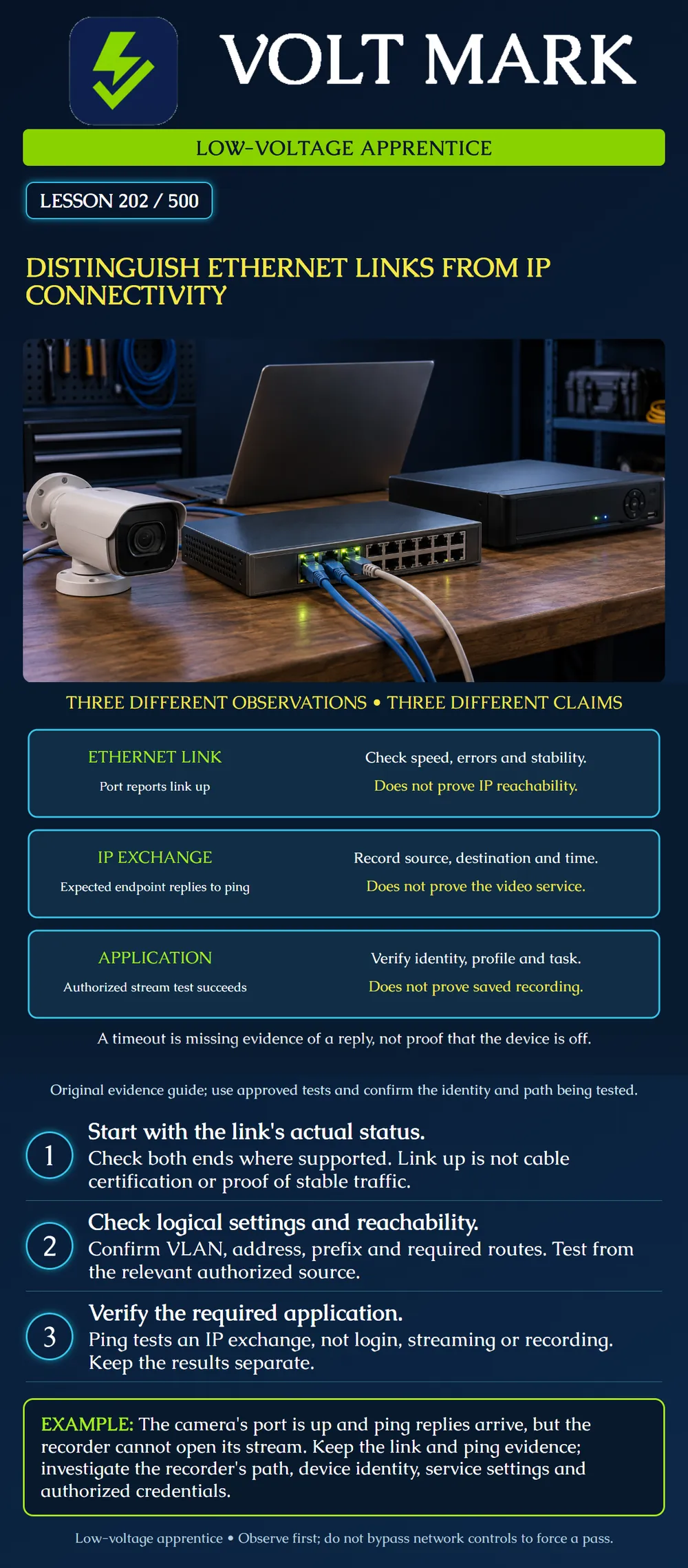
Explain what a link indicator, an IP response and an application test each establish. Build an evidence record without declaring an entire system healthy from one successful check.
Ethernet link: the interface reports an established link under the observed conditions. IP exchange: a particular source receives a response from a particular destination using the tested protocol. Application: the authorized service performs the tested task. These are related observations, but they are not interchangeable. The poster is an original evidence guide, not a promise that every fault follows a strict three-step sequence.
Use this fictional evidence card: C1's port is up; the maintenance laptop receives four expected echo replies; the recorder reports an authentication error and no stream. Write one supported conclusion for each observation, two facts still unknown, and the next authorized check. Do not query or change any network.
Answer: The port reports link; the laptop completed four echo exchanges; the recorder's application attempt failed with the stated error. Neither cable certification nor a successful recorder session has been established. Compare the recorder's approved endpoint, account role and service settings with the owner; preserve the error and verify the required stream after any authorized correction. Do not replace the cable solely on this evidence.
Mistake: Signing off the cable after seeing link up. Correction: Record the link observation and obtain the required cable-test evidence separately.
Mistake: Closing a recorder streaming fault because the maintenance laptop can ping the camera. Correction: Test the required recorder-to-camera function from its approved source context and retain the application error.
Mistake: Writing camera powered off after an echo timeout. Correction: Record that no timely reply arrived; compare authorized power, interface and application evidence before assigning a cause.
Cisco's Catalyst troubleshooting guidance warns that a link indicator does not establish that a cable is fully functional. It covers interface status, errors, cabling and configuration problems. Use the actual model's documentation for LED meanings and supported diagnostics rather than transferring one product's colors or commands to another. Source: https://www.cisco.com/c/en/us/support/docs/switches/catalyst-6500-series-switches/12027-53.html
Microsoft describes ping as an ICMP Echo Request/Reply test of IP connectivity. Its output includes replies and round-trip timing. The documentation also distinguishes testing a numeric address from testing a name, which may introduce a name-resolution issue. Source: https://learn.microsoft.com/en-us/windows-server/administration/windows-commands/ping Sources accessed2026-09-30. The cases and worksheet below are original training material.
Identify the device, interface and cable path. Record observed link state, negotiated speed and duplex where applicable, error-counter observations and recent up/down events. Check both ends when supported and authorized. Keep PoE supply status separate from data-link evidence; power delivery alone does not demonstrate an application connection.
A link that establishes at one instant can still have intermittent problems. An increasing error count during the relevant interval is more informative than a total with an unknown age. Record the observation period and preserve existing evidence; do not clear counters just to make them look clean.
A connected indication is not a cabling certification result. Copper and optical links have different test methods and media requirements. Use the approved cabling or optical test procedure when required; do not infer a fiber loss budget or copper performance category from the port light.
Check the approved logical configuration: device identity, address, prefix, VLAN or network zone, and any required gateway or route. A patch to the wrong VLAN can produce an Ethernet link while preventing the intended communication. A wrong address or duplicate address can also confuse the diagnosis.
Use the relevant source position. A laptop on a maintenance network may have access that the recorder does not, or the reverse. Record where the test originates, which interface it uses when relevant, and which address family is tested. Do not disable network controls or move a device to an unrestricted network simply to obtain a reply.
When the expected endpoint returns an Echo Reply, the tested exchange succeeded at that time. Confirm identity through approved records and device evidence; a response from an address alone is not a cryptographic identity check. A few replies do not establish sustained capacity, every packet size or every service.
A timeout means the expected reply was not received within the test's waiting period. It does not by itself prove the device has no power. Filtering, path issues, endpoint behavior and other conditions can affect the result. Some working applications can coexist with blocked ICMP echo traffic.
A successful numeric-address test and a failed name-based test suggest reviewing name resolution and the actual resolved addresses. They do not authorize changing DNS settings arbitrarily. Record the exact target and result before referring the issue to the responsible network owner.
A fictional camera port reports link up. An authorized test from a maintenance laptop receives replies from the expected camera. The recorder still cannot open its required stream.
The evidence supports the observed link and laptop-to-camera IP exchange. It does not prove the recorder follows the same path or uses working credentials. Compare the recorder's configured endpoint, approved service/protocol, supported stream profile, account role and connection error. Do not conclude that the cable must be replaced solely because the video application failed.
If a supported application test succeeds, record the identity and function tested. A live stream does not prove a recorder wrote the clip. Follow the separate recording verification procedure when saved footage is the required outcome.
A fictional panel's documented policy does not allow ICMP echo responses, but its authorized management service responds correctly from the approved workstation. Record both observations. Do not classify the panel as offline simply because ping timed out. Do not broaden the policy to make a test tool's result look better.
Device and interface: Physical cable/port references: Source device, network and test time: Target identity and address: Link state, speed and observed error behavior: Relevant VLAN/address/prefix/route evidence: IP test protocol and exact result: Application task and exact result: What the evidence supports: What remains unproven: Authorized next action and owner:
A useful note reads: "At the recorded time, four expected echo replies returned from the approved test target. Recorder streaming still failed with the documented error." It does not read: "Network all good."
Texas journeyman, 15 questions, scored by topic against the 70% mark. No card, and no account needed to start.
Free study material for low-voltage apprentices. This is a national foundation course: requirements differ by state and by local jurisdiction, and a practice that is common in one place is not a rule everywhere. Nothing here is a licence, a certification, or authority to work unsupervised, and completing it does not count as apprenticeship hours or continuing-education credit. Check the codes adopted where you are working, the licensing authority for that work, and your employer's safety programme. VoltMark is not affiliated with, endorsed by, or sponsored by NFPA, OSHA, NICET, BICSI, FOA, or any state or local licensing authority.

Electrician licensing exam prep: practice questions, timed exam simulations, and step-by-step help finding every answer in the NEC.