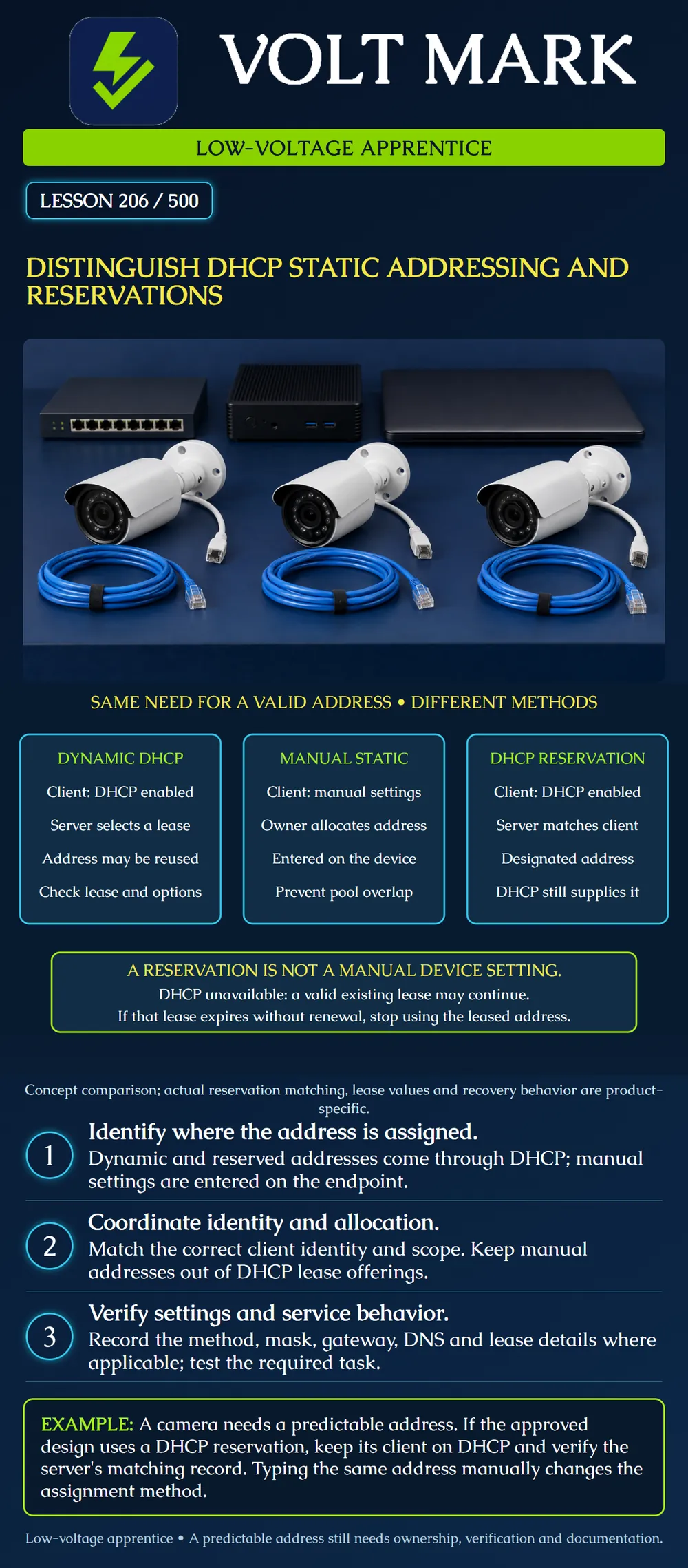
Distinguish an address leased dynamically, an address entered manually and an address supplied through a DHCP reservation. Identify which device or service owns the settings and how to verify the chosen method.
Dynamic DHCP: the endpoint requests settings and an authorized DHCP service supplies an address lease and applicable options. A dynamically leased address may remain the same through renewals; dynamic does not mean it must change at every restart.
Manual static: the network owner allocates an address and the authorized technician enters the approved address and related settings on the endpoint. For the address itself, there is no DHCP lease to renew. This does not eliminate other dependencies such as routing, DNS, power or the application server.
DHCP reservation: the authorized server is configured to associate a designated address with the expected client identity. The endpoint remains a DHCP client. A reservation makes the intended assignment predictable; it does not turn the endpoint into a manually configured device.
Terminology varies between products. A menu called "static lease" may refer to a DHCP reservation. Verify the actual client mode and server behavior rather than relying on the label alone. In this lesson, "manual static" specifically means an address entered on the device.
Mistake: Calling Camera C manually static because its reserved address stays the same. Correction: Record its DHCP client mode and server reservation separately from Camera B's manual configuration.
Mistake: Assuming every leased device loses its address immediately when DHCP stops. Correction: Read the actual lease expiry; under the supplied assumptions the existing lease remains usable until 16:00, but cannot be used beyond expiry without renewal.
Mistake: Reusing the old camera's reservation without checking the replacement interface. Correction: Have the administrator verify the replacement's actual client identifier and update the appropriate scope record through the approved process.
Microsoft describes DHCP scopes, options, reservations and exclusions. A reservation supplies the designated address through DHCP; an exclusion prevents the server from offering specified addresses. Manual assignments must be coordinated with the DHCP allocation design to avoid conflicts. Source: https://learn.microsoft.com/en-us/windows-server/networking/technologies/dhcp/dhcp-scopes
RFC2131 describes DHCP client identification and lease operation. A client with a still-valid prior lease may continue using that address while unable to contact the server. If its lease expires without successful renewal, it must discontinue that leased address. Do not interpret a DHCP-service outage as an automatic instant loss of every existing client's address. Source: https://www.rfc-editor.org/rfc/rfc2131.html Sections3.7,4.2 and4.4.5; accessed2026-09-30.
Consider three fictional cameras under an approved training plan. Camera A uses dynamic DHCP. Camera B uses a manually allocated address outside DHCP offerings. Camera C uses a server-side reservation and remains on DHCP.
For A, inspect its actual lease and received settings. For B, inspect its saved manual values and allocation record. For C, inspect both the received lease/settings and the correct server reservation. The same address displayed on a screen does not reveal which of these mechanisms supplied it.
Reservations can depend on the client's hardware address or another client identifier according to the product and configuration. Check the identity the actual server uses. Record the correct interface; a device with several interfaces may not use the identifier printed for a different connection.
If a camera is replaced, its old reservation does not automatically identify the replacement. Have the authorized owner update the matching record and allocation documentation. Do not copy or spoof the old hardware identity as an improvised workaround. Keep the retired device's handling and any released allocation under the approved process.
Confirm the intended subnet and VLAN. A correctly typed reservation in the wrong scope does not establish a working deployment. Where DHCP crosses a routed boundary through an approved relay, the network owner must supply that design. Do not start an extra DHCP server or move the device to an unrelated network to force an address assignment.
Receiving an address is only one check. Confirm prefix or mask, gateway, DNS and other required options. An address in the expected-looking range does not prove all options or services are correct. Keep the identity of the observed DHCP service in the verification record when the platform exposes it.
Suppose Camera B is manually assigned an address that an authorized server may also lease. Another client might later receive it. Avoid this by following the approved pool boundaries or exclusions and the owner's allocation records. An exclusion does not itself prove that no other manually configured device already uses that address.
Do not choose an address merely because it does not answer ping. A reservation, a manual allocation and a future-use hold are all ownership information that a short network test may not reveal.
A fictional DHCP client has a lease expiring at16:00. At15:00 the DHCP service becomes unavailable. Assume the current lease remains valid, no negative acknowledgment or conflict occurs, and the network otherwise works.
At15:10, inability to renew does not by itself mean the existing address must be abandoned. The client follows its lease/retry behavior. If it still has no successful renewal when the lease expires at16:00, it must stop using that leased address. This example does not predict every application's behavior or promise a particular fallback address.
A reservation does not remove the need for the configured DHCP service when obtaining or renewing a lease. Inspect the actual lease terms rather than assuming all reserved clients have the same duration. A newly starting client without a valid usable lease may face a different outcome than one with time remaining.
Do not test this by shutting down a production DHCP service. Use a sanctioned lab or supplied records and document the assumptions.
Read the approved design and assignment mode. Identify the endpoint and interface. Compare client settings with the allocation record and, for DHCP, the relevant server evidence. Verify the required local and routed application tasks. Record the observation time, received or saved values and any unresolved mismatch.
A manual device cannot obtain a new address merely because someone edits a DHCP reservation. Conversely, changing a client from DHCP to manual configuration changes its administration model even if the displayed address remains identical. Make such changes only through the approved process.
Device/interface identity: Approved method: Address and subnet: Allocation owner: Client configuration mode: DHCP scope/server/reservation match when applicable: Lease expiry and observed renewal evidence when applicable: Gateway, DNS and required options: Conflict-prevention record: Application verification and unresolved issue:
Texas journeyman, 15 questions, scored by topic against the 70% mark. No card, and no account needed to start.
Free study material for low-voltage apprentices. This is a national foundation course: requirements differ by state and by local jurisdiction, and a practice that is common in one place is not a rule everywhere. Nothing here is a licence, a certification, or authority to work unsupervised, and completing it does not count as apprenticeship hours or continuing-education credit. Check the codes adopted where you are working, the licensing authority for that work, and your employer's safety programme. VoltMark is not affiliated with, endorsed by, or sponsored by NFPA, OSHA, NICET, BICSI, FOA, or any state or local licensing authority.

Electrician licensing exam prep: practice questions, timed exam simulations, and step-by-step help finding every answer in the NEC.