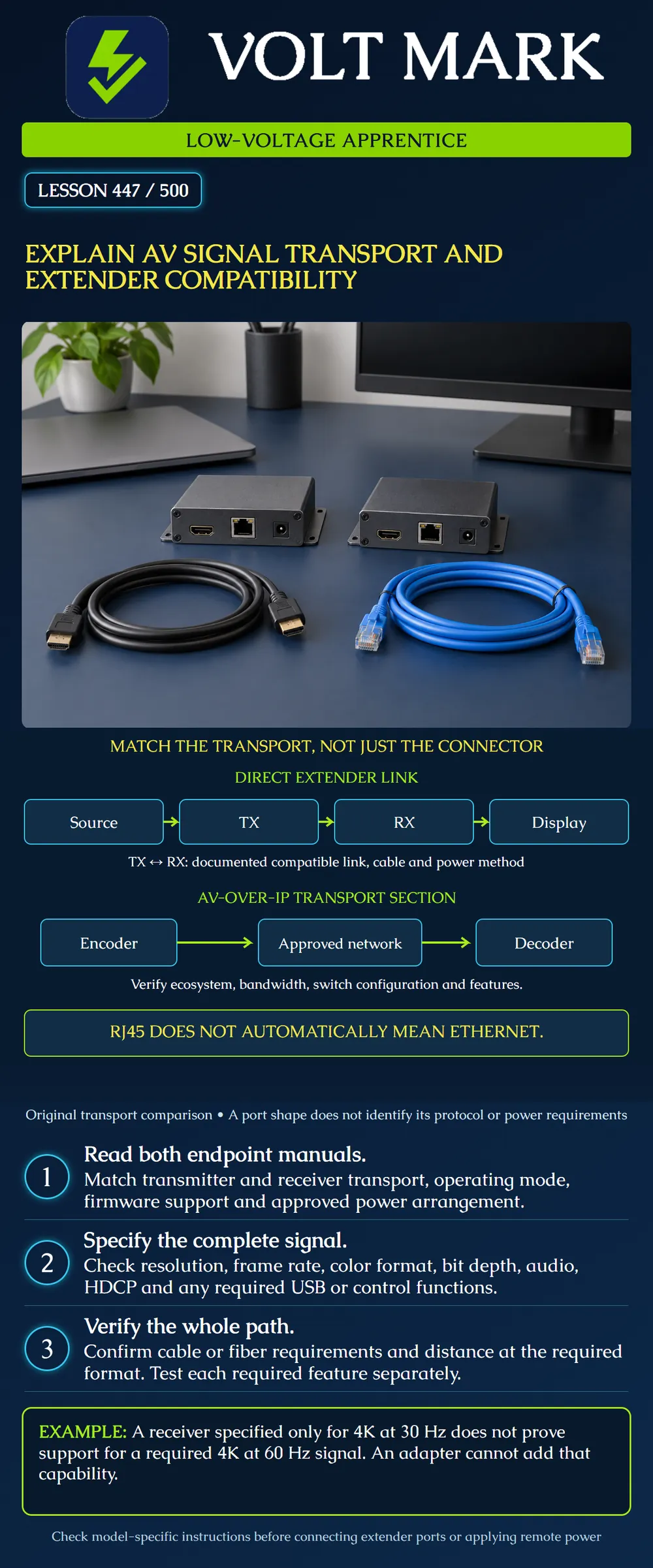
Explain the difference between an AV signal, its physical medium and its transport method, then document compatibility from source through display.
This is a desk-planning and authorized-trainer lesson. The diagrams are conceptual paths, not pinouts or installation instructions. No particular connector, cable category, transport family or “4K” label guarantees every desired feature. Read the exact equipment manuals and current compatibility documentation.
Extron's DTP T SW4 HD 4K setup guide illustrates why mode matters: this specific product offers DTP and HDBaseT choices, with different remote-power behavior. It warns against connecting the extender interface to a computer data network and requires the correct mode before connection. That example does not establish that every DTP model supports HDBaseT or that every HDBaseT device uses the same power arrangement.
The HDBaseT Alliance provides certified-product listings and supported-feature comparisons. Use those alongside product instructions when checking an intended pairing. A technology name alone does not confirm every optional capability needed by a project.
Signal: What must arrive at the destination? Record video timing and required audio, control or peripheral functions. Medium: What carries it between locations? Examples include a specified copper cable or fiber assembly. Transport: How do the endpoints send and recover it? A direct extender link and a network encoder/decoder path are different architectures even when both use category cable.
A modular RJ45-shaped connector does not prove ordinary Ethernet service. Do not patch an unidentified AV port into a switch or apply an assumed PoE supply. Similarly, two fiber connectors that fit mechanically do not establish optical or protocol compatibility.
The top poster row shows source to transmitter (TX), an approved TX-to-RX link, then receiver (RX) to display. Read the input and output interface specifications at each boundary. The TX/RX label itself does not identify a universal protocol.
For the link, record manufacturer, model, transport, required operating mode, supported pairing, cable specification and power arrangement. Use the documented direction of operation. An active cable or extender may be directional; do not assume it works in reverse.
A displayed picture demonstrates some operation under the tested conditions. It does not prove every format or side channel. Record the actual source output and display input state rather than just “video good.”
The lower poster row shows only the transport section: encoder, approved network and decoder. A source feeds the encoder, and a destination receives the decoder output; those external endpoints are omitted in this row for clarity.
An AV-over-IP design needs the intended compatible ecosystem or documented interoperability and an appropriately designed network. Identify the required bandwidth, switching features and configuration from the product design guide. Do not assume that every encoder works with every decoder, or that an existing switch has the capacity and configuration required by a proposed stream.
The existence of a separate management Ethernet port on an extender does not mean its AV link can traverse an ordinary data switch. Label the management and transport ports distinctly in the schedule.
For video, replace a vague description such as “4K” with the required pixel dimensions, frame rate, color sampling, bit depth and other required characteristics. Document HDR requirements if applicable. Read the allowed combinations; separate maximum claims on a brochure may not operate together.
Document required audio formats/channels, HDCP compatibility for protected content, USB functions, serial or IR control and any return-audio feature. EDID capability exchange and HDCP content protection are different parts of the path; do not treat one as proof of the other. A basic test image does not prove protected playback, peripheral operation or every audio format.
Do not describe unauthorized circumvention of content protection as a compatibility fix. Use properly supported equipment and the approved configuration.
Record actual cable type, length, patching and terminations against the model's guidance at the intended format. A rated distance is conditional on the specified installation and operating requirements, not a guarantee for any cable that fits.
For an optical link, record fiber type, connector/polish requirements, strand count, polarity, optical module compatibility and the documented distance or loss budget. A long campus run needs the actual engineered optical path; the presence of fiber alone does not grant an arbitrary reach. Do not look into optical ports. Refer inspection and testing to the established fiber procedures in the curriculum.
For remote power, identify which device supplies power, which receives it, and the specified method. Do not substitute passive power injection or an unrelated network power standard based on connector appearance.
A fictional room specification requires 3840 by 2160 at 60 Hz, 4:4:4, 8-bit video, two-channel audio and USB keyboard operation. The receiver's supplied sheet lists only 3840 by 2160 at 30 Hz. Its documentation therefore does not prove the required 60 Hz path.
The source can be temporarily set to 30 Hz for an approved diagnostic comparison, but a picture at that reduced format is not a pass against the 60 Hz requirement. Record “lower-format comparison successful; required format unverified.” If USB is not supported by the selected pair, successful video does not cure the missing keyboard function.
A replacement receiver also requires documented compatibility with the transmitter, link and power method. Replacing one device with a higher headline rating does not prove the entire chain meets the requirement.
Create columns for requirement, source, TX/encoder, link/network, RX/decoder, display/peripheral and evidence. Mark each cell supported, unsupported or unknown, with a manual page or approved design reference. A required function with an unknown cell remains unverified. For a known unsupported combination, identify the specific mismatch and refer the design change to the responsible person. List each intended acceptance check separately. Video, audio, control and USB need evidence appropriate to their functions. Record the final actual format and approved configuration after testing.
Extron DTP T SW4 HD 4K Setup Guide: https://media.extron.com/public/download/files/userman/DTP_T_SW4_HD_4K-68-2916-50_A.pdf Opened directly. Product-specific mode, remote-power and network-port warnings used as examples; no universal model-family assumption.
HDBaseT Alliance, Products & Certification: https://hdbaset.org/products-certification/ Opened directly. Used for certified-product and feature-comparison resources. Sources checked 2026-10-01. Diagrams, acceptance example and worksheet are original instructional synthesis; current model-specific engineering review remains necessary.
Mistake: Patching an extender transport port into a switch because it resembles Ethernet. Correction: Identify the port's documented transport and power method before connection; distinguish management ports from AV link ports.
Mistake: Accepting a 30 Hz picture against a 60 Hz requirement because both are called 4K. Correction: Record the actual format and mark the required format unverified until the complete supported chain is demonstrated.
Mistake: Buying a higher-rated receiver without checking the existing transmitter. Correction: Verify the exact TX/RX pairing, modes, medium and power arrangement, then check audio, video and USB independently.
Texas journeyman, 15 questions, scored by topic against the 70% mark. No card, and no account needed to start.
Free study material for low-voltage apprentices. This is a national foundation course: requirements differ by state and by local jurisdiction, and a practice that is common in one place is not a rule everywhere. Nothing here is a licence, a certification, or authority to work unsupervised, and completing it does not count as apprenticeship hours or continuing-education credit. Check the codes adopted where you are working, the licensing authority for that work, and your employer's safety programme. VoltMark is not affiliated with, endorsed by, or sponsored by NFPA, OSHA, NICET, BICSI, FOA, or any state or local licensing authority.

Electrician licensing exam prep: practice questions, timed exam simulations, and step-by-step help finding every answer in the NEC.