Compare a device schedule with its related drawings by identifier and attributes, document discrepancies, and carry the authorized resolution into the work record.
A device schedule organizes information about equipment or installation locations. A drawing shows information spatially or diagrammatically. Reconciliation checks whether those documents describe the same intended work. Equal totals are only one check; the identities and attributes must also agree.
Start with the current authorized drawing set and schedule. Record the sheet numbers, revisions, issue dates, scope, and relevant references. A newer date alone does not settle every conflict. Follow the project's document-control and clarification process rather than inventing a universal precedence rule.
Use the device or location identifier defined by the project. Match each scheduled item to its drawing representation, and each relevant drawing item back to the schedule. Watch for duplicate tags, missing rows, untagged symbols, and similarly named devices in different areas.
A grouped schedule row may represent multiple instances. Read quantity fields, grouping, filters, and notes before deciding that one row equals one device. In model-based workflows, schedules can display model information, but that does not guarantee that an issued PDF, separate list, or filtered view contains the same complete scope.
Check the information necessary for the task: system, location, device type, quantity, installation status, mounting reference, and relevant connection or detail references. Do not infer a model number or mounting arrangement simply because the identifier matches.
Different documents may intentionally provide different levels of detail. An absent attribute is not automatically a contradiction, but it may still leave an unanswered installation question. Record what is missing and locate the referenced information before proceeding.
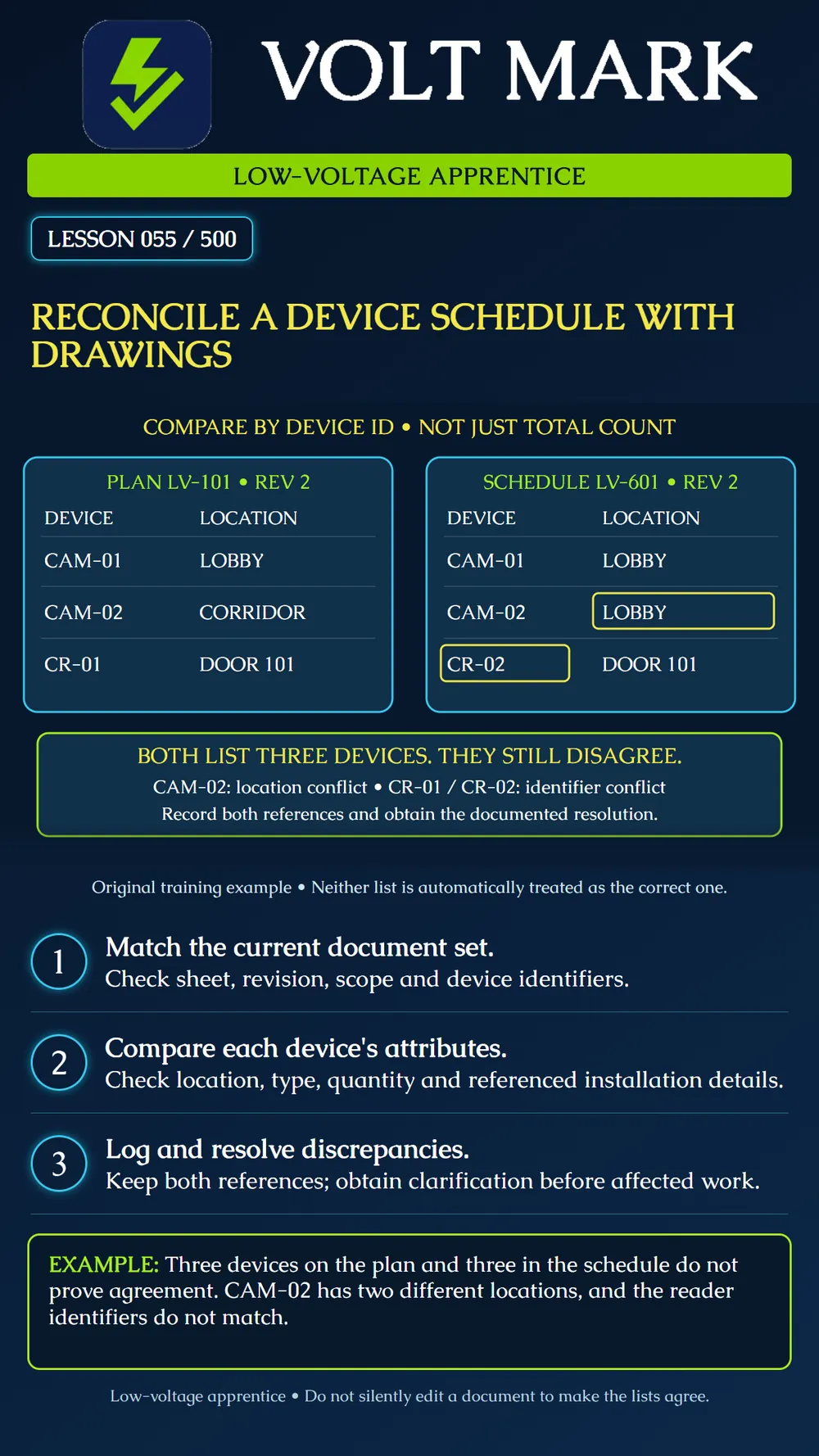
Plan LV-101, revision 2, lists: CAM-01 in the lobby. CAM-02 in the corridor. CR-01 at Door 101.
Schedule LV-601, revision 2, lists: CAM-01 in the lobby. CAM-02 in the lobby. CR-02 at Door 101.
Both lists contain three items. CAM-01 agrees. CAM-02 has a location conflict. The reader at Door 101 has an identifier conflict: CR-01 versus CR-02. These are two discrepancy topics, not proof that two additional devices must be purchased. Neither list is automatically declared correct.
Identify the affected item and quote or summarize each conflicting entry accurately. Include both sheet and revision references and a location reference where helpful. State the specific decision needed. Separate facts from proposed solutions.
For the camera, a useful record is: “CAM-02 is shown in the corridor on LV-101 Rev 2 and in the lobby on LV-601 Rev 2. Confirm the intended location and issue coordinated documents.” This is clearer than “camera schedule wrong,” which assumes the answer.
Obtain the response through the authorized project process before the affected procurement, labeling, or installation. Keep the response linked to the discrepancy. Update working records only as permitted, and retain the revision history. Verify that related schedules, labels, drawings, and test records reflect the resolved identifier and location.
An informal conversation can help identify the issue, but do not lose the documented decision that the project requires. A field change should not disappear into an untracked spreadsheet edit.
Use an instructor-provided plan and schedule with several seeded discrepancies. Match every identifier, compare attributes, and classify each finding as agreement, mismatch, missing information, or scope question. Write one clarification request that includes enough information for another person to find the issue without your verbal explanation.
Autodesk, Create schedules and specify fields in Revit: https://www.autodesk.com/learn/ondemand/tutorial/create-schedules-and-specify-fields-in-revit Autodesk, Create a Schedule or Quantity: https://help.autodesk.com/cloudhelp/2025/ENU/RevitLT-DocumentPresent/files/GUID-6D4DBBDA-3611-40CD-9A45-BE40EB07188A.htm Sources reviewed September 30, 2026. They support the schedule concept; the comparison exercise and discrepancy workflow are original teaching material subject to project procedures.
Free study material for low-voltage apprentices. This is a national foundation course: requirements differ by state and by local jurisdiction, and a practice that is common in one place is not a rule everywhere. Nothing here is a licence, a certification, or authority to work unsupervised, and completing it does not count as apprenticeship hours or continuing-education credit. Check the codes adopted where you are working, the licensing authority for that work, and your employer's safety programme. VoltMark is not affiliated with, endorsed by, or sponsored by NFPA, OSHA, NICET, BICSI, FOA, or any state or local licensing authority.

Electrician licensing exam prep: practice questions, timed exam simulations, and step-by-step help finding every answer in the NEC.