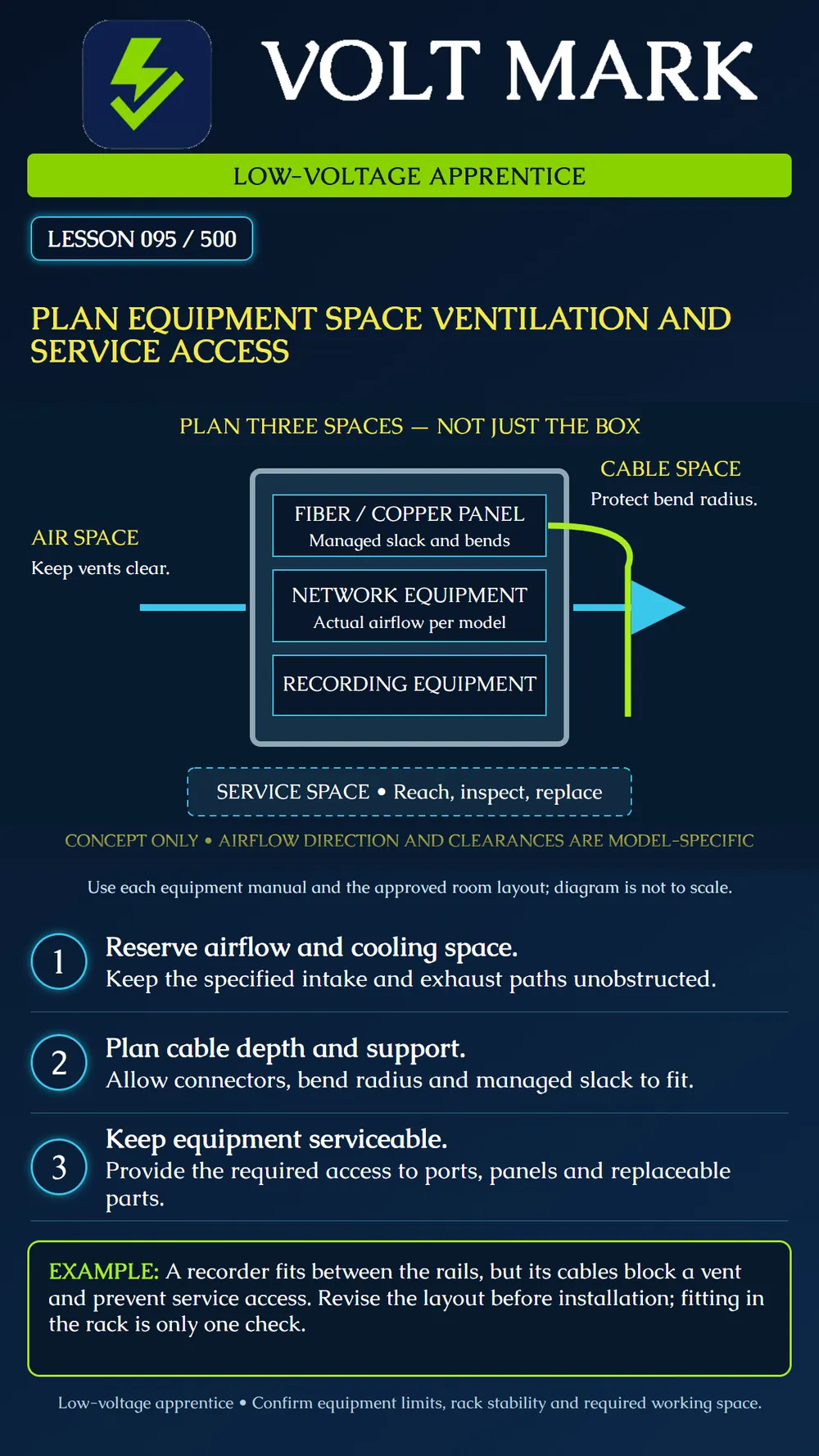
Produce an equipment layout that accounts for cooling, cable routing and maintenance, rather than checking only whether the chassis fits.
Use the equipment schedule and current manufacturer manuals to identify the actual models. Record physical dimensions, mounting arrangement and required clearances. Keep the approved room layout available; the space outside the cabinet matters too.
Identify each intake and exhaust. Leave the specified paths clear and assess the temperature where equipment actually takes in air. A closed rack can be warmer than the room. The poster arrows illustrate airflow conceptually; real equipment may move air in a different direction. Do not assume one spare rack unit or one clearance distance is sufficient for every model. Cisco's installation guidance addresses unrestricted vents and equipment access. Axis warns that its S4000 recorder needs a well-ventilated environment and adequate surrounding space to prevent overheating. Neither instruction makes a crowded cabinet acceptable merely because a fan runs.
Map cables from ports to their managers and onward routes. Include connector length, release-latch access, support and slack storage. Fiber and copper cables have manufacturer-specific bend limits. Panduit's cable-routing guidance illustrates controlled cable exits and bend-radius protection. A cable that reaches its port may still be poorly routed. Avoid forcing a door against connectors or storing spare cable across equipment openings. Use compatible managers and the cable instructions, not a universal bend-radius value.
Consider what a technician will need to inspect, disconnect or replace. Plan access to indicators, ports and serviceable components, following the actual equipment instructions. Coordinate rack loading, stability and mounting hardware with the responsible installer. Keep required electrical working space and egress distinct from ordinary cable-management space; have the responsible qualified trades and designer resolve applicable requirements. This lesson does not authorize opening power equipment or moving energized infrastructure.
A proposed cabinet layout includes a network switch, recorder and fiber panel. During a drawing review, the team discovers that the recorder's cable bundle crosses a ventilation opening and a proposed shelf obstructs access to its service panel. Mark both conflicts. Revise the placement or cable route using the model instructions, then review the revised drawing. Do not declare success solely because the total equipment height fits.
Use an unpowered training rack or a drawing. Highlight airflow paths in cyan, cable routes in lime and service access with dashed outlines. Identify one conflict and write a proposed correction. Obtain supervisory review before changing a live system.
Equipment ID and model: Manual revision and relevant section: Mounting arrangement: Intake/exhaust direction and clearance: Cable connectors, bend limits and manager: Service task and access needed: Room and cabinet environmental limits: Conflict, responsible person and resolution: Recheck evidence:
Cisco C9350 Series Smart Switches — Preparing for Installation; installation guidelines and site requirements. Specific model values are not generalized in this lesson. https://www.cisco.com/c/en/us/td/docs/switches/lan/cisco9350/hardware/preparing-for-installation_9350.html AXIS S4000 Rack Recorder — User manual; ventilation caution. https://help.axis.com/en-us/axis-s4000 Panduit FiberRunner Cable Routing System; controlled entry and bend-radius management. https://www.panduit.com/en/products/featured-products/fiberrunner-cable-routing-system.html
Scope: National apprentice planning fundamentals. No universal equipment clearance, code working-space dimension or actual installation approval is provided.
Free study material for low-voltage apprentices. This is a national foundation course: requirements differ by state and by local jurisdiction, and a practice that is common in one place is not a rule everywhere. Nothing here is a licence, a certification, or authority to work unsupervised, and completing it does not count as apprenticeship hours or continuing-education credit. Check the codes adopted where you are working, the licensing authority for that work, and your employer's safety programme. VoltMark is not affiliated with, endorsed by, or sponsored by NFPA, OSHA, NICET, BICSI, FOA, or any state or local licensing authority.

Electrician licensing exam prep: practice questions, timed exam simulations, and step-by-step help finding every answer in the NEC.