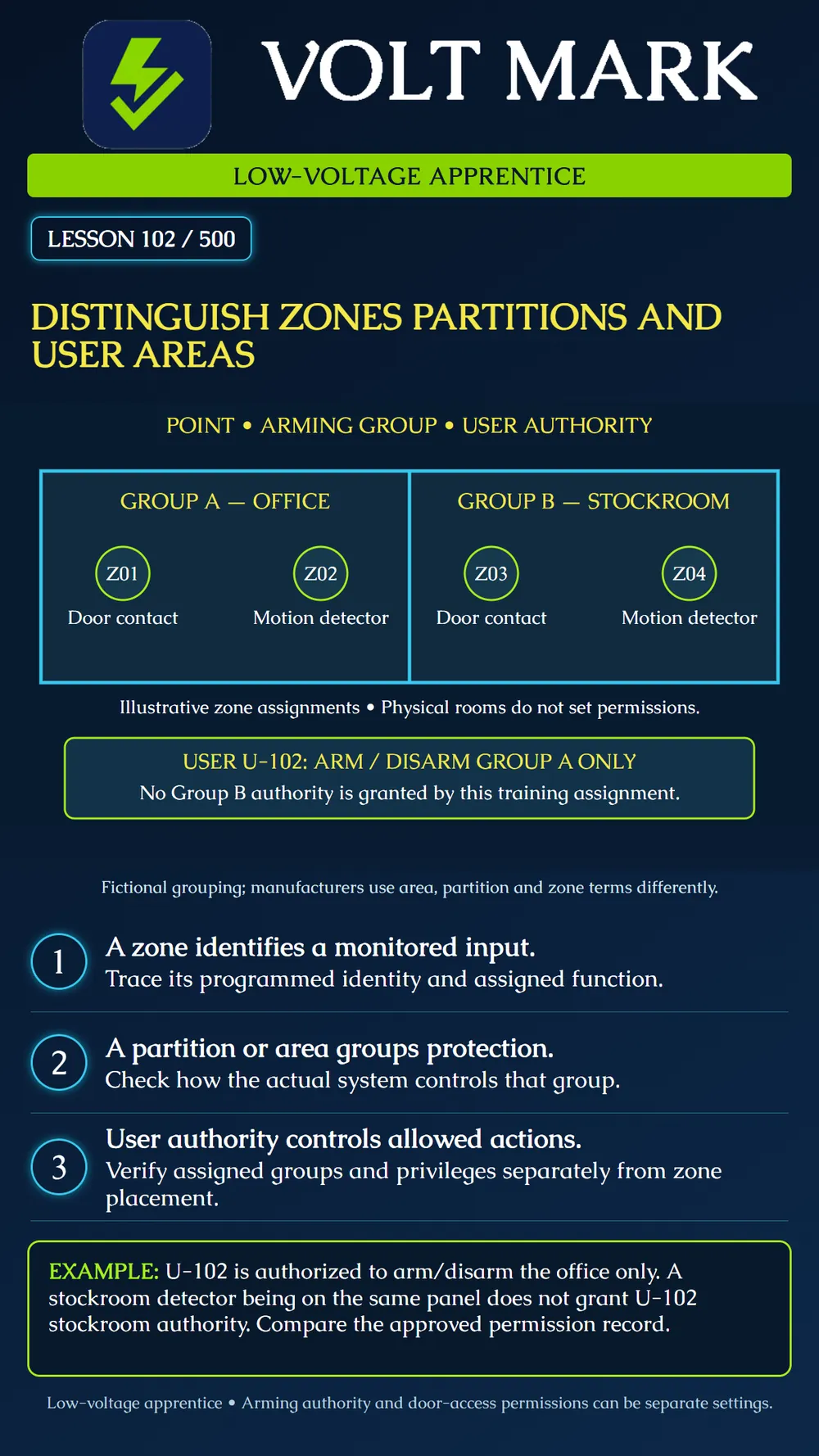
Separate the monitored input, its arming group and the user's authority when reading an intrusion-system plan.
A zone is a programmed monitored input or point in the intrusion system. Its identity helps the system and operator identify a condition. Do not assume one zone always equals one room or one physical detector; the actual wiring, device arrangement and programming determine what it represents. Use the zone list to connect the displayed identity to the installed devices and function.
A partition or area commonly groups protection for control such as arming and disarming. The manufacturer's terminology and available system modes matter. DMP's XR150/XR550 guide describes an Area mode in which areas can be armed or disarmed independently and user access can be limited. That does not mean every panel, mode or shared-zone arrangement behaves identically.
User authority is a different layer. It specifies which groups and actions a user may control. DSC's PowerSeries Neo guide describes restricting a user code to particular partitions. DMP's profile documentation separates arm/disarm area selections from access-area selections and other menu permissions. Therefore, permission to operate an intrusion group must not be assumed to grant every door-access or administrative privilege.
First, identify the monitored points and their locations. Second, identify their programmed group assignments. Third, compare the user's authorized actions and group scope with the approved permission record.
The poster uses the neutral term “group” so the concept is clear without pretending that all product vocabularies match. Its floor plan is fictional and simplifies the system to two independent groups. It does not depict common areas, shared zones or every possible operating rule. A physical wall is not a programming boundary until the actual configuration implements the intended grouping.
Group A: Office, containing Z01 door contact and Z02 motion detector. Group B: Stockroom, containing Z03 door contact and Z04 motion detector. User U-102: arm/disarm Group A only.
The two groups may be supported by the same panel, but that fact does not grant U-102 Group B authority. A worksheet should show the Group A permission and the absence of Group B permission for this exercise. It should not include a real user PIN.
If the approved record and the actual profile disagree, record the discrepancy for the authorized administrator. Do not expand permissions just to make a demonstration succeed. Changes and functional verification require the normal approval and supervised test process.
Also distinguish identity from state. A point assigned to the office remains the office point whether its current status is normal or faulted. A user permission record does not prove the group's current armed state. Read and record these separately.
On a paper plan, label four points, assign them to two groups and give a fictional user access to only one group for arm/disarm. Explain which information identifies the input, which defines grouping and which authorizes an action. Use no live codes or production settings.
Panel model / system mode: Manufacturer's zone term: Point ID / devices represented: Partition or area term: Point-to-group assignment: User ID / profile reference: Authorized actions / groups: Separate door-access settings where applicable: Approved record revision: Discrepancy / owner / resolution evidence:
DMP XR150/XR550 System User Guide, Know Your System Type: https://xruserguide.dmp.support/xsug/know-your-system-type DMP XR150/XR550 System User Guide, Predefined User Profiles: https://xruserguide.dmp.support/xsug/predefined-user-profiles DSC PowerSeries Neo User Manual, Assigning a partition to a user code: https://docs.johnsoncontrols.com/dsc/r/DSC/en-US/PowerSeries-Neo-HS2016/HS2016-4/HS2032/HS2064/HS2064-E/HS2128/HS2128-E-Alarm-Panel-User-Manual-International/1.2/Managing-Users/Access-code-types/Assigning-a-partition-to-a-user-code
Scope: National intrusion concepts. Actual capabilities, naming, shared areas and permissions must be verified against the installed model and approved configuration.
Free study material for low-voltage apprentices. This is a national foundation course: requirements differ by state and by local jurisdiction, and a practice that is common in one place is not a rule everywhere. Nothing here is a licence, a certification, or authority to work unsupervised, and completing it does not count as apprenticeship hours or continuing-education credit. Check the codes adopted where you are working, the licensing authority for that work, and your employer's safety programme. VoltMark is not affiliated with, endorsed by, or sponsored by NFPA, OSHA, NICET, BICSI, FOA, or any state or local licensing authority.

Electrician licensing exam prep: practice questions, timed exam simulations, and step-by-step help finding every answer in the NEC.