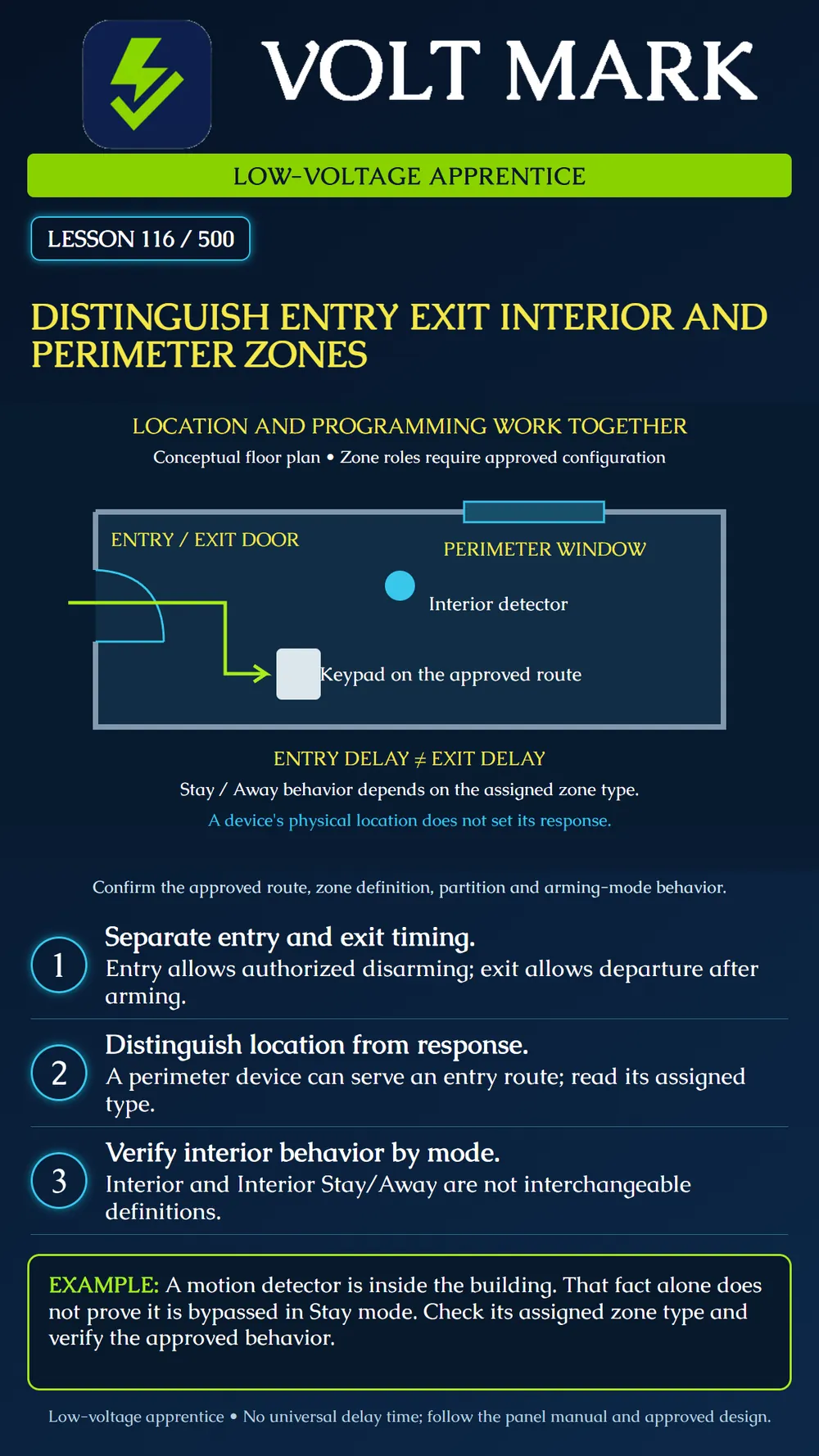
Separate the physical location of intrusion devices from their programmed response, including entry, exit and arming-mode behavior.
A perimeter device monitors a boundary such as a door or window. An interior detector monitors space inside that boundary. These descriptions help explain the layout, but do not by themselves assign panel behavior. The main entrance is physically on the perimeter and may also be the authorized entry and exit route.
Entry delay provides time for an authorized arriving user to disarm through the intended route. Exit delay provides time to leave after initiating arming. The actual sequence and duration depend on the panel, configuration and approved application. Do not copy a remembered timer value into a new installation.
DSC PowerSeries Pro's Delay 1 definition illustrates the distinction: arming starts exit delay, and opening the assigned door after that delay starts entry delay. Its Interior Delay type changes behavior with arming mode. DSC's Neo documentation distinguishes Interior Stay/Away from Interior and states that the former is bypassed in Stay mode. These bounded examples show why the full zone definition matters. They do not establish identical behavior for every system.
Some interior types follow an entry delay that has already started, while other definitions differ. Read the complete applicable definition before predicting a sequence. Likewise, a perimeter window and an authorized entrance may require different responses even though both are boundary openings.
The poster is a conceptual layout, not a zone assignment schedule. It shows a door, window, interior detector and keypad route to make the roles visible. It does not specify coverage, entry times, actual zone numbers or a universal Stay-mode arrangement.
A trainee sees a motion detector inside a training room and assumes it is inactive during Stay arming. The instructor asks for its assigned definition. The location alone cannot answer the question. The trainee records the actual definition and expected mode behavior before observing the authorized demonstration. This is a fictional learning example, not a statement about an installed system.
Use an instructor-approved training system and its manual. Obtain the approved zone schedule and route drawing. Identify the panel model, partition assignment, device labels and zone definitions. Keep the configured response separate from the physical location on the drawing.
Mark the authorized entry door, exit route and keypad. Identify interior detection along the route and other perimeter openings. Have the instructor explain how the approved configuration supports ordinary authorized movement. Do not independently change a zone definition to fix a route that seems inconvenient.
Build a comparison record for the modes relevant to the training system. For each zone, write what the manual and approved configuration require after exit delay, during an active entry delay and in each intended arming mode. If the behavior is unresolved, mark it UNKNOWN instead of guessing from the detector type.
Before a demonstration, the responsible person must arrange any required monitoring test status. Follow the approved test sequence. Record the starting mode, event order and observed indications. Keep panel indications separate from any remote receipt check required by the plan. Do not simulate an intrusion on a production system without the authorized procedure.
Compare observations with the documented expectation. Preserve mismatches for review. A zone that is quiet may be bypassed or otherwise configured differently; silence does not establish correct coverage. Restore the approved final state and document any required retest.
Panel / manual revision / approved schedule: Device label / physical location / zone: Partition / assigned definition: Entry and exit behavior: Stay / Away / other required mode behavior: Authorized test sequence: Expected response / actual response: Unresolved item / owner / retest: Final system state and restoration confirmation:
Answer: Yes. Physical location and programmed role describe different aspects.
Answer: No. Verify the zone definition and configuration.
Answer: No. One supports arrival and disarming; the other supports departure after arming.
Researched 2026-09-30, primary manufacturer documentation: DSC PowerSeries Pro Delay 1: https://docs.johnsoncontrols.com/dsc/r/DSC/en-US/PowerSeries-Pro-Reference-Manual/1.3.1/Programming/Programming-descriptions/Zone-setup/001-zone-types/001-Delay-1 DSC PowerSeries Pro Interior Delay: https://docs.johnsoncontrols.com/dsc/r/DSC/en-US/PowerSeries-Pro-Reference-Manual/1.3.1/Programming/Programming-descriptions/Zone-setup/001-zone-types/010-Interior-Delay DSC PowerSeries Neo Interior Stay/Away: https://docs.johnsoncontrols.com/dsc/r/DSC/en-US/PowerSeries-Neo-HS2016/HS2016-4/HS3032/HS2064/HS2064-E/HS2128/HS2129-E-Alarm-Controller-Reference-Manual/1.2/Programming/Programming-Descriptions/Zone-Setup/001-AssignZone-Types/Interior-Stay/Away Original diagram, scenario, practice and record form. No universal timings or local code requirements asserted.
Free study material for low-voltage apprentices. This is a national foundation course: requirements differ by state and by local jurisdiction, and a practice that is common in one place is not a rule everywhere. Nothing here is a licence, a certification, or authority to work unsupervised, and completing it does not count as apprenticeship hours or continuing-education credit. Check the codes adopted where you are working, the licensing authority for that work, and your employer's safety programme. VoltMark is not affiliated with, endorsed by, or sponsored by NFPA, OSHA, NICET, BICSI, FOA, or any state or local licensing authority.

Electrician licensing exam prep: practice questions, timed exam simulations, and step-by-step help finding every answer in the NEC.