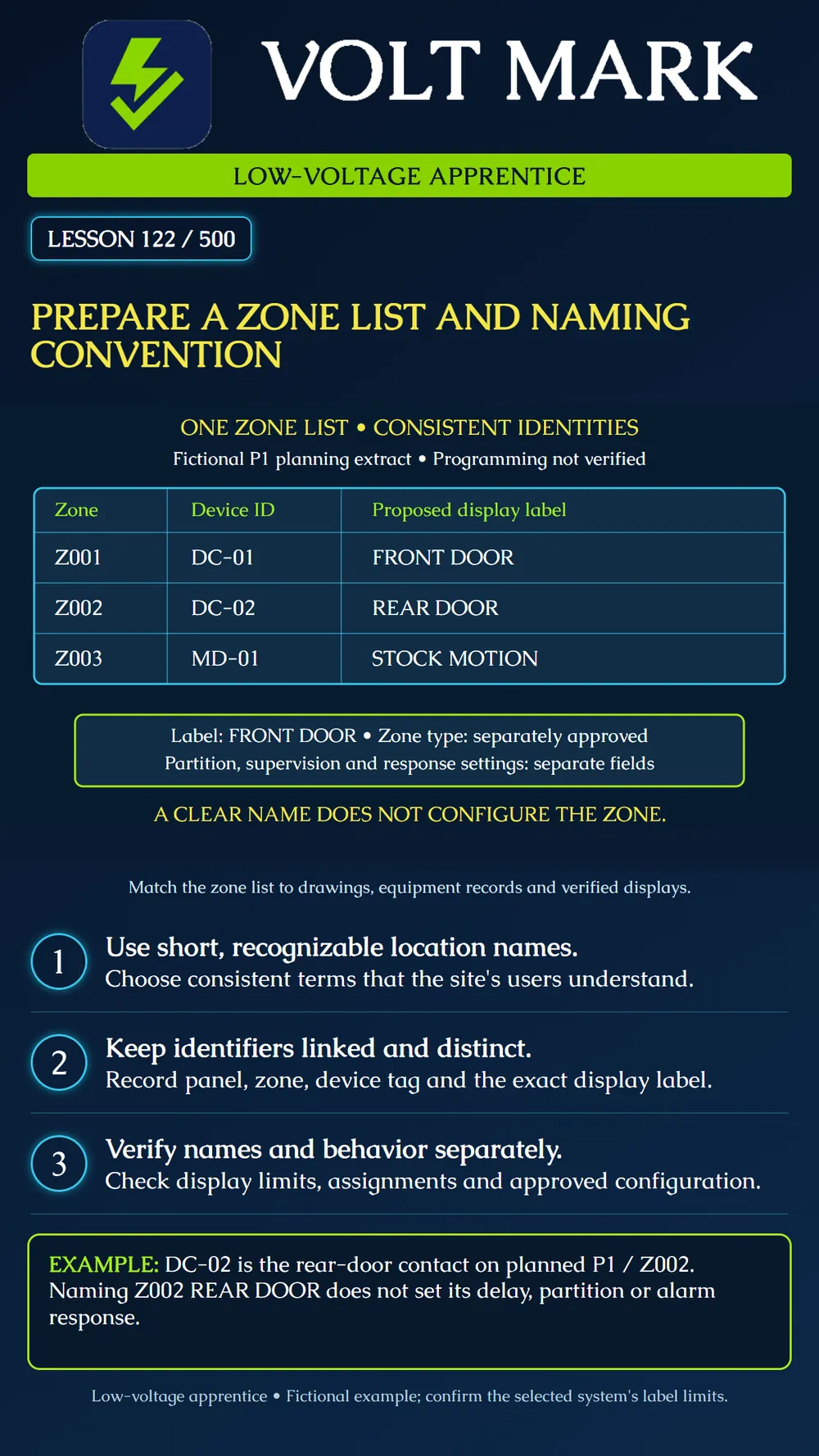
Prepare a clear zone list that links panel and zone identifiers to field devices, recognizable names and separate programming records.
A zone number identifies a system input or logical zone within its system context. A field-device tag identifies equipment in the project records. A display label helps users recognize the location or purpose of an event. These identifiers serve different jobs. Keep their relationship explicit.
Begin with the approved equipment schedule and current drawing. Record the panel reference, zone identifier and all field devices associated with that zone. Do not assume every project has one device per zone or that all products use the same addressing arrangement. Have the qualified installer confirm the actual mapping. This lesson uses one device per zone only as a simple fictional exercise.
Choose a naming convention before entering labels. Use familiar location terms, and add a distinguishing feature where two names could be confused. For a larger fictional building, NORTH LOBBY DOOR and SOUTH LOBBY DOOR may be clearer than DOOR 1 and DOOR 2. Check the actual display capacity before adopting either phrase. Avoid abbreviations whose meaning only the installer knows. Agree on any abbreviations with the responsible site representative.
DSC's PowerSeries Pro documentation describes custom zone labels used in displays and events, with a maximum of two lines of 14 ASCII characters for that documented system. That is a specific example, not a universal label limit. Other equipment, apps, receivers or service records may display names differently. Check each required destination rather than assuming a label automatically appears everywhere.
A label is identification text. Keep the approved zone type, partition assignment, supervision and response settings in their own fields. Calling a zone FRONT DOOR does not establish an entry delay. A readable name can still be attached to the wrong input. Verification must address both the name and the underlying assignment.
Continue the P1 equipment example from Lesson 120: P1 / Z001 | DC-01 | FRONT DOOR P1 / Z002 | DC-02 | REAR DOOR P1 / Z003 | MD-01 | STOCK MOTION
The labels contain 10, 9 and 12 characters respectively, counting spaces. Each fits within 14 characters as plain ASCII text. This arithmetic illustrates checking a length constraint; it does not approve a product or confirm programming. Zone types, partitions and supervision remain separately pending for the exercise.
KP-01 remains a keypad on the planned bus. It is not added as Z004 merely because it is the fourth row in the equipment schedule. An equipment count does not define the zone numbering scheme.
Ask someone familiar with the building to locate the proposed names on the plan. If the building has two rear doors, REAR DOOR needs a clearer distinction. Preserve the stable equipment tags while resolving the labels. Record the approved terminology and revision so future additions follow the same convention.
Compare names as actually displayed. An automatically shortened label might remove the only distinguishing word. Check supported characters, spaces, line wrapping and abbreviations. Maintain a cross-reference if a monitoring service uses a different description. Do not assume changing local text updates the service's records.
Prepare the three-row fictional list. Add columns for location, proposed label, approved label, zone type, partition, supervision, verification status and drawing revision. Mark unresolved programming fields pending. Introduce a deliberate mismatch between DC-02 and Z003 on a training worksheet, then locate it by comparing the equipment schedule and drawing. Correct the worksheet with a revision note. Any live functional verification requires its own authorized, coordinated test process. Record the actual observed event and restoration in the appropriate test record; this naming exercise does not itself authorize activation.
Panel reference; zone identifier; device tags; physical location; exact display label; label approval/date; approved configuration reference; drawing revision; service-description cross-reference; verified mapping/status; discrepancy owner. Use additional fields required by the selected system. Keep credentials out of the ordinary zone list.
Primary manufacturer sources checked September 30, 2026: DSC / Johnson Controls, PowerSeries Pro Reference Manual 1.3.1, Zone labels: https://docs.johnsoncontrols.com/dsc/r/DSC/en-US/PowerSeries-Pro-Reference-Manual/1.3.1/System-Operation/Labels/Zone-labels DSC / Johnson Controls, Label Programming worksheet: https://docs.johnsoncontrols.com/dsc/r/DSC/en-US/PowerSeries-Pro-Reference-Manual/1.3.1/Programming-worksheets/Label-Programming Sources support the product-specific label purpose and size example. Fictional IDs, naming exercise and workflow are original instructional material.
Free study material for low-voltage apprentices. This is a national foundation course: requirements differ by state and by local jurisdiction, and a practice that is common in one place is not a rule everywhere. Nothing here is a licence, a certification, or authority to work unsupervised, and completing it does not count as apprenticeship hours or continuing-education credit. Check the codes adopted where you are working, the licensing authority for that work, and your employer's safety programme. VoltMark is not affiliated with, endorsed by, or sponsored by NFPA, OSHA, NICET, BICSI, FOA, or any state or local licensing authority.

Electrician licensing exam prep: practice questions, timed exam simulations, and step-by-step help finding every answer in the NEC.