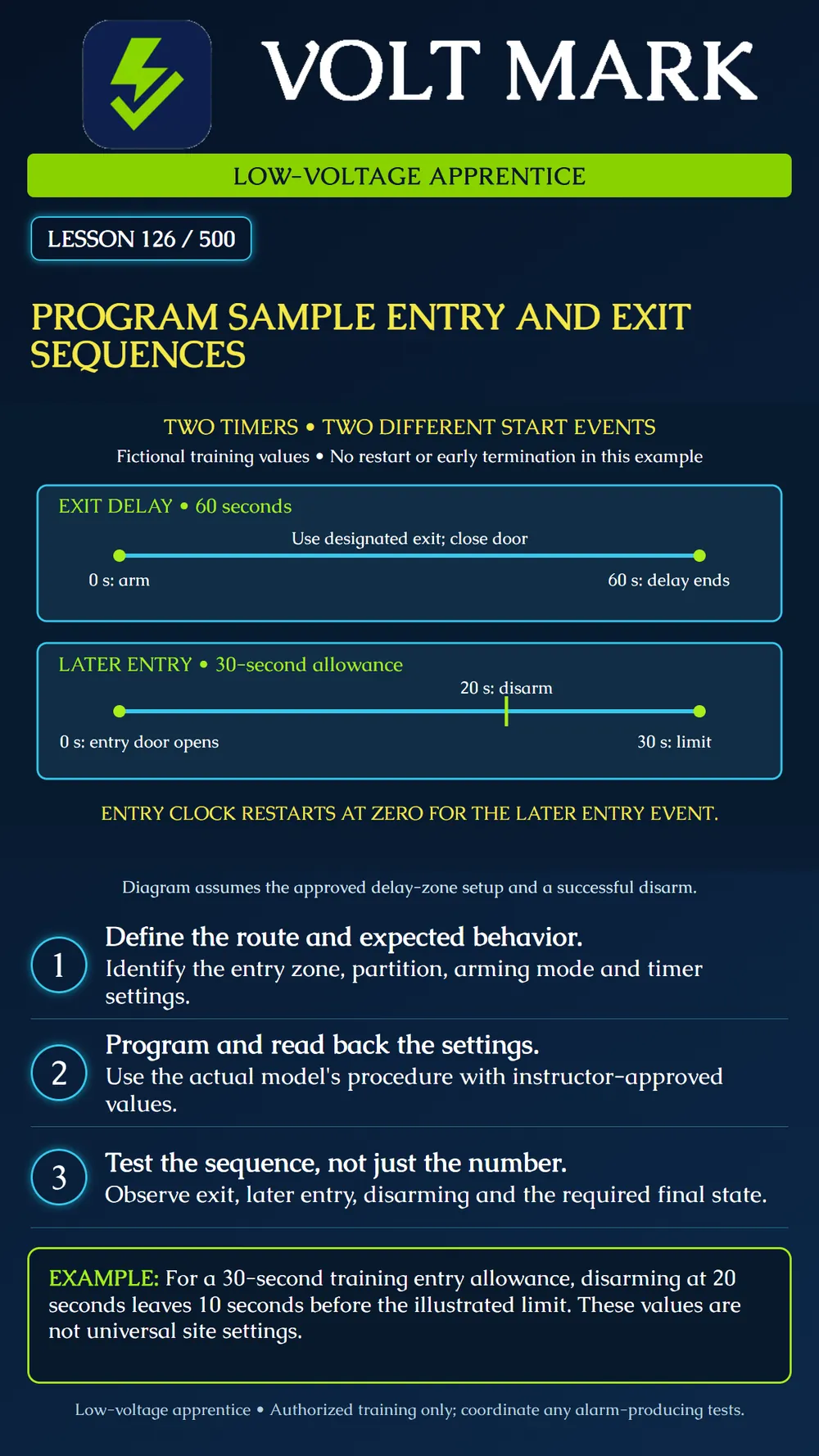
Configure an instructor-approved sample entry/exit sequence and verify that the observed behavior matches the intended route, zone assignment and timing.
Entry and exit delays start from different events. An exit delay provides time to leave after the applicable arming action. Later, opening a designated delay entry zone starts its entry delay. A user must complete the required disarming action within that allowance. Do not treat the two timers as one continuous countdown.
For a specific manufacturer example, DSC describes its Delay 1 zone as following the entry-delay-1 and exit timers: arming starts exit delay, and opening the door after exit delay starts entry delay. The documented keypad buzzer prompts disarming during entry. These statements describe that zone type; they do not mean every zone automatically receives a delay.
The programming plan needs more than two numbers. Identify the controller and software version, partition, entry-zone identity, zone type, intended exit route and arming mode. Review any route detectors and special options that affect the sequence. Delay restart, early termination and arming-mode behavior can change what the learner observes. Record the actual options rather than guessing from the timer value alone.
The poster assumes a simple approved training arrangement without an exit restart or early termination: Exit allowance: 60 seconds. Entry allowance: 30 seconds. Successful entry disarm: 20 seconds after opening the entry door.
The first timeline begins when the exercise's arming action starts exit delay. The learner follows the designated route and closes the entry/exit door before the illustrated 60-second delay ends. The system's resulting state must still be checked.
The second timeline represents a later entry. Its zero is a new event: opening the designated entry door after the system is armed and exit delay has ended. It is not the 60-second point of the first timeline. The learner disarms at 20 seconds, which is 10 seconds before the illustrated 30-second allowance expires. The 30-second marker shows the allowance that would otherwise expire; a successful disarm ends the entry sequence.
A programmed number can be correct while the wrong door zone or partition has been selected. A successful test from one route does not prove every route. Likewise, a timer may restart or end early when a configured feature operates. Investigate a mismatch against the actual configuration before changing the time.
Do not assume that the expiry of entry delay determines the exact time a monitoring service receives an event or initiates a response. Alarm indication, transmission options and response arrangements are separate aspects of the system. Any exercise intended to produce an alarm needs explicit coordination and its own expected results.
Controller/model/version; configuration backup reference; date/instructor; zone and partition; arming mode; entry/exit route; approved timer values and units; relevant options; read-back result; observed events and elapsed times; successful disarm; final state; discrepancies and resolution. Keep user and installer credentials out of general training records.
Checked September 30, 2026: DSC / Johnson Controls, PowerSeries Pro Reference Manual, Delay 1: https://docs.johnsoncontrols.com/dsc/r/DSC/en-US/PowerSeries-Pro-Reference-Manual/1.3.1/Programming/Programming-descriptions/Zone-setup/001-zone-types/001-Delay-1 DSC / Johnson Controls, System Times worksheet: https://docs.johnsoncontrols.com/dsc/r/DSC/en-US/PowerSeries-Pro-Reference-Manual/1.3.1/Programming-worksheets/System-Times DSC / Johnson Controls, SIA quick reference table: https://docs.johnsoncontrols.com/dsc/r/DSC/en-US/PowerSeries-Pro-Reference-Manual/1.3.1/Regulatory-approvals/SIA-False-Alarm-Reduction-Installations-Quick-Reference/SIA-quick-reference-table The last reference illustrates application-specific timing and behavioral constraints. No universal compliance limits or defaults are asserted here. The two timelines and arithmetic are original fictional training examples.
Free study material for low-voltage apprentices. This is a national foundation course: requirements differ by state and by local jurisdiction, and a practice that is common in one place is not a rule everywhere. Nothing here is a licence, a certification, or authority to work unsupervised, and completing it does not count as apprenticeship hours or continuing-education credit. Check the codes adopted where you are working, the licensing authority for that work, and your employer's safety programme. VoltMark is not affiliated with, endorsed by, or sponsored by NFPA, OSHA, NICET, BICSI, FOA, or any state or local licensing authority.

Electrician licensing exam prep: practice questions, timed exam simulations, and step-by-step help finding every answer in the NEC.