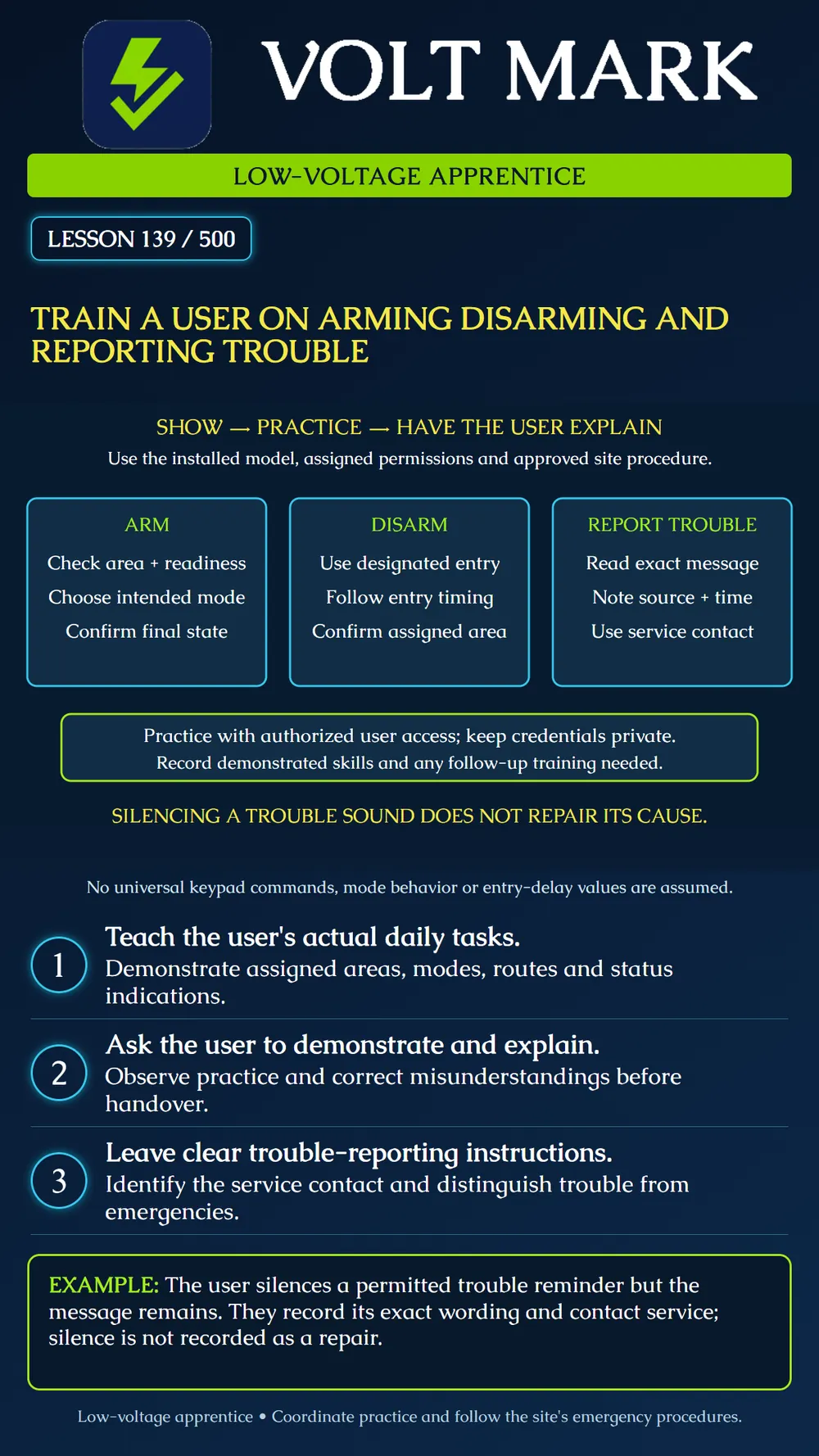
Deliver practical user training that verifies understanding of daily operation, system status and trouble reporting.
Train the user on the installed model and their approved permissions. Identify the areas they operate, their normal arrival and departure routes, and the modes used at that site. A generic demonstration on a different keypad is not enough to establish that they can use their own system.
Prepare an authorized practice session and coordinate any monitoring or sounder effects. Explain the purpose of each action before demonstrating it. Have the user perform the task and explain the resulting indication in their own words. Record what they demonstrate rather than treating attendance as proof of understanding.
Manufacturer instructions provide the operating details. DSC's cited user guidance describes readiness and arming errors, disarming within the configured entry allowance, and viewing trouble information. Exact controls and indications vary by keypad, software and configuration. This lesson deliberately provides no universal key sequence.
Show how to identify the intended area and current state. Explain the site-approved modes and what protection each actually includes. Do not assume every mode called Stay or Away has identical behavior across all installations.
Demonstrate the applicable readiness checks and response to an open or unready zone. Teach the user to follow the approved resolution and service process rather than routinely bypassing protection to make arming succeed. Bypass permissions and any approved exceptional use require their own clear instruction.
Practice the normal departure sequence and designated exit route. Have the user confirm the final armed state for the intended area using the system's actual indications. Pressing an arm button or hearing a tone is not enough when the expected state has not been established.
Show the designated entry route and explain the configured entry allowance. Let the user practice with their own authorized access method without displaying or recording its secret value. Verify that they can identify the correct area and confirm the resulting disarmed state.
Explain what to do if the expected indication does not appear or an error occurs, using the site's approved procedure. Do not encourage repeated guesses at codes. Teach how to obtain help and how the site's alarm-response process differs from routine troubleshooting.
Show how to view the relevant message using the actual user instructions. Record the exact wording, affected device or area, and when it occurred. A photograph may help only when authorized and when it does not expose credentials or sensitive information.
Explain the difference between acknowledging or silencing an allowed reminder and resolving its cause. The system may remain in trouble after the sound stops. Do not tell the user to disconnect power, remove batteries or disable reporting merely to quiet an indication.
Leave the correct service contact and the information needed for a useful report. Separately explain the site's response to an actual emergency or suspected intrusion. Routine service instructions do not replace the applicable emergency procedure.
The instructor presents a simulated trouble screen. The user follows the approved method to silence its reminder, but the message remains. The user then reads the exact message, identifies the affected source and explains whom to contact.
A successful explanation says that the reminder is quiet while the condition remains unresolved. It does not say the system is repaired. No actual trouble was induced or cleared to create this lesson.
Ask the user to demonstrate their normal arming task, explain the selected mode, identify the entry route, perform the authorized disarming practice and describe a trouble-reporting action. Observe without supplying every next step. Correct misunderstandings and repeat the relevant portion.
Adapt the training format to the user's needs and the interface available. Provide a concise site-specific reference with model identification, ordinary steps, contact information and a revision date. Keep secret codes out of printed sheets and general handover records.
Confirm the agreed final system and monitoring state after practice. Record completed tasks, remaining training needs and who will follow up. User instruction does not replace technical acceptance testing or approval of unresolved defects.
Date; trainer and authorized participant; system/keypad version; assigned areas; tasks demonstrated; mode/route understanding; status recognition; trouble-reporting practice; reference material supplied; unresolved questions; follow-up owner; final system state. Do not record the participant's secret credential.
Checked September 30, 2026: DSC / Johnson Controls, PowerSeries Pro User Manual, Arming troubles: https://docs.johnsoncontrols.com/dsc/r/DSC/en-US/PowerSeries-Pro-HS3032/HS3128/HS3248-User-Manual/Securing-the-premises/Arming-troubles-and-exit-faults/Arming-troubles Disarming the system with a keypad: https://docs.johnsoncontrols.com/dsc/r/DSC/en-US/PowerSeries-Pro-HS3032/HS3128/HS3248-User-Manual/Securing-the-premises/Disarming-the-system/Disarming-the-system-with-a-keypad Trouble conditions: https://docs.johnsoncontrols.com/dsc/r/DSC/en-US/PowerSeries-Pro-HS3032/HS3128/HS3248-User-Manual/Troubleshooting/Trouble-conditions The teaching sequence and simulated exercise are original instructional material. No real credentials, user competency certification or live system changes are claimed.
Free study material for low-voltage apprentices. This is a national foundation course: requirements differ by state and by local jurisdiction, and a practice that is common in one place is not a rule everywhere. Nothing here is a licence, a certification, or authority to work unsupervised, and completing it does not count as apprenticeship hours or continuing-education credit. Check the codes adopted where you are working, the licensing authority for that work, and your employer's safety programme. VoltMark is not affiliated with, endorsed by, or sponsored by NFPA, OSHA, NICET, BICSI, FOA, or any state or local licensing authority.

Electrician licensing exam prep: practice questions, timed exam simulations, and step-by-step help finding every answer in the NEC.