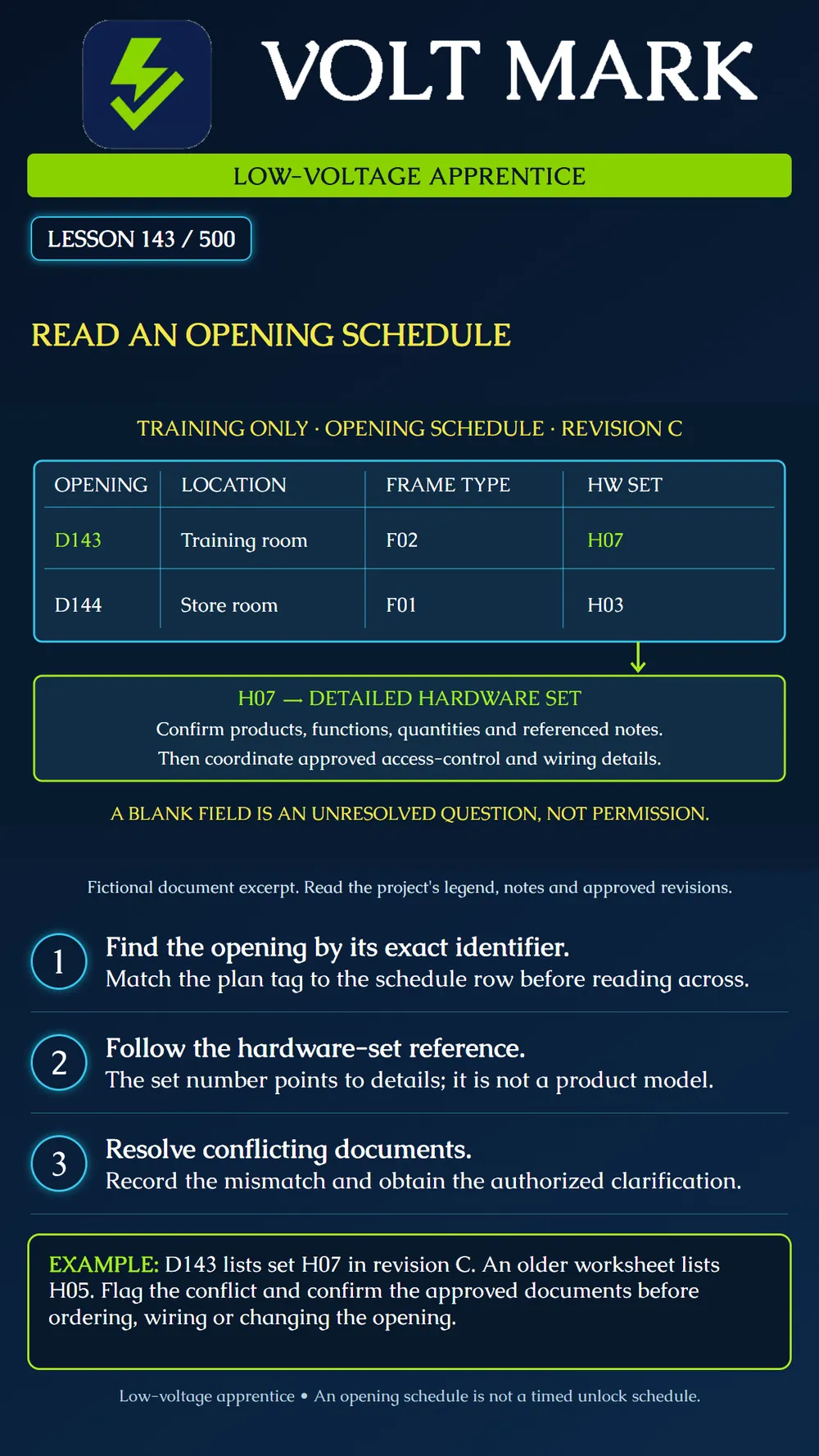
Trace an opening identifier through a document schedule, its hardware set and associated access-control information. Record discrepancies without inventing design intent.
An opening schedule is a document table describing identified openings. It is different from a timed unlock schedule in access-control software. Begin with the opening tag on the plan and find the matching row. Similar room names are not reliable substitutes for the unique identifier.
Read the headings and legend before interpreting values. A code such as F02 may refer to a frame type elsewhere in the drawings. A hardware-set code such as H07 points to a group of specified hardware. Neither code, by itself, is a manufacturer model number. The table format varies by project; do not assume that a column occupies the same position as on a previous job.
Primary-source context: Allegion's Overtur report definitions distinguish door schedules, which associate individual doors with opening attributes, from hardware-set reports, which associate openings with sets and the products in those sets. The Steel Door Institute also describes a suggested door, frame and hardware schedule format. These support the relationship illustrated here, not a mandatory nationwide form.
Reading a row is the beginning of coordination. Follow referenced elevations, details, notes and specifications. For an access-controlled opening, locate the approved functional description and wiring information relevant to that opening. An entry in a remarks column reading access control does not supply a voltage, current requirement, locking function, interface arrangement or permission to modify the frame.
Keep document identity with the observation: sheet or document number, revision, issue purpose and the applicable approved change. The most recently dated file is not automatically the authorized construction instruction. Use the project's document-control process to establish which information governs the work.
The fictional revision-C excerpt lists: D143 / Training room / Frame type F02 / Hardware set H07. D144 / Store room / Frame type F01 / Hardware set H03.
A trainee is assigned D143 but opens an older worksheet showing H05. The correct learning task is to identify and report the discrepancy, not choose the parts that happen to be available. Record both references and ask the designated project lead to confirm the approved resolution. Do not change a controlled document independently.
The H07 arrow in the poster illustrates a lookup. It does not show a cable connection. The simplified excerpt omits many fields that a real project may need. Missing fields in this training graphic do not imply that dimensions, ratings, accessibility, egress or other design requirements can be omitted from actual work.
First, match the exact opening tag on the plan to the schedule. Second, read across that row without drifting into the next opening. Third, follow each type and set reference to its definition. Fourth, review notes and approved changes that apply to the opening. Fifth, compare the documented arrangement with the authorized field observation. Finally, identify unresolved items before releasing dependent work.
Use neutral observations. "Schedule revision C assigns H07; worksheet revision A assigns H05" is more useful than "the schedule is wrong." The former gives the reviewer a traceable conflict without assuming which source needs correction.
Use the fictional excerpt and prepare two lookup cards. On the D143 card, record F02 and H07. On the D144 card, record F01 and H03. Have another trainee locate each row from the card. Then introduce a worksheet with the H05 conflict and draft a clarification request naming both revisions.
Next, use an approved sample project's documents under supervision. Identify an opening, its assigned hardware set, the corresponding product information and the applicable access-control detail. Record any referenced document you cannot locate. Do not substitute a familiar detail from another opening.
Opening identifier and location: Plan sheet / schedule sheet / revision / issue status: Door type / frame type / hardware set: Legend, notes and details followed: Access-control functional and wiring references: Approved change reference: Field observation: Conflict or missing information: Responsible reviewer / clarification / date: Dependent work released by authorized party:
Is H07 a product model in this example? No; it identifies the detailed hardware set. Does D144 use the same frame type as D143? No; F01 and F02 differ. Does an opening schedule describe daily unlock times? Not in this lesson. Does a blank field authorize the apprentice to decide the missing requirement? No. What makes a discrepancy useful? Exact identifiers, document references and the observed conflicting entries.
Primary sources checked September 30, 2026: Allegion Overtur, Report Definitions: https://support.overtur.allegion.com/hc/en-us/articles/13264186717716-Report-Definitions Steel Door Institute, Technical Documents, SDI111D-24 schedule description: https://steeldoor.org/tech_data/ The example, reading routine and worksheet are original teaching material. No actual project's documents were approved or changed.
Free study material for low-voltage apprentices. This is a national foundation course: requirements differ by state and by local jurisdiction, and a practice that is common in one place is not a rule everywhere. Nothing here is a licence, a certification, or authority to work unsupervised, and completing it does not count as apprenticeship hours or continuing-education credit. Check the codes adopted where you are working, the licensing authority for that work, and your employer's safety programme. VoltMark is not affiliated with, endorsed by, or sponsored by NFPA, OSHA, NICET, BICSI, FOA, or any state or local licensing authority.

Electrician licensing exam prep: practice questions, timed exam simulations, and step-by-step help finding every answer in the NEC.