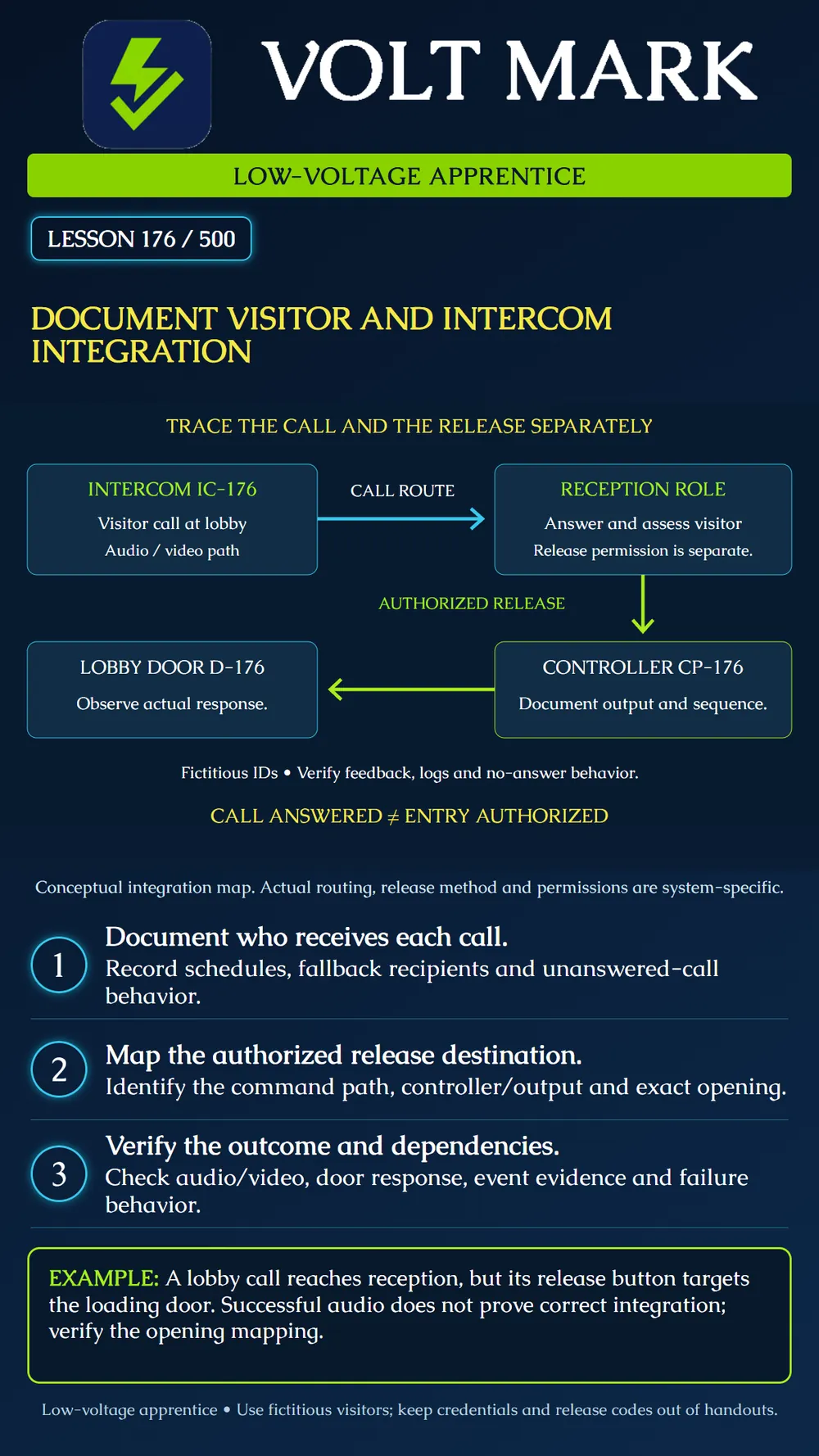
Create a clear record of how a visitor call reaches an authorized person, how an approved release command reaches the intended opening, and how the outcome is verified. Treat communication, authorization and physical response as separate functions.
The AXIS I8116-E manual describes SIP contacts with availability and fallback routing. Its release example distinguishes requesting a door controller to release from using the intercom's internal relay. This shows why documentation must identify the actual integration path rather than merely state 'intercom opens door.' The same manual distinguishes SIP call signaling from the transport of audio/video. These are product examples, not a universal architecture or settings prescription. Source: https://help.axis.com/en-us/axis-i8116-e
Do not copy sample release codes, relay choices or durations into a real system. Use approved project settings and installed-model instructions. This lesson's CP-176 controller path is an original fictional example, not an assertion that every intercom uses a separate controller.
IC-176 represents the lobby calling station. Reception is a role, not a person's private telephone number. The cyan arrow identifies call routing. The lime path represents a deliberate authorized release command through CP-176 to D-176. The final box calls for observing the actual door function. It does not claim that the door opens automatically or that a command proves entry occurred.
Document the station ID, location, hardware/software versions, call-button destination and the approved communication method. Identify whether the installation uses direct calling, a telephone service, management software or another supported arrangement. Record the relevant system references and service owner.
Describe the normal answering role, hours of availability and what happens when nobody answers. Identify any approved fallback role, busy condition, timeout or after-hours route. Do not assume that a fallback contact is automatically authorized to release every opening. Separate the ability to answer from the authority to admit a visitor.
Record which audio and video paths are expected and what constitutes usable communication. A call that rings but has one-way audio is not the same result as a verified two-way conversation. A clear camera image does not establish the visitor's identity or purpose by itself; admission follows the owner's documented process.
Identify the method of release, the authorized role, the integration rule reference, the receiving controller or relay and the exact door or gate destination. Record the approved release behavior and return-to-normal sequence. Use protected references for sensitive configuration; do not put credentials, private contact details or operational release codes into public lesson materials.
Where the actual installation uses an intercom relay, document that architecture. Where it uses a controller command, document that instead. Avoid drawings that imply both paths are active when only one is intended. Follow the approved hardware and life-safety sequence; intercom admission must not override required egress or gate protection.
Record the relevant power source, network connection and any server or service dependency. Identify which component owns the function and which team restores it after a failure. Do not state that 'offline' always produces a particular lock condition. Verify the defined behavior for the actual failure being tested, keeping network interruption distinct from loss of power.
A fictional lobby station calls Reception during business hours and a fictional Security role after hours. The intended release target is D-176 through CP-176. A draft configuration instead points the release action to a loading door.
The apprentice marks the mapping incorrect even if audio and video work perfectly. The useful finding names the station, action reference, expected opening, actual configured destination and document revision. It does not simply say 'intercom broken.' The supervising team corrects and verifies the mapping through its approved process.
A second scenario routes unanswered calls to an unstaffed extension. Record the observed result and compare it with the approved no-answer sequence. Do not create an automatic unlock rule to make the visitor flow easier. Escalate the mismatch to the system owner.
A third scenario shows a release event but no door movement. Record the event, lock/simulator response and available position feedback separately. The door may require a person to move it, and a closed-position input alone does not prove that the latch is secure. Describe exactly what was observed.
Use fictitious identities and an isolated trainer. With the instructor's approved test plan, trace a normal answered call, an unanswered call, an authorized release and a role without release permission. Include any approved failure-case simulation and document its limits. Confirm the intended destination before operating a physical release. Do not contact real visitors, alter a production network or call an emergency endpoint.
Use a results table with these fields: test ID; station; call destination; time/schedule condition; answering role; audio/video result; release authorization; command destination; observed opening response; event references; discrepancy; and restoration. Mark untested functions as unverified.
Provide the approved integration map, configuration references, service responsibilities, test results and outstanding issues. Keep secrets in the owner's approved credential system. The record should let another technician trace the path without needing to guess which 'front door' or which relay was intended.
Answer: No.
Answer: No.
Answer: The approved timeout/fallback outcome and what was actually observed.
Answer: No; use protected references.
Answer: No; distinguish command, physical response and passage evidence.
Free study material for low-voltage apprentices. This is a national foundation course: requirements differ by state and by local jurisdiction, and a practice that is common in one place is not a rule everywhere. Nothing here is a licence, a certification, or authority to work unsupervised, and completing it does not count as apprenticeship hours or continuing-education credit. Check the codes adopted where you are working, the licensing authority for that work, and your employer's safety programme. VoltMark is not affiliated with, endorsed by, or sponsored by NFPA, OSHA, NICET, BICSI, FOA, or any state or local licensing authority.

Electrician licensing exam prep: practice questions, timed exam simulations, and step-by-step help finding every answer in the NEC.