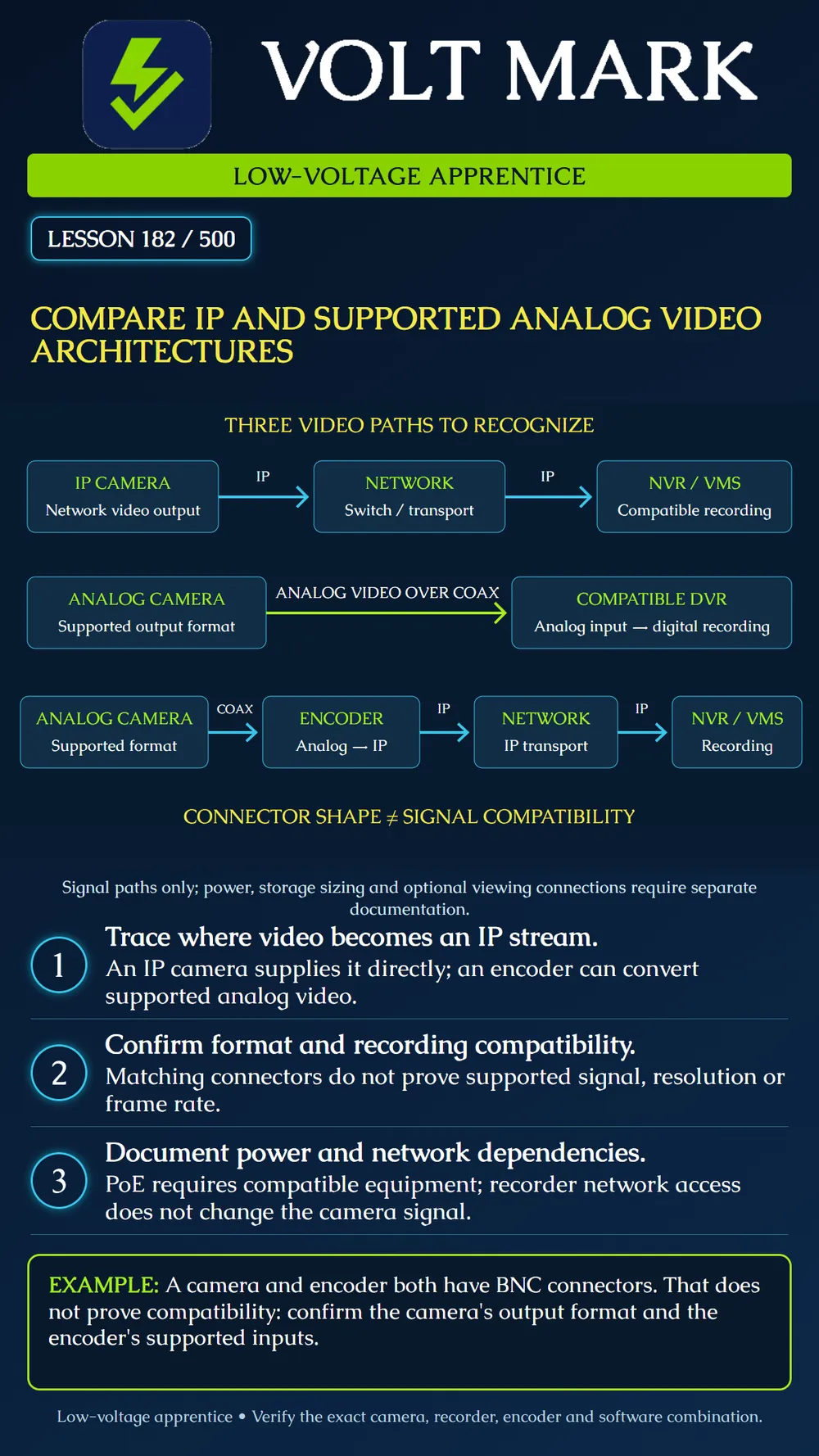
Trace three common video paths and identify the compatibility evidence needed for each. Separate video format, transport, power and recording instead of identifying a system solely by its connector.
An IP camera provides network video to a compatible recording or management system over an appropriate network path. NVR means network video recorder; VMS means video management software. Record camera and software versions, supported streams/codecs, required features, channel licensing and actual network/storage capacity. A switch provides connectivity, not automatic assurance that the recorder supports every camera function.
Power over Ethernet may power compatible equipment, but it is not implied by an Ethernet connector. Confirm the required power method and available power budget. Some products use separate supplies. The poster omits power wiring so the signal paths remain readable.
The camera sends a supported analog video signal to a compatible digital video recorder. The DVR digitizes/encodes the incoming video for digital recording. A DVR can also have network access for viewing or management; that does not turn its analog camera input into an IP-camera input.
Hanwha Vision's HRX-434 is a concrete example of a recorder with specified AHD, TVI, CVI, CVBS and IP support, subject to channel and performance limits. This is a model-specific capability, not proof that all DVRs accept those formats or every resolution/frame-rate combination. Source: https://www.hanwhavision.com/us/products/product-details/HRX-434
A video encoder converts supported analog video into a network stream that a compatible NVR/VMS can receive. Axis's video-encoder paper illustrates this migration path and distinguishes it from IP cameras using Ethernet-over-coax adapters. An encoder changes the video representation; an Ethernet-over-coax system transports network traffic over a supported coax link. They are not interchangeable devices. Source: https://whitepapers.axis.com/en-us/video-encoders
Axis describes the M7104 as an encoder for standard-resolution analog cameras. Its BNC inputs are not evidence that it accepts every HD analog format. Check the exact input specification rather than relying on appearance. Source: https://www.axis.com/products/axis-m7104
The first row starts with network video. The second starts with analog video and ends at a DVR. The third shows the analog-to-IP transition at an encoder. The arrows are functional signal paths, not cable-length, wiring or power instructions. Optional recorder network links, monitors and other storage arrangements are omitted.
Coax is a transmission medium, not a complete format description. A BNC connector can appear on equipment with different supported signals. Similarly, twisted-pair cabling alone does not establish that a device speaks Ethernet. Record the actual interface and any approved conversion equipment.
A fictional customer has three cameras and wants one viewing interface. Camera A provides an IP stream. Camera B is documented as standard composite analog. Camera C is documented as an HD analog format.
For A, verify the VMS/recorder's support for the actual stream and required functions. For B, investigate a documented compatible DVR input or encoder path. For C, verify the exact HD analog format and supported resolution/frame rate at the receiving device. Do not assume the encoder selected for B supports C because both use BNC.
The exercise does not require buying a converter or connecting live equipment. Fill in an evidence matrix with camera model/version, output format, medium, receiving device/input, supported mode, power method and recording requirements. Mark unsupported or unverified combinations explicitly.
A second fictional case has a DVR with a network port. A trainee draws IP cameras plugged into its analog inputs. Correct the drawing: the network port's capabilities and any supported IP camera channels must be established from that DVR's documentation. The analog inputs remain their documented type.
A third case powers an encoder by PoE and assumes the attached analog cameras also receive power. Mark camera power unresolved. Encoder power does not automatically establish a power path to every attached camera. Any power-over-coax capability must be supported by the actual equipment and approved arrangement.
Consider reuse of existing cable, supported image performance, network capacity, device support, recording limits, fault visibility and maintenance access. Do not declare one architecture adequate solely because a live picture appears. The chosen path must support the task defined in Lesson 181, including the recorded result.
Integration can limit features independently of basic video. Audio, PTZ control, events, analytics metadata or playback may require separate support. A standards label or generic compatibility claim does not establish every desired feature in every software version. Verify the actual combination and document any exclusions.
Using authorized, compatible equipment, trace one documented channel from source to playback. Record the input mode, stream or recording settings and whether the intended clip can be retrieved. Keep personal credentials out of the lesson record. Do not expose a recorder to the public internet or change production network settings as part of this exercise.
If the image is absent, first confirm the expected format and supported input. Then follow the model-specific diagnostic process for power, cable and configuration. Do not connect arbitrary adapters or apply power to an unknown video input.
Free study material for low-voltage apprentices. This is a national foundation course: requirements differ by state and by local jurisdiction, and a practice that is common in one place is not a rule everywhere. Nothing here is a licence, a certification, or authority to work unsupervised, and completing it does not count as apprenticeship hours or continuing-education credit. Check the codes adopted where you are working, the licensing authority for that work, and your employer's safety programme. VoltMark is not affiliated with, endorsed by, or sponsored by NFPA, OSHA, NICET, BICSI, FOA, or any state or local licensing authority.

Electrician licensing exam prep: practice questions, timed exam simulations, and step-by-step help finding every answer in the NEC.