Translate assigned video-system duties into an access worksheet and a verification plan. This is a fictional training exercise, not permission to alter a customer's recorder, accounts or recordings.
A person who watches a live entrance does not necessarily need to search yesterday's footage. A person who reviews an incident does not automatically need to distribute a copy. A technician who maintains the recorder does not automatically have authorization to inspect every recording. Start with the approved duty and the approved camera list, then identify the controls the actual platform supports.
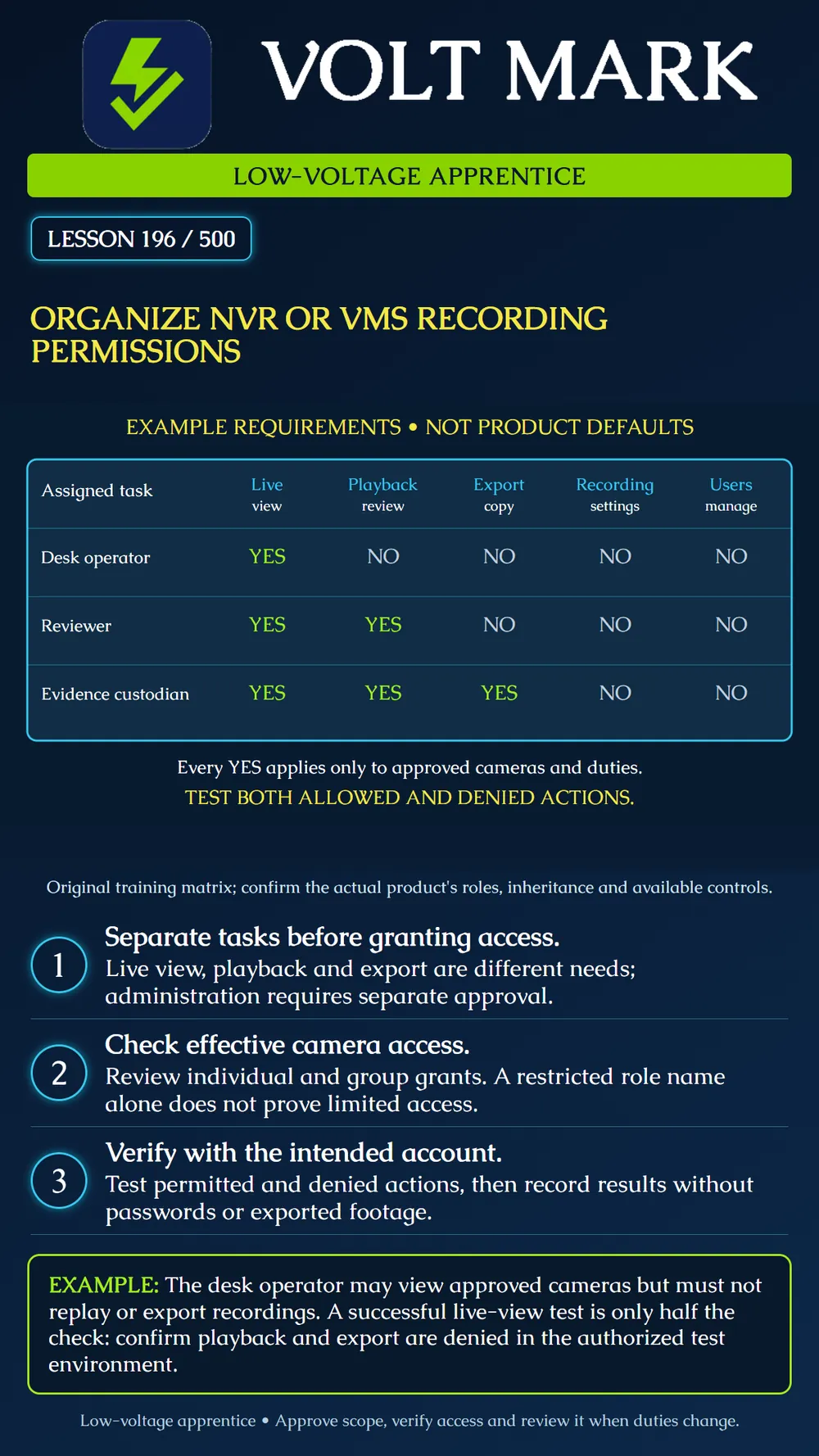
The matrix describes intended requirements, not manufacturer role defaults. Desk operator: live view YES; playback, export, recording settings and user management NO. Reviewer: live view and playback YES; export, recording settings and user management NO. Evidence custodian: live view, playback and export YES; recording settings and user management NO. Every YES is limited to the explicitly approved cameras and work purpose. The example contains no administrator row because administrative access must be evaluated separately; do not assume a broad administrator role can be constrained to the same three camera lists.
These are three fictional task assignments. A real platform may bundle permissions, require a different role structure or lack one of the desired restrictions. Record that gap and have the system owner approve a supported design. Do not silently grant administration just to make an export button appear.
The AXIS Camera Station Pro manual distinguishes export from incident-report permission. It describes Administrator, Operator and Viewer roles, and access inherited from individual and group assignments. Its example combines cameras granted individually with cameras granted through a group. Administrators of the server computer automatically receive application administrator privileges; the Administrators group's privileges cannot be removed there. These are product-specific behaviors, not universal NVR rules. Source: https://help.axis.com/en-us/axis-camera-station-pro Sections: User permissions; User permission for exporting. Accessed 2026-09-30.
For each fictional identity, write the task owner, business purpose, camera identifiers, permitted actions, denied actions, approving person, review date and nonsecret test reference. Include the product/version and relevant groups. A worksheet with only "viewer" is incomplete because role names do not fully describe effective access across products.
Separate human operator identities from device or recording-service identities. Document who owns each service identity and the approved process for changing it. Do not reuse an operator's password for a recording service or assume changing an operator's playback access changes the recorder's background recording process.
List additional capabilities separately where the platform provides them: audio listening or speaking, PTZ movement, manual recording, incident reports, deletion, retention changes and configuration changes. Permission to start a manual recording is not the same requirement as permission to change the recording schedule. Time-of-day access and camera-group scopes must be verified against actual supported features; do not invent an unavailable control.
Use a sanctioned test environment and harmless training recordings. Have the authorized administrator prepare the proposed accounts. Sign in as the intended nonadministrator test identity; testing from the administrator's existing session does not demonstrate that user's restrictions.
For the desk operator, confirm that the approved entrance camera can be viewed. Then check that an out-of-scope camera is unavailable, recorded playback is denied and exporting is denied. If a cached session or an old group membership changes the result, record the observed behavior and follow the documented refresh procedure before repeating the check. Do not bypass a denied action.
For the reviewer, confirm that the approved training recording can be played while export remains denied. For the evidence custodian, test an authorized export to an approved controlled destination using only training footage. Confirm that recording settings and user administration remain unavailable for all three example identities. A missing button alone is weaker evidence than a documented permission check and the approved test result for the relevant supported workflow.
If any forbidden action succeeds, mark the access test failed and refer the configuration to the authorized administrator. Do not call the role verified simply because the permitted action worked. Keep test records free of passwords, recovery codes and sensitive footage.
The exercise handover includes the approved requirements matrix, product-specific mapping, effective group membership, camera scope, expected and observed results, unresolved limitations and owner sign-off status. An exported copy is a separate controlled artifact; permission to export is not blanket permission to email or publish it. Review assignments when duties change and use the organization's approved revocation process when access is no longer needed.
Answer: No. Test each intended permission and restriction.
Answer: No. Check the product's effective inheritance and actual access.
Answer: No. It is a hypothetical requirements row.
Answer: No. Refer the unsupported or incorrect permission mapping for authorized correction.
Answer: Nonsecret identity/role references, approved scope and test evidence.
Free study material for low-voltage apprentices. This is a national foundation course: requirements differ by state and by local jurisdiction, and a practice that is common in one place is not a rule everywhere. Nothing here is a licence, a certification, or authority to work unsupervised, and completing it does not count as apprenticeship hours or continuing-education credit. Check the codes adopted where you are working, the licensing authority for that work, and your employer's safety programme. VoltMark is not affiliated with, endorsed by, or sponsored by NFPA, OSHA, NICET, BICSI, FOA, or any state or local licensing authority.

Electrician licensing exam prep: practice questions, timed exam simulations, and step-by-step help finding every answer in the NEC.