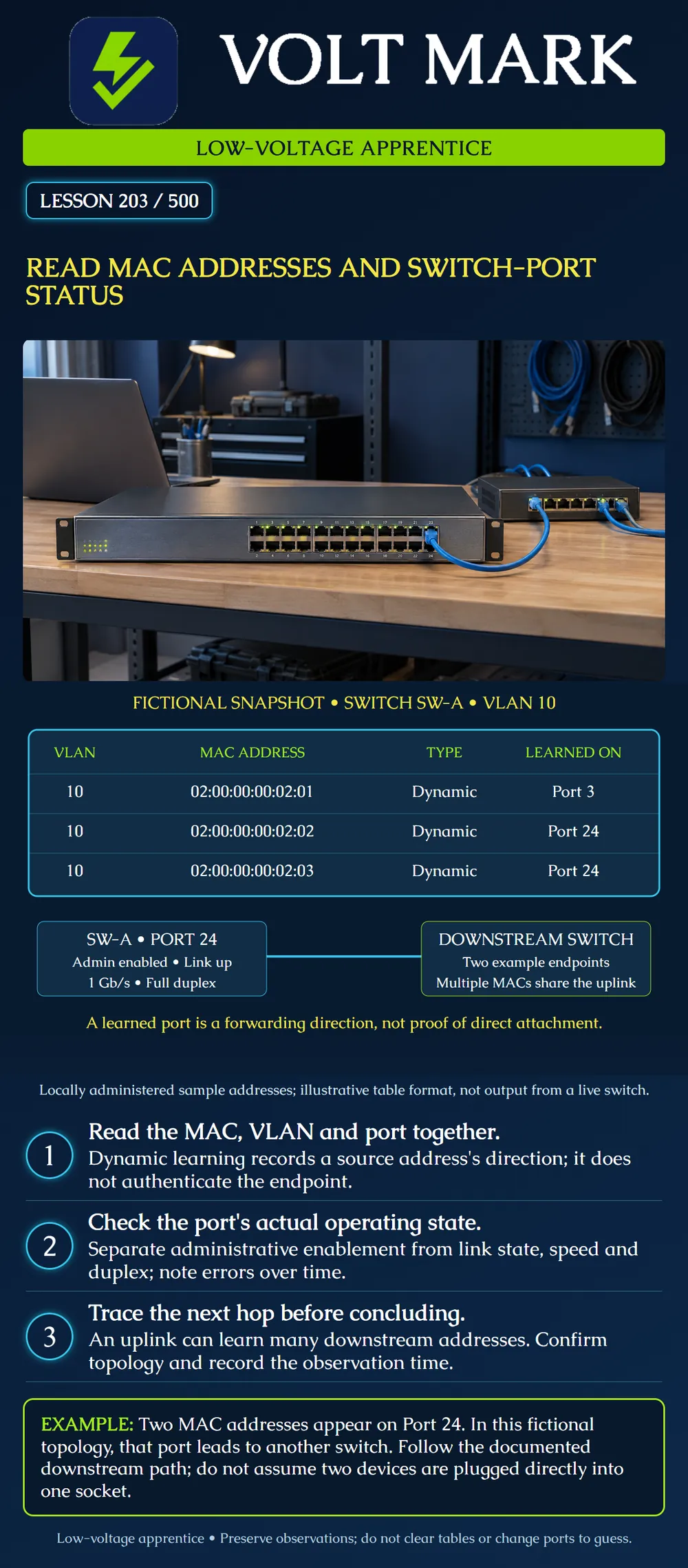
Read a MAC-address table with its VLAN and port context, then compare it with interface status and the documented physical path. Distinguish forwarding evidence from verified device identity.
A common Ethernet MAC address contains six octets, usually displayed as twelve hexadecimal digits. Each hexadecimal digit represents four bits; twelve times four equals48bits. The same example can appear as02:00:00:00:02:01,02-00-00-00-02-01 or0200.0000.0201. Normalize the separators when comparing records, without dropping leading zeros.
The example addresses beginning02 are locally administered individual/unicast addresses. They are fictional examples, not assigned identities for this site and not a vendor-identification prefix. The individual/group bit is clear and the universal/local bit is set in the first octet. Do not assign these addresses to real equipment.
Mistake: Labeling a camera directly attached to Port24 because its MAC is learned there. Correction: Check the documented uplink and follow the downstream switch mapping before recording the endpoint's physical port.
Mistake: Declaring a device disconnected because its dynamic MAC row disappeared. Correction: Check the VLAN, observation time and aging context, then correlate with interface and inventory evidence.
Mistake: Copying enabled into the link-up field of the worksheet. Correction: Record administrative state and observed operational state separately; an enabled interface may have no established link.
Cisco describes dynamic MAC learning from a received frame's source address, associated with the incoming port and VLAN. The table supports forwarding toward a known destination; dynamic entries can age out. The documentation also notes spoofing limitations, so learning an address is not authentication. Source: https://www.cisco.com/c/en/us/td/docs/switches/lan/c9000/lyr2-fwd/cdp-lldp-mac-udld/cdp-lldp-mac-udld-configuration-guide/c-configure-mac.html
IEEE's MAC-address tutorial identifies the individual/group and universal/local bits in the address representation. Source: https://standards.ieee.org/wp-content/uploads/import/documents/tutorials/macgrp.pdf
Cisco's interface troubleshooting guide distinguishes operational conditions and provides examples of interface status and error counters. Labels and supported commands depend on the actual platform. Source: https://www.cisco.com/c/en/us/support/docs/switches/catalyst-6500-series-switches/12027-53.html Sources accessed2026-09-30. The following table and cases are original exercises, not live equipment output.
A learned address does not certify the device's owner, physical label, software version, IP address or application health. Compare it with approved inventory, interface-specific device information and the traced cable path. Devices can have multiple interfaces and addresses; use the address for the interface actually being traced.
A manufacturer-looking prefix is not adequate identity proof, and a locally administered address should not be treated as a vendor assignment. A MAC address can be changed or impersonated. Keep MAC-table observation separate from any required authenticated device-identification process.
An absent dynamic row also does not automatically prove an endpoint is disconnected. The entry may have aged out, the selected VLAN or table filter may be wrong, or the expected source traffic may not have been observed. Record the table scope and time before deciding the next authorized check.
Administrative state: is the interface configured to be enabled? Operational state: is the relevant link currently established? Operating details: what speed, duplex and error behavior are reported?
The poster supplies an enabled Port24 with link up,1Gb/s and full duplex. This is a fictional status snapshot, not a throughput measurement. It does not guarantee one gigabit per second of usable application data or prove the downstream camera stream works.
A port can be administratively enabled yet have no link. A deliberately disabled port is a different condition from a cable fault. Product-specific states such as error-disabled require their documented interpretation; do not simply re-enable them without understanding the cause and obtaining change authorization.
Record the observation time, switch identity, port, VLAN, entry type and relevant age information if supplied. Do not assume a universal dynamic aging interval; consult the actual configuration and platform. A static entry is configured evidence, not proof that a source frame was recently seen.
For counters, distinguish a lifetime total from a change during a known interval. In an original arithmetic example, a relevant error counter rises from120 to127 in60seconds. That is seven additional counted events during the interval, assuming no reset or wrap. It does not by itself establish which cable or device caused them or supply a universal pass/fail threshold.
Do not clear the MAC table or counters just to simplify a screenshot. Preserve the baseline and use approved read-only observations where available. If a later diagnostic requires a disruptive action, follow the site's authorized process.
Start with the expected interface address from the approved device record. Find its MAC/VLAN/port association on the correct switch. Compare that port with the physical map. If it is an uplink, follow the documented next switch and repeat the authorized observation. Stop when the physical endpoint mapping is supported, or record the missing evidence instead of guessing.
If an address unexpectedly moves between ports, preserve the timestamps and topology evidence. A move can have several explanations, including a legitimate topology change. Do not label it a loop or unauthorized device solely from one unexplained row.
Switch identity and observation time: Table scope and VLAN: Full normalized MAC address: Dynamic/static/other entry type: Learned interface: Administrative and operational states: Speed/duplex and counter interval: Physical path or downstream device: Inventory match and remaining identity checks: Unresolved issue and responsible owner:
Texas journeyman, 15 questions, scored by topic against the 70% mark. No card, and no account needed to start.
Free study material for low-voltage apprentices. This is a national foundation course: requirements differ by state and by local jurisdiction, and a practice that is common in one place is not a rule everywhere. Nothing here is a licence, a certification, or authority to work unsupervised, and completing it does not count as apprenticeship hours or continuing-education credit. Check the codes adopted where you are working, the licensing authority for that work, and your employer's safety programme. VoltMark is not affiliated with, endorsed by, or sponsored by NFPA, OSHA, NICET, BICSI, FOA, or any state or local licensing authority.

Electrician licensing exam prep: practice questions, timed exam simulations, and step-by-step help finding every answer in the NEC.