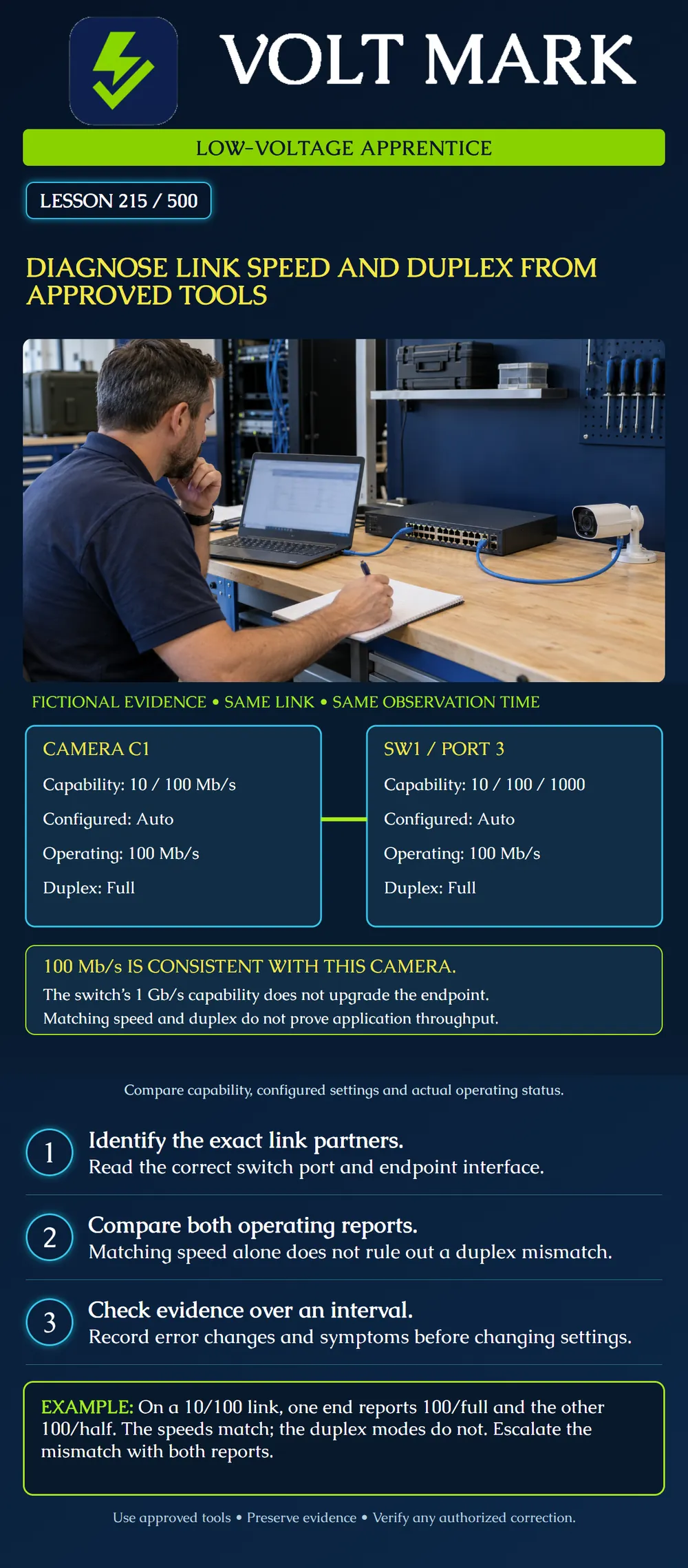
Compare the capabilities, configured settings and operating results at both ends of an Ethernet link. Explain the evidence before proposing a setting change.
Capability asks what the interface can support. Configuration asks what it is told to use or negotiate. Operating status asks what it is using now. A gigabit-capable switch port can operate at 100 Mb/s when connected to a 10/100 endpoint. That is not automatically a defect.
Full duplex permits simultaneous sending and receiving on the link. Half duplex uses shared transmission access. A 10/100 connection with one end at full duplex and the other at half duplex can remain physically connected yet perform poorly. Read both ends rather than trusting a link light.
Autonegotiation exchanges supported abilities. For ordinary compatible 10/100 Ethernet equipment, matching automatic configuration is generally appropriate; use the actual equipment requirements. Do not transfer a legacy 10/100 forcing procedure to every copper, fiber or multigigabit interface.
Camera C1 has a documented 10/100 Mb/s interface. Its configuration is Auto and its operating report is 100 Mb/s, full duplex. SW1 port 3 supports 10/100/1000 Mb/s. Its configuration is Auto and its operating report is also 100 Mb/s, full duplex.
These fictional simultaneous reports agree. The camera's supported interface limits this link to 100 Mb/s in the example. The switch's higher capability does not upgrade the camera interface.
This conclusion is narrow: the reported speed and duplex are consistent. It does not certify the cable, prove error-free operation or establish a promised video throughput. IP reachability, available path capacity and application behavior still need their own evidence.
Use the approved switch management interface, documented read-only status command or authorized endpoint diagnostic view. Identify the equipment, interface, time and connection being examined. A technician's laptop link-speed display describes its own adapter connection, not necessarily the camera's connection.
If a managed switch lies between two endpoints, there are separate links to inspect. A laptop-to-switch gigabit result cannot establish the far camera-to-switch rate. A media converter or other intermediate device also changes which link a report describes.
Where the endpoint does not expose an operating duplex report, mark that evidence unavailable. Do not silently fill in full duplex from an Auto setting. Obtain an approved diagnostic source or administrator assistance.
For a separate legacy 10/100 link, suppose the camera is configured for 100/full and reports 100/full. The switch is configured for Auto but reports 100/half. Both are physically up.
The two reports establish a duplex mismatch in the supplied scenario. Matching numerical speeds do not resolve it. A common explanation is one-sided forced configuration, but document the actual settings and model requirements before selecting a correction. Do not blindly force every switch port to full duplex.
The administrator should choose compatible settings for both ends within an approved change window. After the change, verify both operating reports and the original application symptom. If only one report is available, do not claim the two ends have been verified.
Interface error counters are evidence to correlate, not automatic root-cause labels. CRC/FCS errors can have several causes. Late collisions on a legacy half-duplex link can suggest a duplex problem, but can also have other explanations. Do not label every receive error a damaged patch cord.
Record a baseline and a later reading without clearing historical evidence. Note traffic conditions and whether the interface or device restarted. Counter wrap or reset invalidates a simple subtraction across that boundary.
Original exercise: a receive-error counter is 120 at 10:00 and 135 at 10:05, with no reset or wrap. The increase is 15 errors in five minutes. This shows errors accumulated during that interval; it does not identify the cause or an error percentage. The total number of relevant frames is not supplied, so do not invent a percentage.
The poster's 100 Mb/s is a link operating rate. Protocol overhead, shared upstream resources, traffic patterns, device processing and application settings affect useful throughput. A displayed 100 Mb/s does not mean a camera sends 100 Mb/s, and a slow file transfer does not by itself prove a duplex mismatch.
Avoid confusing bits and bytes. Mb/s means megabits per second. MB/s means megabytes per second. A numerical comparison must use matching units and a clearly defined measurement. Do not run disruptive traffic generators on an operational camera or access-control network under this lesson.
Record: Asset/interface; physical neighbor; supported modes; configured speed/duplex; operating speed/duplex; link transitions; relevant counter baseline; later counter value; elapsed time; symptom; evidence source; authorized next action.
For the poster case, record a consistent 100/full result at both ends. For the mismatch case, record 100/full versus 100/half and escalate. For an unknown endpoint report, record unknown rather than pass.
After an authorized correction, preserve before-and-after evidence. Verify the application over the owner's required test interval. A new link indication alone does not close an intermittent performance problem.
Use two fictional reports for one legacy 10/100 link: endpoint configured 100/full and operating 100/full; switch configured Auto and operating 100/half. A receive-error count rises from 80 to 92 in four minutes, with no reset or wrap. Write the established mismatch, counter change, two conclusions not established and the next authorized action.
Answer: The reports disagree on duplex, although speeds match. Twelve additional receive errors occurred. No frame total is supplied, so no error percentage can be calculated; the observations do not prove cable damage. Refer the two-end settings to the administrator for a model-appropriate correction, then repeat both operating checks and the original application test. This is a paper diagnosis, not permission to force a port.
Mistake: Using the laptop's gigabit reading as the camera's operating link rate. Correction: Identify the camera-facing interface and its peer; the laptop reports a different connection.
Mistake: Forcing only the switch to full duplex after noticing poor legacy 10/100 performance. Correction: Compare both configured and operating reports and have the administrator select compatible settings at both ends.
Mistake: Reporting a 100 Mb/s link as 100 MB/s of usable video capacity. Correction: Keep bits and bytes distinct and record application throughput separately from the link's operating rate.
Cisco, Configure and Verify Ethernet 10/100/1000Mb Half/Full Duplex Auto-Negotiation: https://www.cisco.com/c/en/us/support/docs/lan-switching/ethernet/10561-3.html Used for capability/configuration/operational distinctions and legacy duplex-mismatch behavior. Historical platform defaults and fiber/gigabit statements are not treated as universal instructions.
Cisco, Troubleshoot Switch Port and Interface Problems: https://www.cisco.com/c/en/us/support/docs/switches/catalyst-6500-series-switches/12027-53.html Used for counter interpretation and checking both sides of the connection. No configuration or counter-clearing command is prescribed.
Texas journeyman, 15 questions, scored by topic against the 70% mark. No card, and no account needed to start.
Free study material for low-voltage apprentices. This is a national foundation course: requirements differ by state and by local jurisdiction, and a practice that is common in one place is not a rule everywhere. Nothing here is a licence, a certification, or authority to work unsupervised, and completing it does not count as apprenticeship hours or continuing-education credit. Check the codes adopted where you are working, the licensing authority for that work, and your employer's safety programme. VoltMark is not affiliated with, endorsed by, or sponsored by NFPA, OSHA, NICET, BICSI, FOA, or any state or local licensing authority.

Electrician licensing exam prep: practice questions, timed exam simulations, and step-by-step help finding every answer in the NEC.