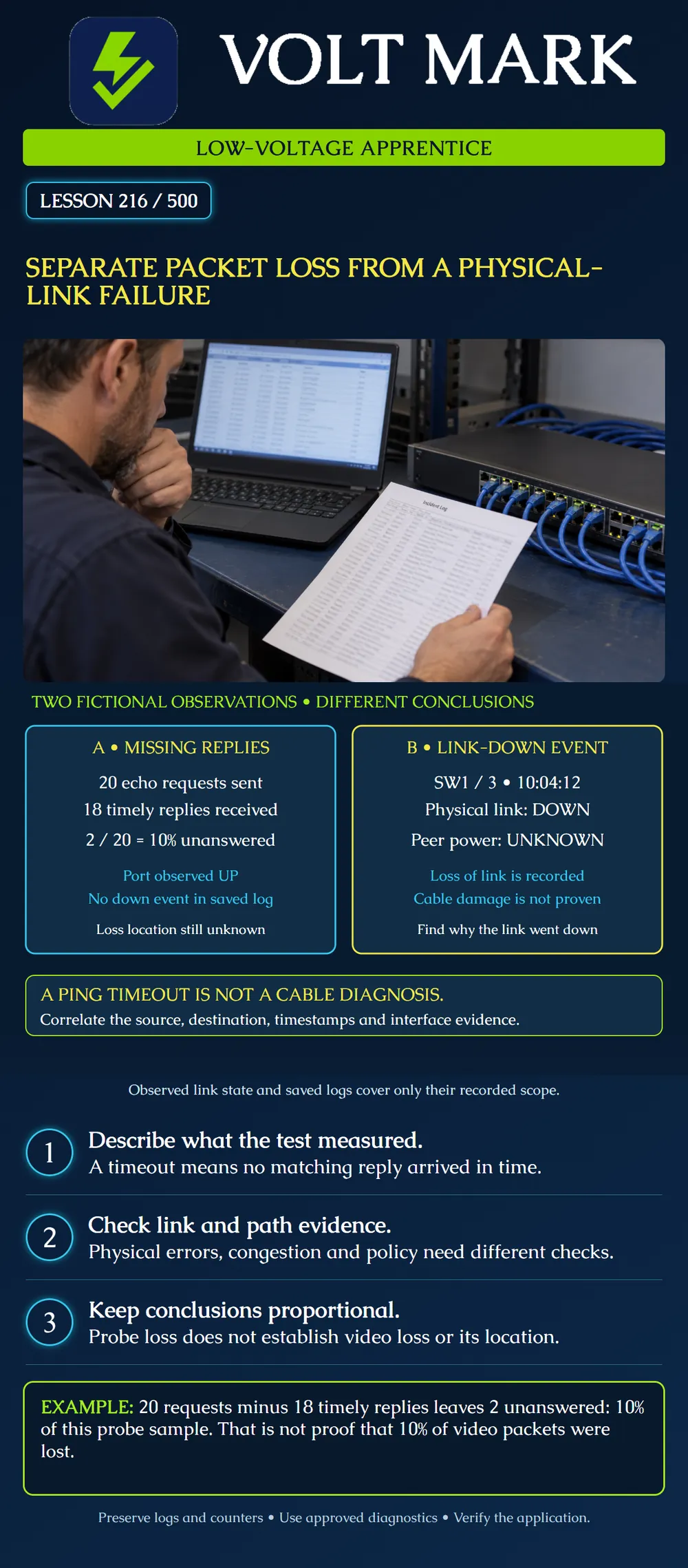
Distinguish missing ICMP echo replies from evidence that a particular Ethernet link went down. Calculate a probe-result percentage without misrepresenting it as application packet loss.
Ping sends ICMP echo requests and reports matching replies and their round-trip times. A timeout means a matching reply did not arrive within the selected waiting interval. The request might not reach the target, the target might not answer, or the reply might fail to return in time. One result does not identify the failing direction or component.
Record the source, destination, IP version, sample size, packet size, timeout and observation interval. A test from a technician laptop may follow a different path from a recorder. A name may resolve to an unexpected address; confirm the actual target before interpreting the result.
A fictional approved test sends 20 requests from a service laptop to camera C1. It receives 18 matching replies within the chosen timeout. The remaining two requests have no timely matching reply.
20 - 18 = 2 unanswered requests. 2 / 20 x 100 = 10 percent unanswered in this probe sample.
The camera-facing switch port is observed up. The saved log for the reviewed interval contains no link-down event. These observations do not establish a failed cable. They also do not prove that the link stayed continuously healthy: a snapshot and a retained log have limits of timing, coverage and retention.
The 10 percent result describes this test. It does not measure the fraction of camera video packets lost, locate the loss, or predict the next hour. ICMP can be filtered, rate-limited or handled differently from application traffic. These are possibilities to investigate, not an excuse to declare every timeout harmless.
A separate fictional switch event records SW1 port 3 physical link down at 10:04:12. Peer power status is unknown.
This supports a narrower conclusion: that interface reported loss of physical link at the recorded time. A disconnected cable, peer power loss, port fault or other cause still needs investigation. Do not rewrite the evidence as cable damage proven. Compare the platform's physical-link indication with administrative state and any protective shutdown events.
If the camera lost PoE at the same time, record the relevant power event separately. It may help explain the link interruption, but correlation alone is not a complete diagnosis. Check that device clocks and time zones are sufficiently aligned to compare the records.
A physical-link failure can interrupt packets on a path using that link. Packet loss can also occur while Ethernet link remains up. Congested egress queues can discard traffic; physical corruption can affect frames without taking down the link; policy and forwarding conditions can prevent selected traffic. A redundant network may reroute around a failed link, so one link-down event does not prove every application became unreachable.
The right next action depends on the evidence. Review interface errors and discards, the intended traffic path, link transitions and application records with the network administrator. Do not replace a cable solely because ping shows a timeout, and do not dismiss an intermittent physical problem solely because the link is up now.
An interface's output-discard counter reads 40 at 11:00 and 55 at 11:05, with no reset or wrap. The increase is 15 during five minutes.
This shows that the device counted 15 additional output discards under that counter's definition. It does not prove the discarded packets belonged to C1 or explain why they were discarded. Correlate queue, traffic and device evidence. Do not add this count to the two missing ping replies: they are different observations and might overlap or concern unrelated traffic.
Read the vendor's counter definitions. Record the baseline before clearing anything; avoid clearing counters unless the administrator's procedure requires it and the original evidence has been preserved.
Use these fields: Incident time and time zone; source and destination; affected application; physical link identity; administrative state; observed operational state; relevant link events; probe settings and result; counter interval and changes; application evidence; uncertainty; next authorized check.
For Case A, write: two of twenty echo exchanges lacked timely replies; camera port observed up; no down event found in the supplied log interval; loss location undetermined. For Case B, write: physical link-down event recorded on SW1/3 at10:04:12; peer power unknown; cause undetermined.
Those statements preserve what is known without pretending to have found a root cause.
For video, review the relevant live stream and recorded playback using approved tools. A recorder may reconnect while a recording gap remains. For access control, verify the required system functions under the approved procedure; network reachability alone is not a door-function acceptance test.
Do not generate flood traffic, disable filtering or interrupt critical equipment to obtain a simpler result. Use a bounded approved test and record its scope. If the issue only occurs at certain times or loads, capture evidence from that condition rather than claiming a quiet-period pass resolves it.
Mistake: Entering 10 percent video packet loss from two unanswered requests out of twenty pings. Correction: Label the calculation as unanswered echo exchanges in this probe sample; obtain separate application evidence.
Mistake: Adding fifteen output discards to the two missing echo replies as seventeen lost camera packets. Correction: Keep the counter delta and probe sample separate because traffic identity and overlap are unknown.
Mistake: Naming cable damage as the cause of a recorded link-down event. Correction: Record the affected interface and time, then compare peer power, administrative/protection events and physical evidence before concluding a cause.
Microsoft Learn, ping: https://learn.microsoft.com/en-us/windows-server/administration/windows-commands/ping Basis for echo-request/reply behavior, timeout and test parameters.
Cisco, Troubleshooting Network Latency and Packet Drops on Catalyst9000 Switches: https://www.cisco.com/c/en/us/support/docs/switches/catalyst-9300-series-switches/225617-troubleshooting-network-latency-and.html Basis for separating physical issues, output drops and other network conditions; no platform-specific corrective command is copied.
Cisco, Troubleshoot Switch Port and Interface Problems: https://www.cisco.com/c/en/us/support/docs/switches/catalyst-6500-series-switches/12027-53.html Basis for interpreting interface status and reviewing the path. This is a product-specific reference, not universal status wording.
Texas journeyman, 15 questions, scored by topic against the 70% mark. No card, and no account needed to start.
Free study material for low-voltage apprentices. This is a national foundation course: requirements differ by state and by local jurisdiction, and a practice that is common in one place is not a rule everywhere. Nothing here is a licence, a certification, or authority to work unsupervised, and completing it does not count as apprenticeship hours or continuing-education credit. Check the codes adopted where you are working, the licensing authority for that work, and your employer's safety programme. VoltMark is not affiliated with, endorsed by, or sponsored by NFPA, OSHA, NICET, BICSI, FOA, or any state or local licensing authority.

Electrician licensing exam prep: practice questions, timed exam simulations, and step-by-step help finding every answer in the NEC.