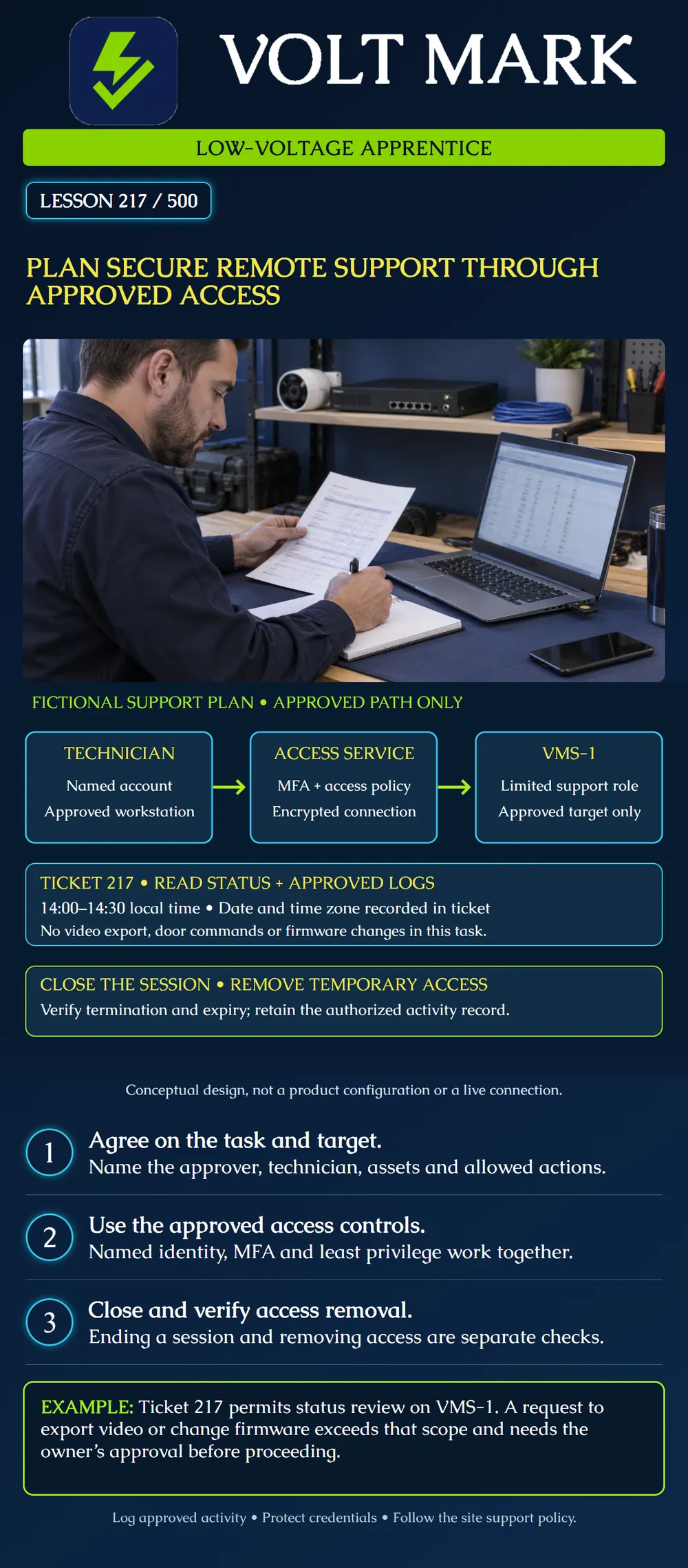
Prepare a remote-support plan that identifies who may connect, how they connect, what they may do and how access ends. This lesson does not create accounts or authorize a live connection.
Remote-support software creates an access path that must be managed. Use the organization's approved service, named identity, multifactor authentication and permissions limited to the assigned work. Prefer phishing-resistant MFA where supported by the approved design. Collect and protect relevant access records.
A secure remote-access product does not automatically authorize all devices or actions behind it. Encryption protects a connection; permissions determine what the authenticated person may do. A VPN or broker connection still needs target restrictions and application-level permissions.
Axis's VMS hardening guidance recommends individual identities and limited privileges, controlled temporary access and logging. It advises against direct Internet exposure of camera ports. The poster is a vendor-neutral planning example, not a promise that every access service implements these controls automatically.
Ticket 217 concerns intermittent status reporting from VMS-1. The fictional owner authorizes technician Morgan to review status and specifically approved diagnostic logs from an approved managed workstation.
The proposed window is14:00 to14:30 local time. The real ticket must record the date and named time zone, or an unambiguous UTC timestamp. Local time alone is not enough for a nationwide support team.
The allowed target is VMS-1. The task does not include video export, live door commands, recording deletion, firmware changes or access to unrelated systems. The restricted scope is a fictional task requirement, not a universal prohibition on those operations in other approved work.
The owner and network administrator select the remote-access method. The diagram shows technician, access service and target as three logical stages. They need not be three separate physical appliances. No direct public camera-management connection is part of this design.
Confirm the technician's identity and request using the organization's known support channel. Do not install software or share access because an unsolicited caller claims to be support. Link the invitation and account to the approved ticket and responsible owner.
Record the approved client/service, target, required permission set, start and end time, supervising contact and recovery method. Confirm the workstation meets the organization's requirements. Use the approved credential-delivery process; do not place passwords or recovery codes into the ticket, lesson worksheet or ordinary screenshots.
The administrator should verify that the planned role can perform the allowed task and lacks unrelated privileges. Do not assume a read-only label on a remote tool limits the VMS account reached through it. Effective permissions may depend on several layers and inherited groups.
Confirm the correct site and target before reviewing information. Keep activity within the approved scope. If the technician needs an additional action, describe the action and operational effect to the owner, then obtain the required approval before doing it.
For Ticket217, a request to retrieve video evidence is a scope change. A request to update firmware is another scope change and may need a separate maintenance plan. Logging into VMS-1 does not approve either operation.
If unexpected permissions or an unrelated system become visible, stop that activity and report the discrepancy. Do not test broader access just because a route or button is available. Preserve only the diagnostic information authorized for the task.
Logging should establish who connected, to what target and when, with relevant actions and outcome. Session recording, where used, must follow the site's privacy and data-handling requirements. Logs and recordings can contain sensitive information; store and retain them according to the owner's policy.
Document the result and any unresolved issue. End the remote session and have the responsible administrator verify that the temporary grant, invitation or account has expired or been removed as designed. Confirm any active session is terminated; expiry of a login invitation does not universally terminate a session already running.
Closing a laptop lid or a client window is not sufficient evidence that future access is removed. Conversely, removing an account without checking outstanding sessions can leave uncertainty. Use the actual service's documented controls and record the outcome.
If continued access is necessary, obtain an approved extension with a new endpoint to the window. Do not silently leave an unattended support agent enabled after a one-time task. Permanent support arrangements require their own owner-approved policy.
Case A: The named account has MFA, but its VMS role is administrator even though only status review is required. The plan is incomplete. Have the administrator correct or explicitly justify the needed effective privileges.
Case B: The approved remote service is unavailable. A helper proposes direct camera port forwarding as a shortcut. Do not improvise that exposure; use the approved escalation and alternative-access process.
Case C: The temporary invitation expires at14:30, but the session remains active. Closing the task requires checking and terminating that session under the approved procedure.
Case D: The technician wants to send logs through a personal file-sharing account. Confirm the approved transfer destination and data scope instead. Diagnostic usefulness does not authorize a new recipient.
Record these fields: Ticket; owner/approver; named technician; approved workstation/service; target assets; allowed actions; denied or excluded scope; MFA method; effective permission review; time window and time zone; on-site contact; activity record location; closeout and removal verification.
Do not put secrets in the worksheet. Use a secure record reference when needed. For an actual access-control or life-safety maintenance task, include the system-specific operational and authorization procedure; this generic remote-access lesson does not replace it.
Review this fictional draft for Ticket217: Morgan uses the approved workstation and remote service with MFA, but the VMS account has administrator privileges; the invitation expires at 14:30; the closeout field says close laptop. Write three corrections to the plan and a completion record. Do not create an account or initiate a session.
Answer: Have the administrator restrict or explicitly justify effective VMS rights for the approved status/log task; enter an unambiguous date and time zone for the window; require documented session termination and temporary-grant removal or expiry. The completion record identifies the ticket, technician, target, permitted work performed, outcome and access-closeout evidence. An invitation's expiry alone does not establish that a running session ended.
Mistake: Accepting an administrator VMS account because the remote login uses MFA. Correction: Match effective target permissions to Ticket217's status/log-review scope; authentication does not justify extra privileges.
Mistake: Closing the client window and marking temporary access removed. Correction: Verify both active-session termination and removal or expiry of the temporary grant using the approved service controls.
Mistake: Sending diagnostic logs to a personal sharing account to speed up support. Correction: Confirm the ticket's authorized data scope and approved destination; usefulness does not authorize a new recipient.
CISA and partner agencies, Guide to Securing Remote Access Software: https://www.cisa.gov/sites/default/files/2023-06/guide_to_securing_remote_access_software.pdf Reference for MFA and reduced-privilege remote tools; use the organization-approved access design.
CISA, Enhanced Visibility and Hardening Guidance for Communications Infrastructure: https://www.cisa.gov/resources-tools/resources/enhanced-visibility-and-hardening-guidance-communications-infrastructure Reference for protected logs, least privilege and phishing-resistant MFA; these principles do not authorize a particular remote session.
Axis, AXIS Camera Station Pro System Hardening Guide: https://help.axis.com/en-us/axis-camera-station-pro-system-hardening-guide Account and remote-access sections address individual/temporary accounts, limited rights, controlled remote access and camera exposure; this is not a universal product setup procedure.
Texas journeyman, 15 questions, scored by topic against the 70% mark. No card, and no account needed to start.
Free study material for low-voltage apprentices. This is a national foundation course: requirements differ by state and by local jurisdiction, and a practice that is common in one place is not a rule everywhere. Nothing here is a licence, a certification, or authority to work unsupervised, and completing it does not count as apprenticeship hours or continuing-education credit. Check the codes adopted where you are working, the licensing authority for that work, and your employer's safety programme. VoltMark is not affiliated with, endorsed by, or sponsored by NFPA, OSHA, NICET, BICSI, FOA, or any state or local licensing authority.

Electrician licensing exam prep: practice questions, timed exam simulations, and step-by-step help finding every answer in the NEC.