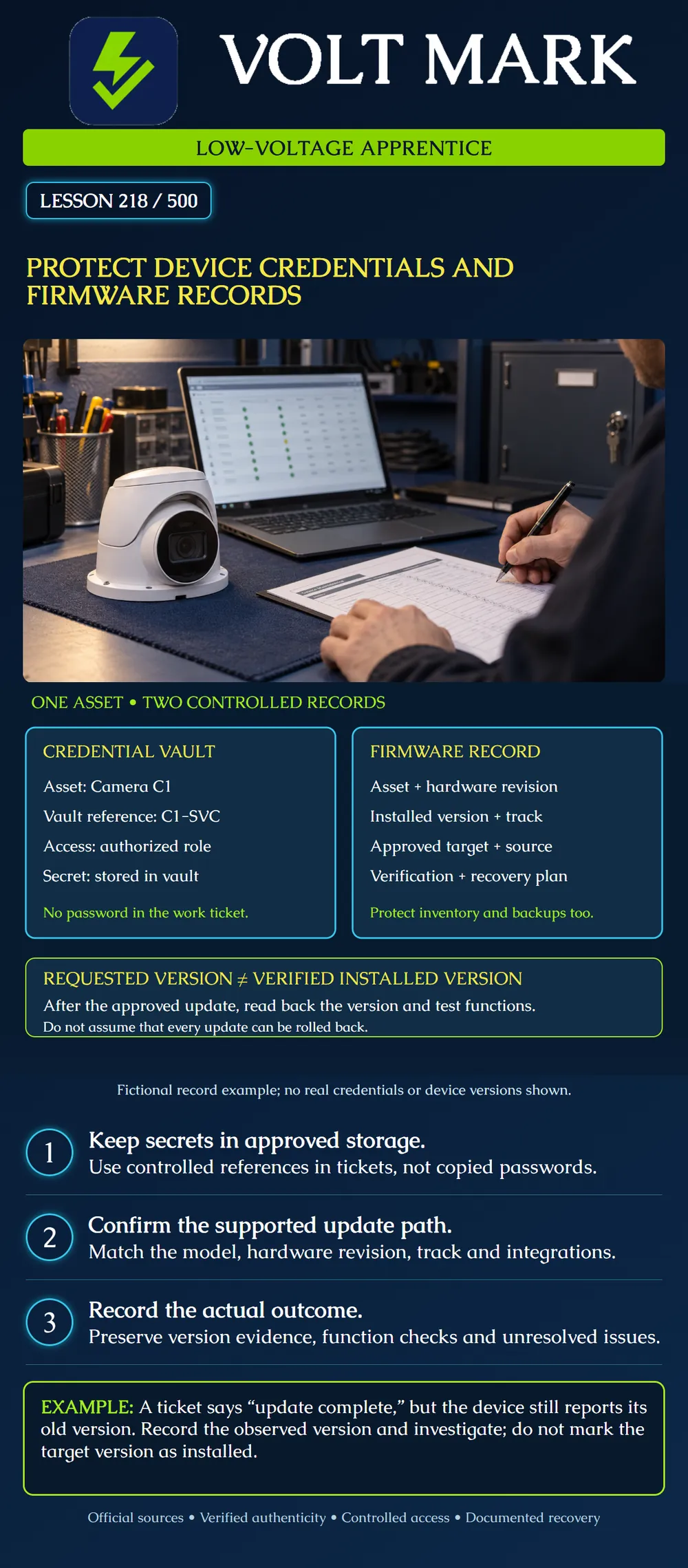
Keep device secrets in approved protected storage and maintain an accurate firmware history without exposing credentials or confusing an intended update with a verified result.
The poster shows camera C1 linked to two controlled records. The credential vault contains the secret and authorized access controls. The work ticket uses a reference such as C1-SVC rather than copying the password. The firmware record contains the actual model, hardware revision, installed version, selected support track and approved change history.
Neither record should be public. An inventory without passwords can still reveal sensitive device locations and software versions. A configuration backup may contain credentials, certificates, private keys or other sensitive settings, depending on the product. Protect the backup and its access separately from an ordinary job note.
Axis recommends unique device passwords and dedicated accounts appropriate to their purpose. Its signed operating-system update mechanism checks cryptographic integrity, where supported. Device-specific upgrade paths and software tracks must be respected. Release notes identify cases where downgrades are restricted for security reasons.
These are useful principles for the apprentice's recordkeeping. Actual account features, signature verification and recovery capabilities differ across manufacturers and models. Follow the documentation for the device in hand rather than assuming every low-voltage controller behaves like an Axis camera.
A fictional technician is given a ticket for C1. The ticket names the asset, location, owner and service-account vault reference. No actual password appears in the ticket.
The firmware change record includes: Current observed version: training version A. Approved target: training version B. Hardware revision: recorded from the actual device inventory. Source: the manufacturer's official download location for that model. Update-path review: required intermediate steps documented. Recovery: supported procedure and responsible person identified. Change status: planned.
A and B are placeholders, not real software releases or upgrade advice. A real record must contain exact version/build strings and the applicable track. Do not replace a version with a vague label such as latest.
Use the organization's approved vault or device-management system, with access assigned to the responsible roles. Human support access should be attributable to the individual where the system supports it. Service accounts need an owner, a documented purpose and only the privileges their integration requires.
Do not paste passwords, API tokens, recovery codes or private keys into tickets, chat messages, photographs of labels or training documents. When sharing diagnostic output, review what it contains and use the approved destination. A screenshot with a password field masked does not prove every other field is safe to distribute.
If a credential is exposed or access is no longer authorized, follow the site's response and replacement procedure. Coordinate dependent services so an authorized credential change does not silently break recording, monitoring or control. Record the change event and relevant vault reference, not the replacement secret. This lesson does not prescribe an arbitrary periodic password-change interval.
Obtain the package through the manufacturer's official channel or an owner-approved repository with traceable provenance. Check the correct model and hardware revision, release notes, prerequisites, integration compatibility and support status. Do not select a file merely because its name resembles the device name.
Use the manufacturer's supported signature or integrity-verification process. A checksum copied from the same untrusted download is not independent evidence of authenticity. A valid signed package can still be wrong for the intended model, unsupported upgrade path or integration; authenticity and suitability are separate checks.
Protect the required backup and verify what it contains and how it can be restored. Confirm the expected service interruption, power requirements and recovery access before the approved maintenance window. A backup file's existence is not proof that an arbitrary downgrade or restore is supported.
After an authorized update attempt, the ticket's operator note says complete. A later device readback still shows training version A.
The defensible record is: target B requested; observed version A at the recorded time; outcome unresolved. Do not enter B into the installed-version field solely because the upload finished or a progress bar reached its end. Confirm the correct device and review the documented update result.
In a second case, the readback shows B but the recorder integration fails its required function check. Record B as installed with the integration issue unresolved. Installed-version verification and system acceptance are different results.
The approved recovery plan might use a supported rollback, restore, replacement device or manufacturer assistance. Do not promise that reinstalling the old file will always work. Security restrictions, hardware requirements, configuration changes and supported paths can prevent a downgrade.
If the chosen target is incompatible, use the owner-approved recovery process and retain evidence. Do not disable authenticity checks or improvise a firmware file to make the update tool accept it. Track unresolved risks and follow the responsible administrator's maintenance policy.
Keep these fields: Asset ID; model; hardware revision; serial/reference as permitted; owner; observed installed version/build; support track; observation date/time; target version; official package reference; authenticity-check result; compatibility review; backup reference; maintenance approval; actual post-update version; function results; recovery status; technician; closeout decision.
Use controlled references for sensitive records. Do not place secrets into the inventory merely because access is restricted. Preserve the history so another technician can distinguish what was planned, attempted, installed and accepted.
A supplied fictional C1 record says target B, upload complete and post-update readback A. First confirm that the readback belongs to C1's intended interface and observation time. The installed-version field remains observed A; the target field remains B; the attempt is recorded as unresolved, with the update result referred to the responsible maintainer. A completed transfer is not evidence of installed B.
Now suppose an authorized follow-up shows B installed but the required recorder connection fails. Record observed B and the failed integration check separately. Keep overall acceptance unresolved and use the pre-approved supported recovery process. In both rows, reference the protected backup and credential record without inserting their secrets. A and B remain exercise placeholders, not recommended releases.
Mistake: Entering target B as installed when only the upload progress bar completed. Correction: Read back the version on the identified device and retain A as the observed version if that is what it reports.
Mistake: Accepting any correctly signed package for C1. Correction: Check the exact model, hardware revision, supported path and integration suitability in addition to authenticity.
Mistake: Promising rollback because an old package and configuration backup exist. Correction: Confirm the manufacturer's supported recovery path and restrictions before the window; preserve protected backup references without claiming downgrade is always possible.
Axis, AXIS OS Hardening Guide: https://help.axis.com/en-US/axis-os-hardening-guide Read for unique credentials, dedicated accounts and signed OS verification. Product-specific defaults are not universalized.
Axis, AXIS OS Lifecycle Guide: https://help.axis.com/en-us/axis-os Read for supported tracks and device-specific upgrade paths. The lesson deliberately avoids prescribing a current release number for all equipment.
Axis, AXIS OS Release Notes: https://help.axis.com/en-us/axis-os-release-notes Read the downgrade-restriction section; recovery depends on the specific product and version.
Texas journeyman, 15 questions, scored by topic against the 70% mark. No card, and no account needed to start.
Free study material for low-voltage apprentices. This is a national foundation course: requirements differ by state and by local jurisdiction, and a practice that is common in one place is not a rule everywhere. Nothing here is a licence, a certification, or authority to work unsupervised, and completing it does not count as apprenticeship hours or continuing-education credit. Check the codes adopted where you are working, the licensing authority for that work, and your employer's safety programme. VoltMark is not affiliated with, endorsed by, or sponsored by NFPA, OSHA, NICET, BICSI, FOA, or any state or local licensing authority.

Electrician licensing exam prep: practice questions, timed exam simulations, and step-by-step help finding every answer in the NEC.