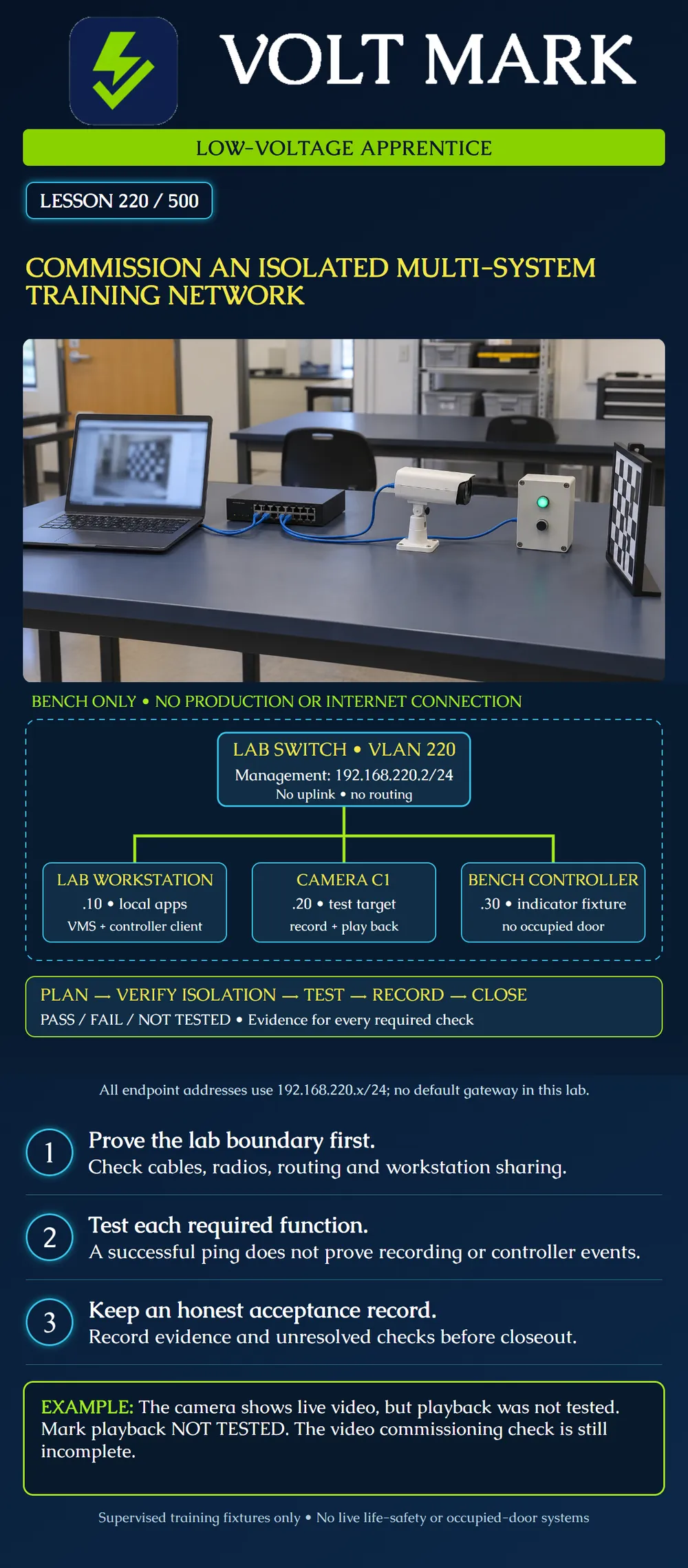
Combine the preceding network lessons in a supervised bench exercise. Verify the boundary, address plan, power assumptions and required application functions, then produce an honest acceptance record.
This is an original conceptual course lab, not evidence that a physical network was commissioned. The instructor selects compatible equipment and approved procedures. Use a camera aimed at a non-sensitive test target and a purpose-built controller training fixture with an indicator. Do not connect an occupied door, fire-alarm system, emergency communication system or production building control.
The lab is physically separate from production and Internet networks. VLAN220 is an organizational label inside this bench; the VLAN number alone does not establish isolation.
The lab contains one managed PoE switch, one workstation, one camera and one bench controller. All illustrated ports are access ports in VLAN220. No inter-VLAN routing or uplink is included.
Supplied static plan: Switch management:192.168.220.2/24. Workstation:192.168.220.10/24. Camera C1:192.168.220.20/24. Bench controller:192.168.220.30/24. Mask:255.255.255.0. Default gateway:none for this local-only exercise.
Each address is distinct and belongs to192.168.220.0/24. The network address is.0 and the broadcast address is.255; neither is assigned to a host. The instructor checks that the chosen switch supports this management arrangement and that every fixture can use the supplied static plan.
The workstation runs compatible local VMS and controller-client applications prepared before the isolated exercise. Any required license, installer, DNS or time dependency must be satisfied locally or handled during approved preparation. An unavailable cloud-dependent feature is not permission to attach an Internet uplink during the lab.
Trace every cable. Confirm no switch uplink, cellular modem, wireless bridge or other connection leads outside the bench. On the lab workstation, review Wi-Fi, other adapters, Internet sharing, routing, VPNs and virtual-network attachments with the instructor. Remove or disable unintended outside paths under the approved lab procedure.
A missing default gateway does not prove isolation; an extra interface or bridge can defeat the intended boundary. Nor does an unanswered ping to an external address prove there is no route. Use configuration and physical evidence. Do not probe an unrelated production network to test the boundary.
If virtual machines are used instead of some fixtures, document their actual virtual-switch attachments. Microsoft's private Hyper-V switch connects VMs on that host without a host-network connection through that switch; internal and external switches have different reach. Additional adapters or routing can change the overall exposure. A virtual-switch name containing lab is not sufficient evidence. The physical poster does not require Hyper-V.
Assume the instructor supplies a60W usable PoE budget, compatible ports, a15.4W PSE allocation for C1 and a30W PSE allocation for the bench controller. These are fictional planning allocations, not device specifications.
15.4W +30W =45.4W allocated. 60W -45.4W =14.6W unallocated. With a supplied10W lab reserve,4.6W remains above reserve.
Confirm each actual fixture's powering method, per-port capacity and required operating conditions. The workstation has its own approved supply and is excluded from this PoE sum. Use enclosed manufacturer-approved equipment; the exercise involves no exposed mains wiring.
Record each link's operational state and supported speed/duplex. Verify endpoint identity, address and effective VLAN membership. Distinguish correct configuration from observed application performance.
For every row, record expected result, actual result, evidence reference, time, tester and PASS/FAIL/NOT TESTED.
A manufacturer verification tool can add evidence for the supported product and test scope. It does not certify every controller, isolation boundary or functional requirement in this multi-system lab.
A trainee obtains successful ping replies from C1 and sees live video. No recorded playback is attempted. The correct result is live-view evidence obtained; playback NOT TESTED; video commissioning incomplete.
In another run, the bench controller connects but its expected event is absent. Record FAIL for that functional check with the observed condition. Do not rename the requirement to connectivity only so the row passes.
A final example has all local functions working but an unintended Wi-Fi connection remains enabled on the workstation. Resolve the boundary discrepancy before accepting the isolated lab. Application success does not override the isolation requirement.
If the instructor introduces a fault, keep it within this bench and record the approved change. Make one understood correction, then repeat the affected checks. Preserve earlier evidence and distinguish the corrected result from the initial failure.
Save the topology, port schedule, address plan, power calculation and test matrix. Record unresolved items. Terminate temporary sessions, remove temporary grants as planned and leave the equipment in the instructor-approved state. Do not reconnect the bench to production as a convenient closeout step.
1.No. 2.No. 3.45.4W. 4.NOT TESTED, with acceptance incomplete. 5.Not under this bench-only exercise. 6.No; inspect all adapters and routing.
Consider a fictional bench result package using the supplied plan. The instructor's records confirm the boundary and saved addresses. The supplied power arithmetic is 15.4 W + 30 W = 45.4 W; 60 W - 45.4 W = 14.6 W remains, or 4.6 W above the 10 W reserve. These figures pass the stated arithmetic conditions only, assuming the specified compatible ports and fixtures.
The video record shows live view but no playback attempt, while the controller record shows the expected local event and indicator. Enter playback NOT TESTED and the controller functional check PASS for that supplied evidence. Overall commissioning remains incomplete: the successful power calculation and controller result cannot substitute for playback or any other untested matrix row. Request the missing approved evidence and retain the original results; do not record a physical lab test as performed by reading this example.
Mistake: Calling the bench isolated because every port belongs to VLAN220 and gateways are blank. Correction: Trace physical and virtual connections with the instructor, including Wi-Fi and extra adapters, before accepting the boundary.
Mistake: Marking video PASS after live view when recorded playback was never attempted. Correction: Record live view separately and playback NOT TESTED; complete the specified recording interval and playback check before acceptance.
Mistake: Adding an Internet uplink when the prepared application requests a cloud service. Correction: Stop the affected lab step and have the instructor resolve the prerequisite during approved preparation without defeating the isolated-bench scope.
Microsoft Learn, Plan for Hyper-V networking in Windows Server: https://learn.microsoft.com/en-us/windows-server/virtualization/hyper-v/plan/plan-hyper-v-networking-in-windows-server Read for private/internal/external virtual-switch boundaries. This is an optional simulation note, not a required implementation.
Axis, AXIS Camera Station Pro Integrator Guide: https://help.axis.com/en-us/axis-camera-station-pro-integrator-guide Read for design/configure/test workflow and product verification documentation. Tool support and test coverage remain product-specific.
Texas journeyman, 15 questions, scored by topic against the 70% mark. No card, and no account needed to start.
Free study material for low-voltage apprentices. This is a national foundation course: requirements differ by state and by local jurisdiction, and a practice that is common in one place is not a rule everywhere. Nothing here is a licence, a certification, or authority to work unsupervised, and completing it does not count as apprenticeship hours or continuing-education credit. Check the codes adopted where you are working, the licensing authority for that work, and your employer's safety programme. VoltMark is not affiliated with, endorsed by, or sponsored by NFPA, OSHA, NICET, BICSI, FOA, or any state or local licensing authority.

Electrician licensing exam prep: practice questions, timed exam simulations, and step-by-step help finding every answer in the NEC.