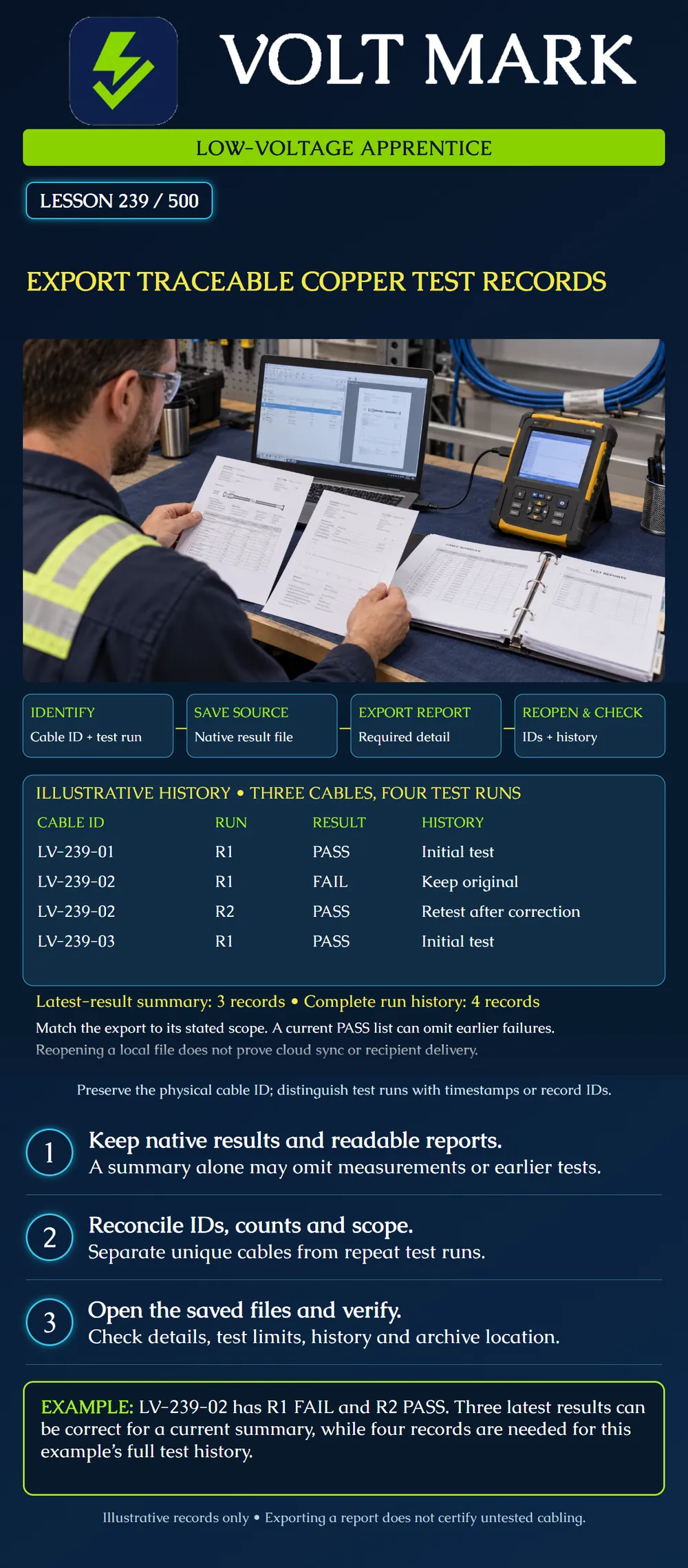
Prepare a traceable export package that connects physical cable labels to test records, preserves the requested history and can be reopened for review.
Use the same cable identifier on the installation records and test results. Distinguish repeated test runs with timestamps, record identifiers or a documented revision field; do not invent a new physical cable identity merely because a test failed. Record the project and test boundary so a reviewer knows what the result represents.
In the LinkWare PC example, imported results must be saved as a project file; Fluke documents the .FLW native format. A readable report is a separate deliverable. Preserve the native results and the required report details so later review is not limited to a screenshot or a total PASS count.
Report tools can export a selected subset or a larger project scope. Check what is selected before saving. Detail settings also matter: a summary, a full report and an export of selected measurement fields do not contain identical evidence.
Fluke's LinkWare Live documentation states that its generated PDF includes only the latest result for a duplicate cable ID. Therefore a PDF of current results may not preserve every earlier failed attempt. This behavior is specific to that documented reporting route; verify the behavior of the software and version actually used.
Physical cable LV-239-01: R1 PASS. Physical cable LV-239-02: R1 FAIL; R2 PASS after a documented correction. Physical cable LV-239-03: R1 PASS.
Unique cables = 3. Total recorded test runs = 1 + 2 + 1 = 4. Latest-result entries = 3. Earlier failed runs retained in history = 1.
R1 and R2 are lesson revision labels, not claims about a manufacturer's built-in naming convention. These are fictional records, not actual completed certification tests.
A current-results report containing three entries is consistent with this example. A package claiming complete four-run history is incomplete if the failed R1 record is unavailable. Conversely, four rows do not prove that four unique cables were tested.
Matching counts alone is insufficient. A package could contain duplicate LV-239-01 records and omit LV-239-03 while still containing three rows. Compare the actual expected cable-ID set with the exported set, then investigate missing, extra and repeated entries.
Use a clearly identified project folder with:
These are recommended organization choices for the exercise, not a universal filename standard. Follow the project's required deliverable format and retention rules. Avoid overwriting the only copy of a source dataset while preparing a cleaner customer-facing report.
Open the native project in compatible software. Open the readable report from its saved location. Confirm that the requested records and details are present. Check cable ID, date/time, exact test limit and boundary, result, and available instrument/operator information. If time-zone or clock accuracy is uncertain, document that rather than fabricating a timestamp.
Inspect the first and last records and the known retest case, then reconcile every required cable ID against the schedule. Confirm that the earlier failure and correction note can be located. Check whether graphs or detailed measurements requested by the project are included. A file that exists but cannot be opened is not a verified archive.
Opening a local export proves only that the inspected local file opens. It does not prove a cloud copy synchronized, another person received it, or a reviewer accepted it. Make each claim only when separately verified. This lesson does not send reports, access a live testing account or change a cloud project.
The instructor provides fictional native records and an expected schedule. Prepare two clearly scoped views: current results and full run history. Write a short manifest that explains why their record counts differ. Reopen the outputs and demonstrate how a reviewer can trace LV-239-02 from its physical label to both test attempts and its correction note.
Answer: Three.
Answer: Four.
Answer: Yes; verify the export route's behavior and preserve history separately when necessary.
Answer: No; reconcile identifiers.
Answer: Not necessarily. Preserve the native records and specified report content.
Mistake: Calling the three-entry latest-results PDF a complete four-run history. Correction: Locate and preserve LV-239-02's earlier failure and correction note separately, and describe the PDF's current-results scope in the manifest.
Mistake: Accepting the package because its row count equals the expected cable count. Correction: Compare the exported cable-ID set against the schedule to find a duplicate ID masking an omitted cable.
Mistake: Closing the export after saving a readable summary while leaving imported native results unsaved. Correction: Save and reopen the native project as well as the required detailed report, then verify the known retest case.
Fluke Networks, Saving a .FLW File – LinkWare PC: https://www.flukenetworks.com/knowledge-base/linkwaretm-pc-10x/saving-flw-file Supports explicitly saving imported results as a native .FLW project.
Fluke Networks, Export PDF Reports in LinkWare PC: https://ko.flukenetworks.com/knowledge-base/linkware-pc-9x/export-pdf-reports-linkware-pc Supports selection scope and report options; English article content on the regional support host.
LinkWare Live Help, How do I make PDFs of test reports?: https://support.linkwarelive.com/hc/en-us/articles/115000961752-How-do-I-make-PDFs-of-test-reports Supports latest-result-only handling for duplicate cable IDs in that PDF route.
Texas journeyman, 15 questions, scored by topic against the 70% mark. No card, and no account needed to start.
Free study material for low-voltage apprentices. This is a national foundation course: requirements differ by state and by local jurisdiction, and a practice that is common in one place is not a rule everywhere. Nothing here is a licence, a certification, or authority to work unsupervised, and completing it does not count as apprenticeship hours or continuing-education credit. Check the codes adopted where you are working, the licensing authority for that work, and your employer's safety programme. VoltMark is not affiliated with, endorsed by, or sponsored by NFPA, OSHA, NICET, BICSI, FOA, or any state or local licensing authority.

Electrician licensing exam prep: practice questions, timed exam simulations, and step-by-step help finding every answer in the NEC.