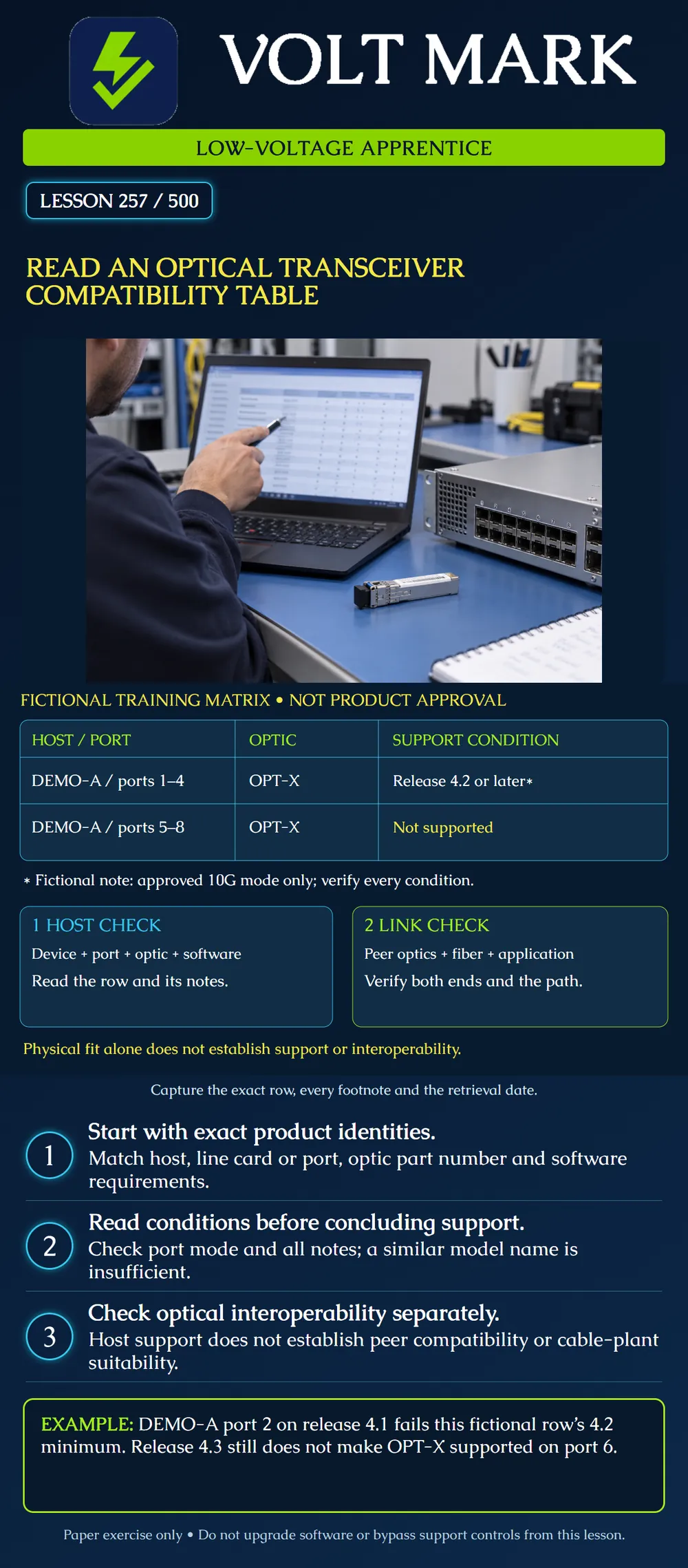
Find the exact support row for a host and optical module, retain its conditions, and separate that result from optical interoperability across the link.
A host compatibility table answers whether an identified optical module is supported in particular equipment under specified conditions. An optical interoperability reference addresses which optical interfaces can communicate with each other.
Cisco publishes separate compatibility and interoperability tool manuals. The host tool supports searches by device and transceiver identity and provides notes and export options. The interoperability manual describes searching optical peers by transceiver attributes. These are useful examples of two different questions; a result in one tool does not replace the other.
Record the exact host product ID, any relevant line card or network module, the intended port, the installed software release and the optic's complete part number. Retain revision or operating-mode details when the manufacturer's documentation requires them.
A broad family name is a starting point for a search, not the final answer. If the table uses a note to limit support, that note is part of the evidence. Save it with the row rather than copying only a green indicator or model name.
Every product and release in this exercise is invented: Host DEMO-A, ports 1–4, optic OPT-X: supported on release 4.2 or later, in the approved 10G mode only. Host DEMO-A, ports 5–8, optic OPT-X: not supported.
The footnote belongs to the first row. This simple exercise defines the release sequence as 4.1, 4.2, then 4.3. Real software release families and support policies require their own documentation; do not compare arbitrary version strings as ordinary decimal numbers.
Scenario A: DEMO-A port 2, OPT-X, release 4.1, approved 10G mode. Conclusion: the stated minimum release is not met.
Scenario B: DEMO-A port 2, OPT-X, release 4.3, approved 10G mode. Conclusion: the fictional row's listed host conditions are met. That is not yet a complete link approval.
Scenario C: DEMO-A port 6, OPT-X, release 4.3. Conclusion: the second row says not supported. A later release in this fictional table does not override that row.
Scenario D: DEMO-A port 2, OPT-X, release 4.3, unspecified port mode. Conclusion: incomplete evidence; verify the mode condition.
For each endpoint, establish its own host support. Then review the optical application at both ends and the intervening cable plant. Record the peer module identities, supported rate/application, fiber requirements, wavelength relationship, connector interface, polarity, and applicable optical power and reach limits.
Use manufacturer documentation to determine the applicable details rather than assuming two physically similar modules are peers. A matching plug shape or a shared nominal wavelength alone is insufficient evidence.
The classroom diagram presents host and link checks side by side. It does not suggest that one can be skipped after the other passes.
If an optic does not appear in a filtered result, first verify the search identity, filters and scope. An absent result is not permission to assume support. It also should not be rephrased as a manufacturer statement of “unsupported” unless the source establishes that conclusion.
Record “not confirmed from the retrieved result” when that is the evidence. Seek the applicable current manufacturer reference or clarification through the normal project process. Do not bypass host support controls as a substitute for verification.
Give the learner a fictional equipment inventory and a supplied matrix extract.
The deliverable is a traceable decision record, not a software change request. If the evidence indicates that a release change may be needed, route it through the responsible team's review; this lesson does not authorize an upgrade.
Classify these requests using only the fictional matrix: A uses DEMO-A port2, OPT-X, release4.3, with mode unspecified; B uses port6 with release4.3; C uses port2 with release4.2 in the approved 10G mode. Give a reason for each decision and one check still needed beyond host support.
Answer: A is unconfirmed because the row's mode condition is missing. B is unsupported in the supplied ports5-8 row; the release does not override it. C meets the listed host conditions in this extract. Even C still needs the far-end host check and optical-peer/cable-plant review. Preserve the row, notes and query context; do not upgrade software or bypass support controls as part of this paper task.
Mistake: Approving OPT-X on DEMO-A port6 because release 4.3 is later than 4.2. Correction: Read the row for ports5-8: it is unsupported in the fictional matrix; another row's minimum-release note does not override it.
Mistake: Recording unsupported when the optic is merely absent from a filtered search. Correction: Preserve the actual query and mark support unconfirmed until the correct identity, filters and manufacturer evidence resolve it.
Mistake: Saving only a supported indicator and omitting the port-mode note. Correction: Attach the applicable conditions and verify the actual mode; a partial row is not complete host-support evidence.
Cisco, Compatibility Matrix Tool User Manual, revised June 24, 2025: https://www.cisco.com/c/en/us/td/docs/interfaces_modules/transceiver_modules/compatibility/matrix/TMG_CM_Tool_User_Manual.pdf Cisco, Optics Interoperability Matrix User Manual: https://www.cisco.com/c/en/us/td/docs/interfaces_modules/transceiver_modules/compatibility/matrix/TMG_IM_Tool_User_Manual.html
Texas journeyman, 15 questions, scored by topic against the 70% mark. No card, and no account needed to start.
Free study material for low-voltage apprentices. This is a national foundation course: requirements differ by state and by local jurisdiction, and a practice that is common in one place is not a rule everywhere. Nothing here is a licence, a certification, or authority to work unsupervised, and completing it does not count as apprenticeship hours or continuing-education credit. Check the codes adopted where you are working, the licensing authority for that work, and your employer's safety programme. VoltMark is not affiliated with, endorsed by, or sponsored by NFPA, OSHA, NICET, BICSI, FOA, or any state or local licensing authority.

Electrician licensing exam prep: practice questions, timed exam simulations, and step-by-step help finding every answer in the NEC.