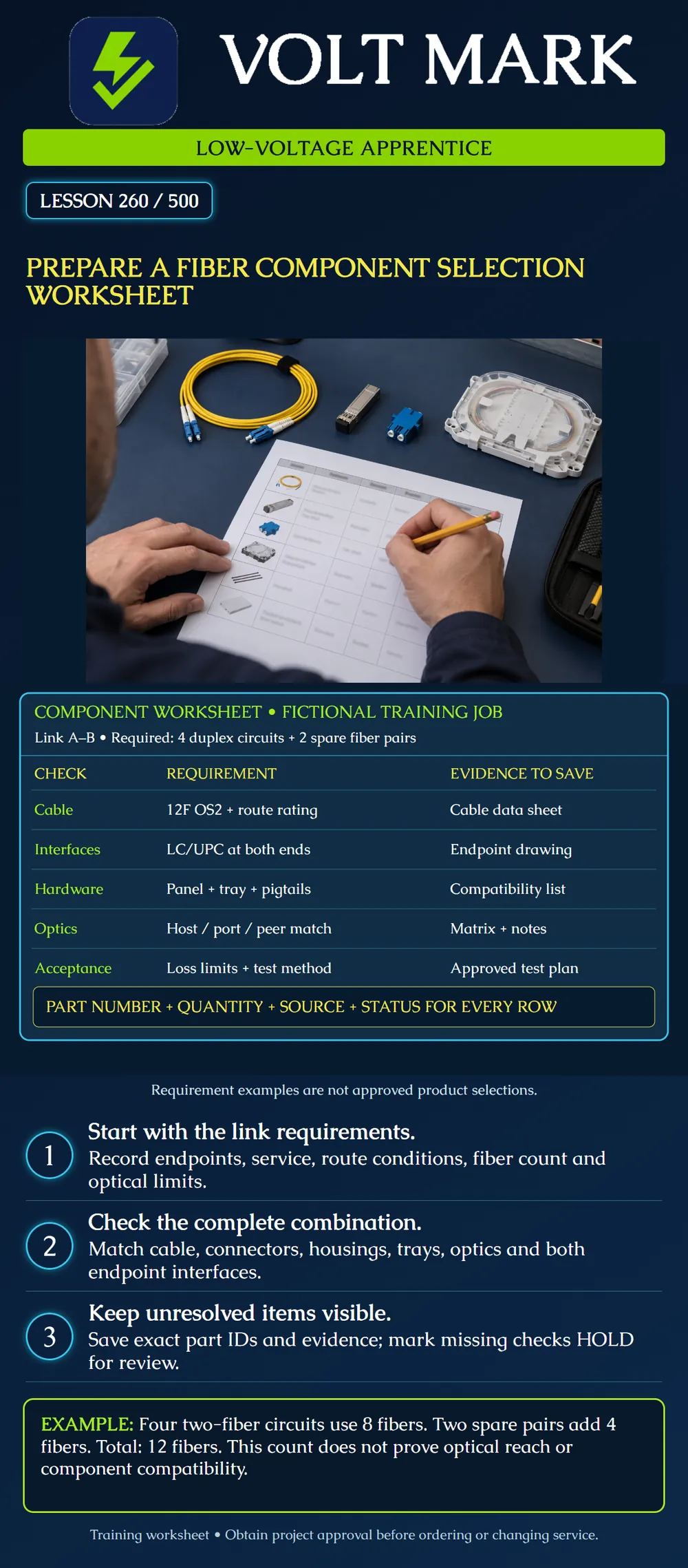
Build a traceable worksheet that connects a project's requirements to proposed fiber components, quantities and supporting evidence. Distinguish a documented requirement from a candidate part and from an approved selection.
A shopping list records what someone wants to buy. A selection worksheet also records why each item fits the job and which checks remain open. A connector that fits a panel may still have the wrong interface polish. A cable with enough fibers may lack the required route rating. A transceiver with the desired nominal speed may not be supported in the installed host. Treat selection as a coordinated system check.
Record the project and link IDs, endpoint A and endpoint B, drawing revision, preparer, date and reviewer. Record the intended service and protocol, rate, required active circuits, reserved capacity, fiber type and measured or designed route length. Distinguish route length from installed cable length, which may include approved service slack. Include the loss-budget reference and environmental conditions. Do not substitute a module's advertised reach for the project-specific optical assessment.
Use these columns: Item/function | Required characteristics | Candidate manufacturer and exact part number | Quantity and unit | Compatibility evidence and revision | Status | Open question / owner. Useful statuses are PROPOSED, VERIFIED AGAINST NAMED EVIDENCE, HOLD and APPROVED BY THE DESIGNATED REVIEWER. A verified row does not automatically approve the entire system. Leave the reviewer field blank until an actual authorized reviewer acts.
Cable: record fiber category and count, construction, jacket/environmental requirements, installation method and the relevant installation limits. A campus route may cross different environments; document the approved transition method rather than assuming a single cable label covers everything.
Interfaces: record connector family and polish at each mating location, single-fiber or multifiber arrangement, and the required polarity map. Where MPO is selected, include fiber population, guide-pin arrangement and key orientation requirements from the documented system. Similar colors or shell shapes are not sufficient compatibility evidence.
Hardware: identify the housing, mounting arrangement, compatible panels/cassettes, splice trays and holders, pigtails, entry/strain-relief parts and cord-management accessories. Determine quantities using the selected products' actual capacities. Do not assume that every housing accepts every tray or that a cassette includes every required accessory.
Optics: record the exact host, line card if applicable, port, operating mode and software version at both endpoints. Save manufacturer support evidence and its notes. Separately verify the optical peers, wavelength arrangement, fiber type, connector interfaces, link loss and receiver limits. One device-support table does not resolve every end-to-end optical requirement.
Acceptance: record the project test method, test wavelengths where applicable, reference method, limits, polarity/continuity requirements, reporting format and labeling plan. Keep acceptance criteria attached to the design before procurement. Passing a quantity calculation is not passing an optical test.
A training brief requests four conventional two-fiber duplex circuits between buildings A and B, plus two spare fiber pairs. Four circuits × two fibers = eight active fibers. Two spare pairs × two fibers = four spare fibers. Eight + four = twelve total fibers. A twelve-fiber cable meets this count with no additional unassigned fibers, subject to every other design requirement.
Assume the exercise design terminates all twelve fibers at both ends using individual pigtails and duplex adapters. At each end: twelve pigtails and six duplex adapters provide twelve positions. Across two ends: twenty-four pigtails and twelve duplex adapters. These are component counts, not package counts. Confirm whether the chosen panel or cassette already includes adapters and pigtails before adding separate rows.
If each active circuit uses one duplex patch cord at each end, four circuits × two ends = eight duplex patch cords for the active circuits. The spare fiber pairs do not automatically require active patch cords or transceivers. Record the project decision for spare accessories separately. Do not infer optic quantities or wavelengths from this worksheet alone.
The poster uses OS2 and LC/UPC as fictional requirements. They are not universal choices, an approved bill of materials or a claim that the illustrated job will pass its optical budget. Candidate product numbers remain unselected until evidence is available.
Item/function: Requirement and source drawing: Candidate manufacturer / full part number: Quantity / unit / package quantity: Compatible endpoint or housing: Evidence URL or document / revision / relevant note: Status: Unresolved question / responsible person: Reviewer / date:
Create a row for the cable, a row for each different termination assembly, patch cords and the proposed optics. Identify one HOLD item, such as an unknown endpoint polish or missing host software version. State the exact document or inspection record needed to resolve it. A good worksheet explains uncertainty rather than hiding it behind a guessed part number.
Mistake: Adding separate pigtails and adapters without checking the selected cassette contents. Correction: Compare included components with the requirement and record component counts separately from packages to avoid duplicate quantities.
Mistake: Assigning active optics and patch cords automatically to every spare fiber pair. Correction: Keep the four active circuits and two spare pairs separate, and obtain the project's accessory decision for the spares.
Mistake: Marking the whole worksheet approved after one row matches its data sheet. Correction: Retain the row's evidence-based state and all HOLD items; leave overall approval to the designated reviewer after the complete system checks.
Cisco Optics Compatibility Matrix User Manual, revised June 24, 2025: https://www.cisco.com/c/en/us/td/docs/interfaces_modules/transceiver_modules/compatibility/matrix/TMG_CM_Tool_User_Manual.html The manual supports product-specific device/transceiver searches, access to notes and data sheets, and export of evidence. No live product-support row is asserted here.
Corning FTTP Selection Guide: https://www.corning.com/content/dam/corning/catalog/coc/documents/selection-guides/CRR-630-AEN.pdf Reference for broad comparison categories: fiber, cable and subunit compatibility, environments, connector styles, tooling and packaging. This lesson does not assert a detailed product selection from the guide.
Corning Frame and Cable Management: https://www.corning.com/optical-communications/worldwide/en/home/Resources/product-drawings/frame-and-cable-management.html Product-specific frames, strain-relief brackets and management accessories support checking hardware as an assembly.
Texas journeyman, 15 questions, scored by topic against the 70% mark. No card, and no account needed to start.
Free study material for low-voltage apprentices. This is a national foundation course: requirements differ by state and by local jurisdiction, and a practice that is common in one place is not a rule everywhere. Nothing here is a licence, a certification, or authority to work unsupervised, and completing it does not count as apprenticeship hours or continuing-education credit. Check the codes adopted where you are working, the licensing authority for that work, and your employer's safety programme. VoltMark is not affiliated with, endorsed by, or sponsored by NFPA, OSHA, NICET, BICSI, FOA, or any state or local licensing authority.

Electrician licensing exam prep: practice questions, timed exam simulations, and step-by-step help finding every answer in the NEC.