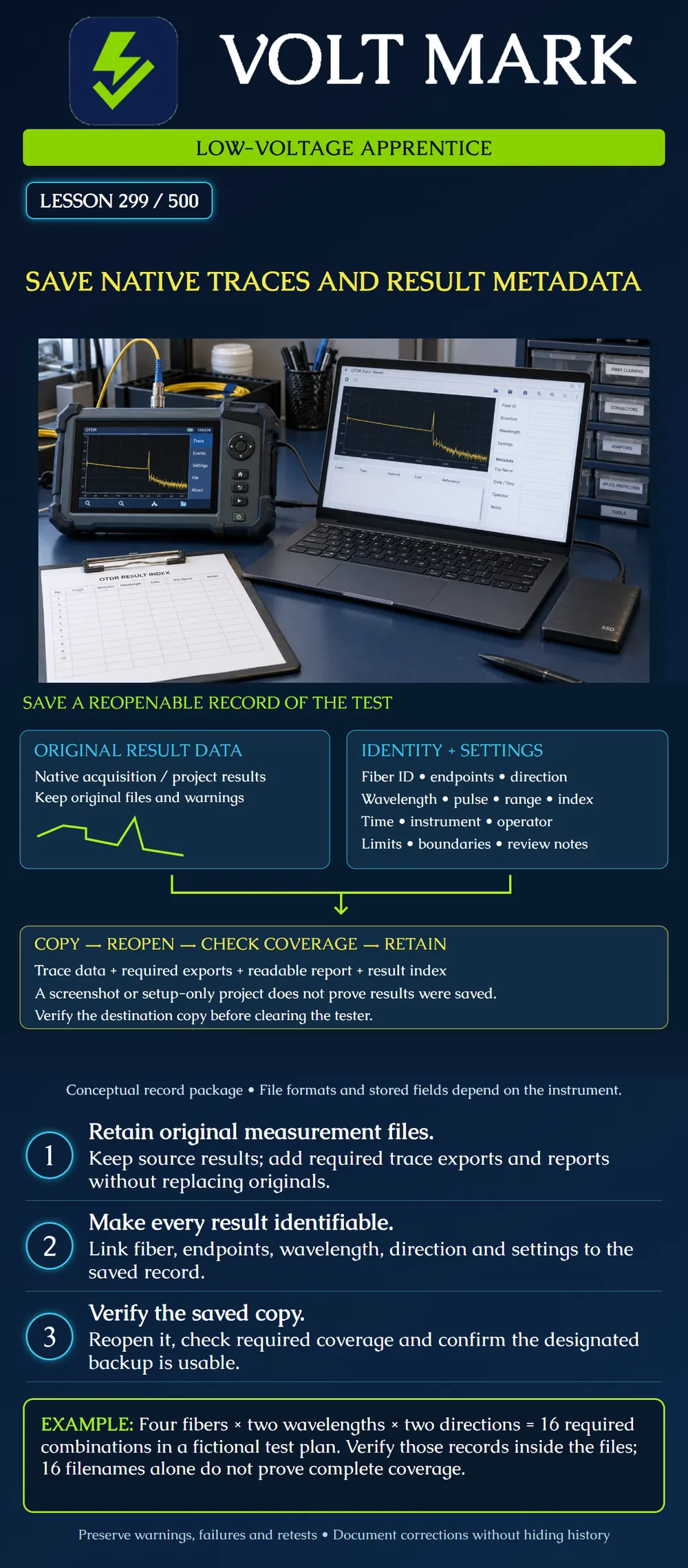
Save an identifiable, reopenable fiber-test record package and verify that the copied results cover the required measurements before treating the transfer as complete.
Retain the instrument's original measurement results and any associated native project or database needed to reopen them. A native result format depends on the equipment; there is no universal filename extension that guarantees complete preservation. A PDF communicates a result, while a screenshot shows only the displayed view. Neither should be assumed to contain all original trace samples, settings, warnings or analysis context.
Fluke's OptiFiber Pro export guidance distinguishes transferring test results from transferring project setup. It describes importing results into management software and creating output formats such as PDF, CSV or SOR. [1] Follow the current workflow for the actual instrument. A project name appearing on a destination drive is not sufficient evidence that the measurements were transferred.
EXFO documents generating SOR trace files from an iOLM result in FastReporter 3. Its two-wavelength example produces separate SOR files for the wavelengths. [2] This illustrates why a useful interchange export may differ from the original result container. Keep the original result as well as any requested exports. Verify compatibility in the intended reader; do not assume every export preserves every vendor-specific analysis feature.
Connect the original results to a readable report and a result index. Include or link the information needed to interpret the test:
The left panel represents source result data, including an illustrative trace. The right panel represents the information needed to identify and interpret it. Both feed the saved package. The bottom panel is a verification sequence: copy the data, reopen the destination copy, check measurement coverage and retain the records according to the project procedure. The miniature trace is decorative instructional art, not an actual test or pass result.
A fictional project requires four fibers, two wavelengths and both directions: 4 × 2 × 2 = 16 measurement combinations. The required set is F01 through F04, each at both specified wavelengths and in both named directions. A result container may hold several combinations, or exports may split them across files. Sixteen filenames could still include duplicates, omit one direction or contain the wrong fiber IDs. Build a coverage table from the actual records and reconcile it with the test plan.
A learner exports a setup-only project and sees its name on a USB drive. When opened at the office, the project has IDs but no measurements. The transfer did not preserve the results. Reopen the destination using the supported application and confirm actual trace data and metadata while the source is still available. Do not erase source results on the basis of a successful copy notification alone.
A report labels a trace F02, but the native result says F01. A filename change does not prove that the measured fiber was F02. Resolve the discrepancy with contemporaneous records and the responsible technician. Preserve the original and document any justified metadata correction, who made it and why. If identity cannot be established, record the limitation and arrange appropriate follow-up rather than silently relabeling evidence.
An initial result has an unresolved event. A later authorized retest resolves it. Keep both files and link the later result to the earlier issue. State what changed in the setup or installation and which record supports the final disposition. Do not delete the warning-bearing result merely to make the folder appear clean. A retest and a reanalysis are different actions and should be described accurately.
Use provided training files for this exercise. Open a destination copy in the intended software. Confirm the visible trace, fiber ID, endpoints, wavelength, direction and key settings. Check that warnings remain visible and reports reference the correct records. Verify all required combinations, then confirm that the designated separate backup can also be accessed. Record the location, date and reviewer. A sync icon or a folder name alone does not demonstrate successful recovery of the contents.
[1] Fluke Networks, Exporting Test Results — OptiFiber Pro, November 25, 2020. Accessed 2026-10-01. Used for result transfer versus project setup and export concepts. Historical operating-system, USB and cloud-service details are not generalized. https://www.flukenetworks.com/knowledge-base/optifiber-pror/exporting-test-results-optifiber-pro [2] EXFO, How to generate a .SOR file from an iOLM test file using FastReporter 3, KB0010302. Accessed 2026-10-01. Used for source versus exported trace and separate wavelength exports. https://knowledge.exfo.com/kb?id=kb_article_view&sysparm_article=KB0010302
Texas journeyman, 15 questions, scored by topic against the 70% mark. No card, and no account needed to start.
Free study material for low-voltage apprentices. This is a national foundation course: requirements differ by state and by local jurisdiction, and a practice that is common in one place is not a rule everywhere. Nothing here is a licence, a certification, or authority to work unsupervised, and completing it does not count as apprenticeship hours or continuing-education credit. Check the codes adopted where you are working, the licensing authority for that work, and your employer's safety programme. VoltMark is not affiliated with, endorsed by, or sponsored by NFPA, OSHA, NICET, BICSI, FOA, or any state or local licensing authority.

Electrician licensing exam prep: practice questions, timed exam simulations, and step-by-step help finding every answer in the NEC.