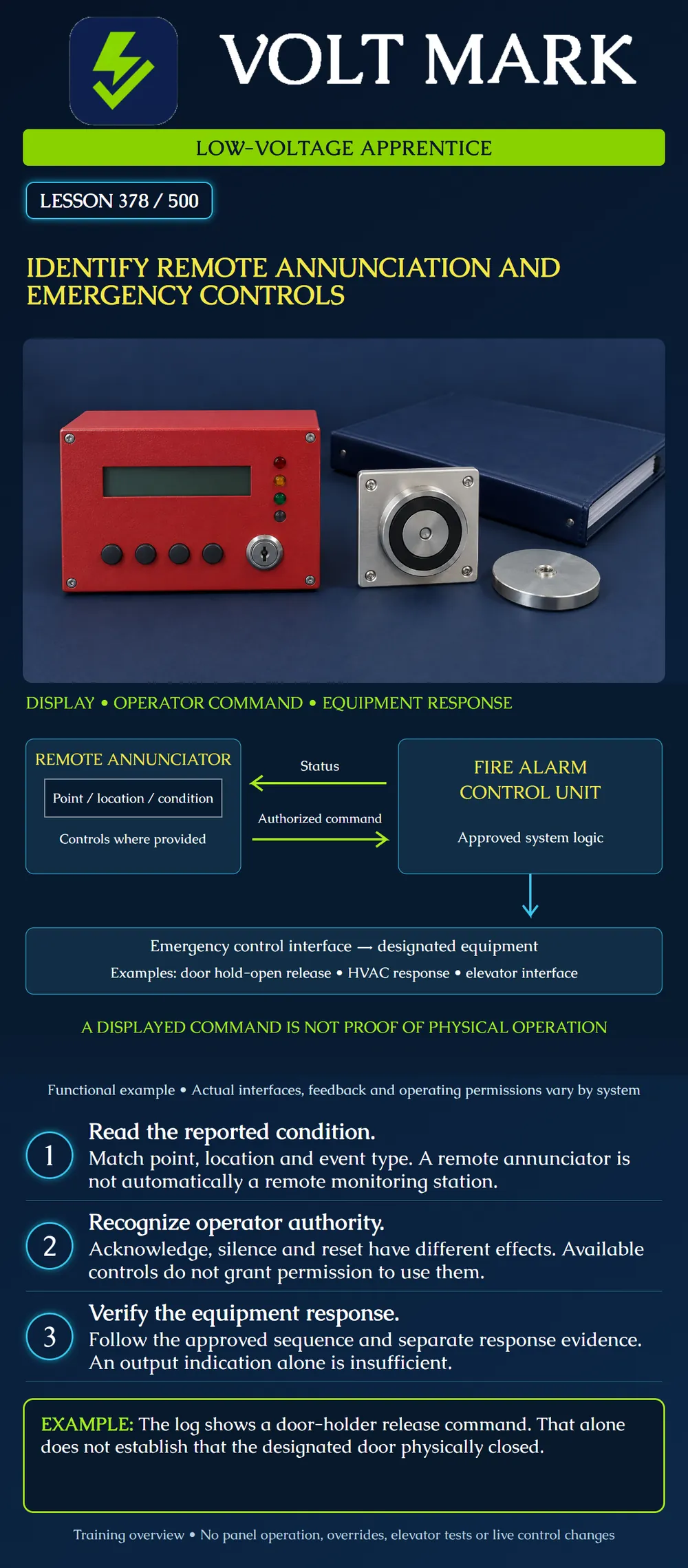
Separate remote indication, authorized operator commands and emergency control functions. Trace the information in a conceptual system diagram and identify what additional evidence is needed to verify physical equipment response.
An annunciator presents system information at another location. Depending on the equipment, it may display text, point or zone identification, indicator lights and event conditions. Some annunciators also provide controls; others have more limited functions. Use the exact compatible system documentation.
The Fire-Lite LCD-80F manual is a concrete example. It describes a remote display that mirrors compatible control-panel information and can provide acknowledge, silence, drill and reset functions. Its capabilities do not describe every annunciator. The reviewed manual is an older product document, not a current compatibility authorization for a proposed installation.
"Remote" describes location relative to other equipment; it does not necessarily mean internet access or off-premises service. A lobby annunciator is different from a supervising station receiving transmitted signals. Do not infer automatic dispatch from a message appearing at either display.
Record the displayed point or zone, location description, event class and relevant time. An alarm, supervisory condition and trouble are not interchangeable. A location label must agree with the physical device and project records. If multiple events exist, a single screenshot may show only part of the event history.
Communication and power support the annunciator's ability to report. A blank screen or communication fault does not mean the protected building has no alarms. Follow the site's reporting and response procedures; do not silence or reset a panel to see whether the problem disappears.
The poster's status arrow runs from the control unit toward the remote annunciator. That direction represents information flow, not field wiring, communication protocol or electrical polarity.
Controls may send requests back to the control unit. Their availability, permissions and effects depend on the system configuration and approved operating procedures.
Acknowledge is not the same as correcting the underlying condition. Signal silence does not establish that an emergency has ended. Reset is not proof that a fault has been repaired or that a building is safe to reoccupy. A drill control can intentionally operate notification functions; it is not an exploratory button for an apprentice.
A key, password or unlocked enclosure is an access mechanism, not evidence that the person holding it is authorized for a particular action. This lesson teaches recognition only. Actual emergencies require the site emergency plan and responsible personnel.
A fire alarm system can interface with other building equipment under an approved sequence. Examples include releasing door hold-open devices, initiating a designated HVAC response or signaling an elevator controller. These functions differ from displaying the event and differ from occupant notification.
Do not generalize the examples into "every alarm shuts down every fan" or "all doors unlock." Door hold-open release, access-control unlocking and door closure are distinct functions. Elevator recall and elevator power removal are also distinct engineered functions. This lesson does not prescribe their triggers, wiring, timing or operating procedures.
The diagram's lower box shows a functional interface to designated equipment. It omits feedback and supervisory paths for clarity. Omission from the sketch does not mean they may be omitted from a real design.
A recorded command establishes that the system reported or issued a command at the point covered by that record. It does not necessarily prove relay operation, downstream controller response or final equipment movement.
For example, a release command to a door holder is not physical proof that the door closed. An obstruction or another problem can affect the outcome. The appropriate verification scope must include the required result, using authorized procedures and the responsible trades. Do not infer a specific failure cause without evidence.
Case A — Wrong lobby description: A remote display identifies a detector as west lobby, while the approved device schedule identifies east lobby. Record the discrepancy for responsible resolution. Do not rename the point from memory or activate another detector to guess.
Case B — Command without confirmation: An archived test record has a fan command entry but no required response evidence. Mark the evidence gap. The command entry cannot stand in for the missing equipment result.
Case C — Remote screen blank: A photograph shows an unlit annunciator. A note concludes "system clear." Reject that conclusion: the photograph establishes neither communication nor the overall system condition. Follow the site's fault-reporting process.
Case D — Shared button names: Two different products both have a silence control. Do not assume their effect, scope or permissions are identical. Review the installed product and approved procedures.
Case E — Door terminology mixed: A report says "door release passed" without identifying whether it means a hold-open device or an access-control lock. Request a specific function, equipment identifier and observed result.
Case F — Interface boundary unclear: The fire alarm team records a successful interface output while the receiving trade has no record. Identify the unresolved boundary and required integrated verification. Neither team should make a broader claim than its evidence supports.
For a fictional interface EC-03, record: Initiating condition; approved sequence revision; remote display label; operator permissions; output/interface identifier; receiving equipment; required physical result; required feedback; verification reference; responsible parties; unresolved issues.
Practice record count: four interfaces each require one command record and one equipment-response record in this invented exercise. Eight records are expected. Seven are present, leaving one missing. That missing record is not automatically a failed device; it is an unresolved evidence item. The exercise does not impose a universal record format or test requirement.
Draw separate arrows for displayed status and operator commands. Add a third arrow for the equipment interface. Label each with the information or action it represents. Do not label any arrow "working" unless the supporting evidence and scope are specified.
Mistake: Reading a blank remote annunciator as an all-clear system state. Correction: Report the display or communication concern under the site's procedure; obtain actual system-condition evidence.
Mistake: Treating an available key or silence button as authorization to operate it. Correction: Check the assigned role and approved operating procedure for the exact system before any control action.
Mistake: Reporting 'door release passed' without distinguishing a holder from an access-control lock. Correction: Name the intended function, equipment and observed physical result; retain command and response evidence separately.
National fundamentals; actual requirements depend on the adopted rules, approved design, exact equipment and responsible authorities.
Texas journeyman, 15 questions, scored by topic against the 70% mark. No card, and no account needed to start.
Free study material for low-voltage apprentices. This is a national foundation course: requirements differ by state and by local jurisdiction, and a practice that is common in one place is not a rule everywhere. Nothing here is a licence, a certification, or authority to work unsupervised, and completing it does not count as apprenticeship hours or continuing-education credit. Check the codes adopted where you are working, the licensing authority for that work, and your employer's safety programme. VoltMark is not affiliated with, endorsed by, or sponsored by NFPA, OSHA, NICET, BICSI, FOA, or any state or local licensing authority.

Electrician licensing exam prep: practice questions, timed exam simulations, and step-by-step help finding every answer in the NEC.