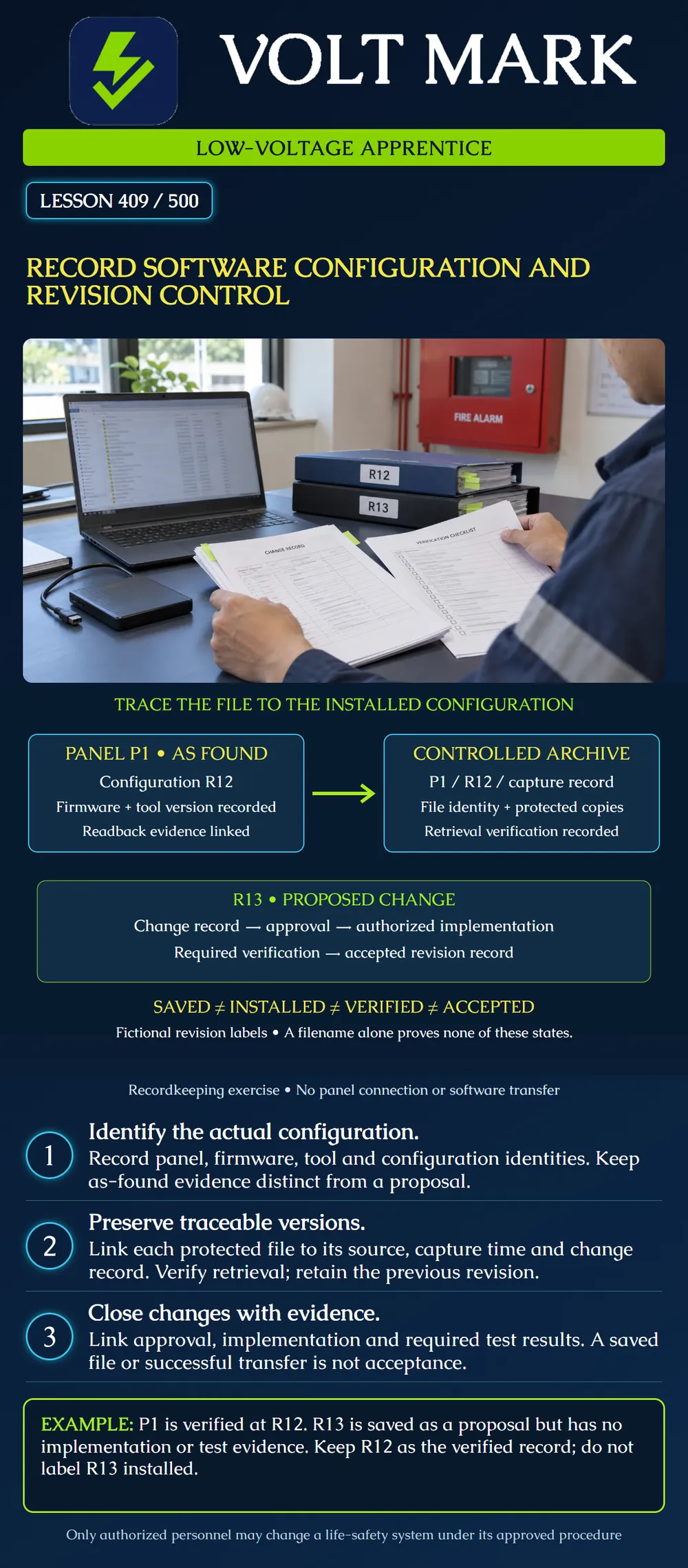
Build a record that connects a saved fire-alarm configuration to the correct equipment, software environment, change authorization and verification evidence. Distinguish a proposal from an installed configuration and from an accepted revision. This is a desk exercise; no panel connection or file transfer is required.
A folder containing “latest” does not establish which program is in a control unit. A file's modification time does not prove it was installed, and a successful transfer does not prove the resulting system performs its required functions. Treat identity, transfer, verification and acceptance as different questions with different evidence.
Record an as-found state honestly. If the current configuration has not yet been verified, label it as found or captured, not accepted. If approval, installation and test records disagree, preserve the discrepancy for the responsible person instead of choosing whichever file has the newest name.
The Fire-Lite ES-200X Rev F manual separates programming transfers from firmware upgrades. Sections 6–7 call for comparison of programmed entries with intended data, testing of affected operations and correction of problems after a program download. Its installation precautions also address reacceptance after changes. These requirements show why transfer success is not the end of verification. Exact procedures, compatibility and testing scope must come from the applicable equipment documentation and approved plan; this lesson supplies no universal transfer sequence or numeric reacceptance sample.
NIST SP 800-128 describes security-focused configuration management for information systems. It is useful background for managing and monitoring configuration, but it is not a fire-alarm installation code, local licensing rule or approval of a particular control-unit workflow.
A useful record starts with site, building, panel identifier, model, relevant hardware identity and the date and time of capture, including time zone. Record the firmware version and programming-tool version separately from the site configuration revision. They describe different items. Do not change firmware simply to match a convenient programming computer.
Identify the person responsible for capture and the source of the record: authorized readback, approved export or another documented source. State what was and was not captured. A report, screenshot or event log may be useful evidence without being a restorable configuration backup.
Keep the original captured file in a controlled archive, with its manifest or record. Follow manufacturer restrictions for operational filenames and formats; do not rename a file in a way that makes it unusable by required tools. Use the archive folder and manifest to distinguish revisions when the device requires a fixed filename.
The manifest should connect file identity, capture source, equipment identity, software versions, configuration revision, storage location, status and related change/test references. Record a cryptographic digest when the organization's process uses one. A matching digest supports file-content identity; it does not establish that the configuration is correct, approved or installed.
Keep protected copies according to the organization's storage and retention policy. A second file on the same removable drive is not independent protection against loss of that drive. Restrict access to configuration data and keep passwords, account details and security-sensitive settings out of public teaching material.
Confirm that the saved artifact can be retrieved and, where supported, opened or checked with the approved compatible tool in an authorized offline environment. Record the scope of that check. An offline file check is not a full demonstration of restoration to equipment.
Do not load a backup into an operating life-safety system merely to see whether it works. Any recovery demonstration on equipment needs the responsible team's authorized procedure, coordination and required verification. A recovery plan should identify who decides, which approved artifact applies, and what evidence is needed after recovery.
Assign a change identifier and record the reason, requested behavior, affected points and interfaces, proposed revision, reviewer and authorization. Link the change to current drawings, point lists and cause-and-effect documents where applicable. A software edit may affect more than the single label visible on screen.
Keep proposed, approved-for-implementation, implemented and verified/accepted statuses distinct. Approval to make a change is not evidence it occurred. Implementation is not evidence that all required testing passed. Record actual installed/readback evidence and reconcile it with the intended revision.
Retain the earlier baseline and the change history. A rollback is itself a controlled action; an older configuration may no longer match changed hardware or field conditions. Do not assume that an older file is automatically safe to restore.
The fictional record for Panel P1 includes: R12 — readback, review and required test records establish the verified configuration. R13 — a saved proposal to change a device description; review has not authorized implementation. A separate folder is labeled “current,” but contains only the R13 proposal.
Question: Which revision does the evidence establish as verified?
Answer: R12. The folder name does not override the records.
Question: What must be said about R13?
Answer: It is a proposal. There is no implementation or test evidence in this exercise. Preserve it with that status and resolve the misleading folder/manifest description through the controlled recordkeeping process.
An alternative case shows R13 was transferred, but a required interface verification remains outstanding. Mark implementation as recorded and verification incomplete. Do not mark accepted or silently replace R12's evidence with R13's file.
Link authorization, intended changes, actual configuration evidence, required test results, discrepancies and final responsible acceptance. Reconcile documentation handed to the owner or service organization through the authorized process. Retain unresolved items explicitly; do not hide them by changing a filename.
Q1. Are firmware and the site configuration revision the same thing?
Fire-Lite ES-200X Series Manual, LS10131-000FL-E:F, May 23, 2022, installation precautions and sections 6–8: https://prod-edam.honeywell.com/content/dam/honeywell-edam/hbt/en-us/documents/manuals-and-guides/installation-guides/ba-fire-ES-200X-Manual-LS10131-000FL-E-F.pdf NIST SP 800-128 publication page, updated October 10, 2019: https://csrc.nist.gov/pubs/sp/800/128/upd1/final The record structure, revision example and diagram are original training material, not a prescribed national form.
Mistake: Selecting R13 because its folder is labeled current. Correction: Use installed/readback and verification records; retain R13 as a proposal in the stated example.
Mistake: Treating a matching digest as proof that a configuration is approved. Correction: Use the digest for file identity and link separate authorization and functional-verification evidence.
Mistake: Replacing the earlier baseline immediately after a successful download. Correction: Preserve the baseline and record implementation separately until required comparisons and tests are complete.
Texas journeyman, 15 questions, scored by topic against the 70% mark. No card, and no account needed to start.
Free study material for low-voltage apprentices. This is a national foundation course: requirements differ by state and by local jurisdiction, and a practice that is common in one place is not a rule everywhere. Nothing here is a licence, a certification, or authority to work unsupervised, and completing it does not count as apprenticeship hours or continuing-education credit. Check the codes adopted where you are working, the licensing authority for that work, and your employer's safety programme. VoltMark is not affiliated with, endorsed by, or sponsored by NFPA, OSHA, NICET, BICSI, FOA, or any state or local licensing authority.

Electrician licensing exam prep: practice questions, timed exam simulations, and step-by-step help finding every answer in the NEC.