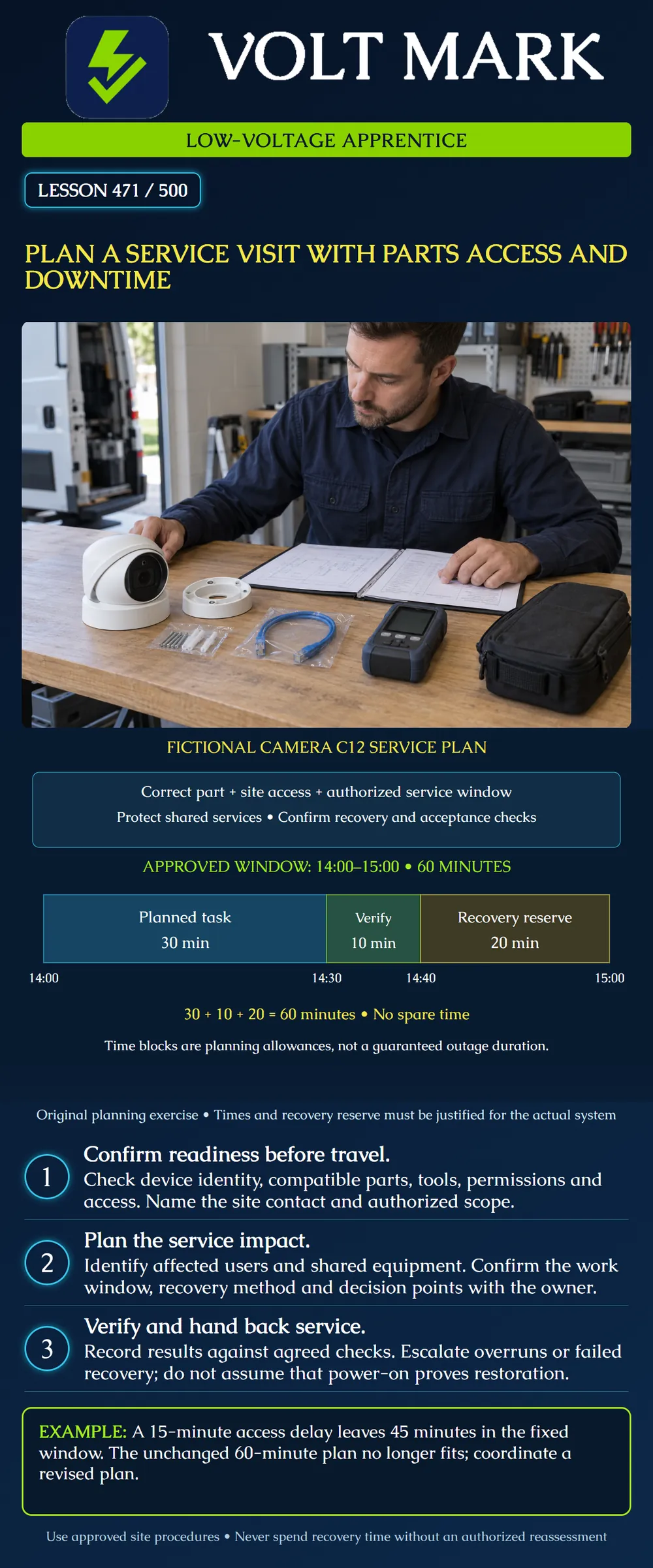
Prepare a service-visit plan that connects the correct parts and access arrangements with an authorized work window, service-impact assessment, recovery plan and acceptance checks.
This is a fictional planning exercise for camera C12. It is not a device repair procedure, an outage authorization or a substitute for manufacturer instructions. No real system has been identified or operated. Fire alarm, access-control, healthcare and other critical systems require their applicable specialist and site processes.
Record the asset identifier, location, reported symptom and authorized objective. Distinguish a diagnostic visit from an approved replacement. A complaint about C12 does not automatically authorize restarting its shared switch or replacing unrelated equipment.
Obtain the current drawing, connection information and available fault history through approved channels. Note what is confirmed and what is only suspected. Establish who can approve a scope change and who can accept restored service.
NIST's configuration-management guidance describes managing and monitoring configurations to support security and business functionality. [1] Its federal information-system context is not a universal service contract. NIST's OT guidance also recognizes reliability and safety considerations for systems that interact with physical processes, including building automation and physical access control. [2] These broad principles explain why a service plan must consider more than the device on the work order.
Confirm the exact model, relevant hardware revision, approved replacement and required accessories. A connector fitting physically does not establish power, protocol, environmental or software compatibility. Use the applicable product documentation and project requirements.
For the fictional camera visit, the worksheet calls for a compatible replacement part, mounting accessories, approved test equipment and the required configuration information. These are planning categories, not an assertion that every service visit needs a new camera.
Check availability before promising a completion date. Keep packaging and part identifiers traceable. If a replacement requires licensing, configuration or an approved software version, identify who supplies and verifies it. Do not put passwords or sensitive configuration secrets in an openly shared work-order attachment.
Record the site contact, entry process, escort requirement, permitted work areas, reachable equipment locations and approved access equipment. Confirm the people needed for remote administration or operational verification are available during the visit.
Site entry and permission to interrupt service are separate matters. A technician may be allowed into a communications room without being authorized to disconnect a live uplink. Likewise, a work order does not override the site's safety procedures or training requirements.
Access delays consume calendar time. Do not assume the agreed service window moves automatically because the crew arrived late or an escort was unavailable.
Camera C12 may share a switch, power supply, network path or recording service with other devices. Map the affected scope before selecting a disruptive action. A restart intended for one camera can affect other users if performed at a shared component.
For this exercise, no shared-equipment restart is included. If diagnosis indicates one may be required, escalate for a revised scope and impact review. Do not use the camera's local work authorization as permission for a broader outage.
Record the agreed operational arrangements for the affected period. Do not invent a fallback or assume that a backup system is working without evidence from the responsible site personnel.
Assume the site has approved a 14:00–15:00 work window for this narrowly defined exercise. Dates and time zone would be specified in a real record.
The original planning allocation is: 30 minutes for the planned task. 10 minutes for verification. 20 minutes reserved for recovery if needed. Total: 30 + 10 + 20 = 60 minutes.
The task block ends at 14:30. The scheduled verification block ends at 14:40, leaving the recovery reserve through 15:00. These are planning checkpoints, not a command sequence. A failure discovered earlier should trigger the approved decision process immediately rather than waiting for 14:40.
The window has no unallocated spare time. The bars describe reserved calendar time, not measured downtime. Actual loss of service could cover only part of the window or extend beyond it if recovery fails. Record actual interruption and restoration times rather than copying the plan into the result.
Identify a technically valid recovery method, required resources, responsible personnel, estimated duration and the checks that demonstrate recovery. A spare part on the truck or an untested backup file is not proof of recoverability.
For the exercise, the twenty-minute reserve must include whatever recovery and confirmation activities the approved plan requires. It is not twenty minutes of repair followed by unbudgeted verification. If the system cannot credibly recover within that reserve, revise the plan before beginning disruptive work.
An old component may be faulty and unsuitable as a fallback. Restoration to a previous configuration may also fail to restore the service. The actual method must be evaluated for the system; this lesson supplies no universal rollback procedure.
Suppose access becomes available at 14:15 while the window still ends at 15:00. Only 45 minutes remain. The unchanged sixty-minute plan exceeds that remainder by fifteen minutes.
Coordinate a revised authorized plan. Possible outcomes include rescheduling or performing only an approved non-disruptive portion of the visit. Do not erase verification or quietly consume the recovery reserve just to make the arithmetic fit.
If an overrun or unexpected condition occurs during authorized work, follow the escalation and operational contingency process. Report the actual condition and remaining options; do not promise restoration by a time no longer supported by evidence.
Use the agreed acceptance checks for C12 and any affected shared services. For a camera, the approved checks may address the intended view, live display, recording and relevant event functions. Their exact scope depends on the system and authorized work.
Power-on or a successful network reply alone does not prove the full service is restored. Record observed results, remaining defects, actual times, parts used and configuration changes. Obtain the required handback acknowledgement without representing it as proof of tests that were not performed.
Draft the C12 visit plan with part verification, access contact, scope, window, shared-service review, recovery decision points and acceptance evidence. Recalculate the plan after the fifteen-minute delay and write the unresolved decision for the responsible coordinator.
Answer: None.
Answer: Forty-five minutes.
Answer: No; it exceeds the remaining window by fifteen minutes.
Answer: Not by itself.
Answer: No.
[1] NIST SP 800-128 publication page and abstract: https://csrc.nist.gov/pubs/sp/800/128/upd1/final [2] NIST SP 800-82 Revision 3 publication page and abstract: https://csrc.nist.gov/pubs/sp/800/82/r3/final Opened October 1, 2026. Used only for broad configuration-management and OT reliability/safety context. Full publications were not reviewed for this lesson. Revision 4 is identified on the page as an initial public draft, not adopted here as a final requirement.
Original fictional planning scenario. Arithmetic checked: 30+10+20=60; 60−15=45; 60−45=15 minutes.
Mistake: Keeping the original sixty-minute task plan after access begins fifteen minutes late. Correction: Recalculate the remaining forty-five minutes and obtain an authorized revised scope or reschedule while preserving verification and recovery.
Mistake: Treating a spare camera as a proven recovery plan. Correction: Verify compatible parts, configuration access, restoration method, responsible people and the confirmation activities within the reserve.
Mistake: Recording the entire planned window as measured downtime. Correction: Record actual interruption and service-restoration times separately from the task, verification and recovery allocations.
Texas journeyman, 15 questions, scored by topic against the 70% mark. No card, and no account needed to start.
Free study material for low-voltage apprentices. This is a national foundation course: requirements differ by state and by local jurisdiction, and a practice that is common in one place is not a rule everywhere. Nothing here is a licence, a certification, or authority to work unsupervised, and completing it does not count as apprenticeship hours or continuing-education credit. Check the codes adopted where you are working, the licensing authority for that work, and your employer's safety programme. VoltMark is not affiliated with, endorsed by, or sponsored by NFPA, OSHA, NICET, BICSI, FOA, or any state or local licensing authority.

Electrician licensing exam prep: practice questions, timed exam simulations, and step-by-step help finding every answer in the NEC.