Organize test evidence so a reviewer can find a physical link, understand its test conditions, inspect its results and follow any retest history.
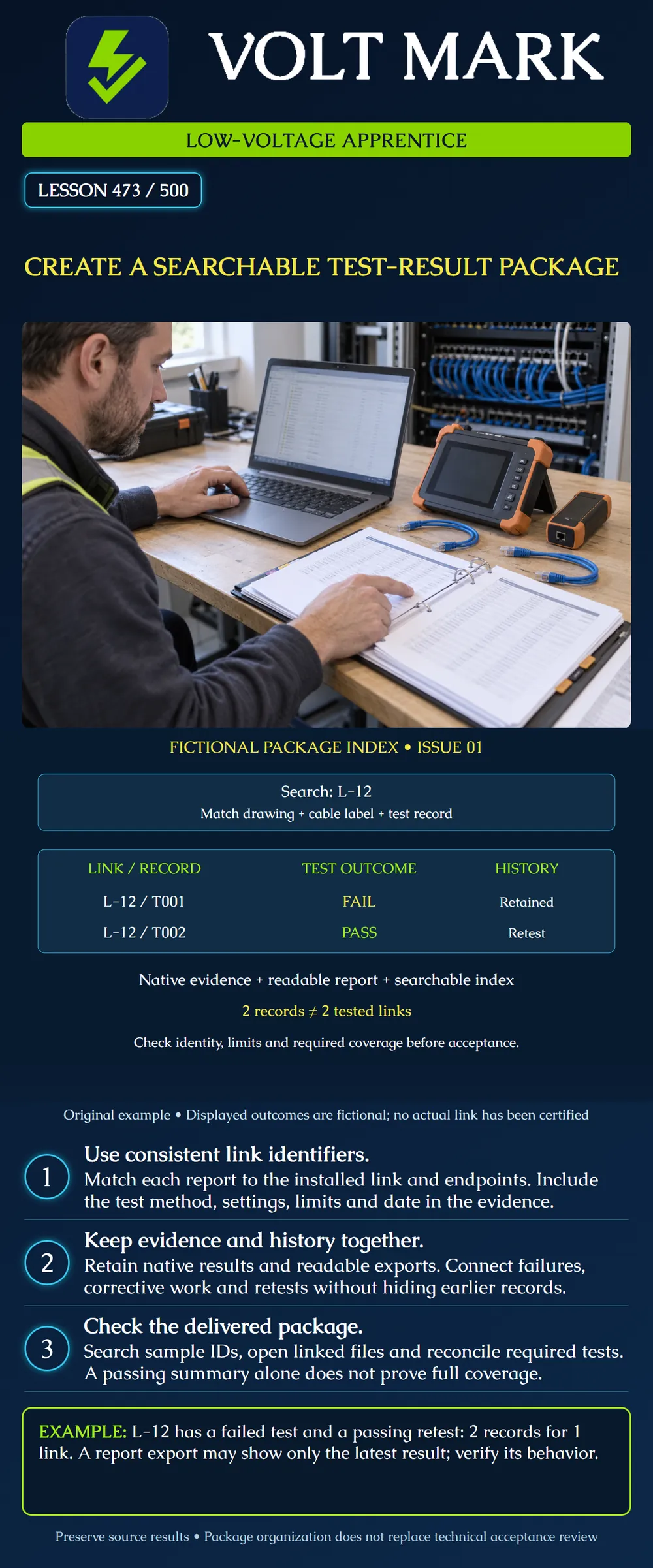
The poster is a fictional package index for link L-12. T001 is a failed test and T002 is a passing retest. These are classroom outcomes, not actual measurements or certification. The package method is an original example; the project's required format, retention and acceptance process govern real delivery.
Use the approved link schedule to establish what should be tested. A count of files is not the same as a count of links, fibers or required test conditions. Identify the required method and coverage before claiming completeness.
For a copper installation, distinguish the required test configuration and limits. For fiber, the required set may involve identified strands, wavelengths, directions and different test methods. Determine that set from the project requirements rather than assuming one report per cable is enough.
If a package has results for eleven of twelve required link IDs, the missing ID remains a gap even if the folder contains twenty files. Duplicate tests cannot supply evidence for an untested link.
Use the same link ID across the physical label, drawing, schedule and test record. Record endpoints and location so the identity can be checked. A useful index might contain project, building, link ID, endpoint references, test-record ID, date, method, outcome and evidence-file location.
The poster's L-12 identifies the link. T001 and T002 identify individual records for that link. Do not rename the second record as a different installed link simply to make each row appear unique.
If a mistaken cable ID must be corrected, retain the original source evidence and document the correction, its basis and responsible review. Do not silently relabel a passing result to cover a missing link.
Keep the native result data supported by the test system and a readable export in the required delivery format. Native evidence may preserve details that a selected summary report omits. A screenshot of a green PASS banner is not a substitute for the required measurement record.
Fluke Networks describes LinkWare PC as supporting the organization, search, archiving and reporting of results from supported testers. [1] That is an example of a manufacturer's result-management workflow, not a requirement to use that product or a claim that every tester exports identical information.
Record the test configuration and applicable limits with the evidence. Include equipment identification and relevant software, calibration or reference information where required. For optical results, make wavelength, direction and measurement method traceable. An OTDR trace and an insertion-loss result answer different questions and should not be mislabeled as interchangeable.
In the original example, T001 failed. Corrective work was then recorded under fictional note CW-01, and T002 passed. The index links both test records to L-12 and points to the corrective-work note.
The example does not specify the fault, repair or measurements, so it cannot establish technical acceptance. A real package must contain enough evidence to substantiate the selected result and the required checks. A later timestamp alone does not prove a retest used the correct setup.
Preserve the earlier failure according to the project retention process. Clearly identify which result is presented for acceptance and why, while retaining the history rather than deleting inconvenient data.
The LinkWare Live PDF help page states that its generated report includes only the latest result when a project contains duplicate cable IDs. [2] This is a product-specific behavior. It demonstrates why a readable report may not show the complete record history.
Check the behavior of the actual software and version used. Confirm the selected project, subprojects, filters and export scope. Do not assume that what appears in an on-screen filter is exactly what the exported report contains.
For L-12, the archive can hold two records while a particular export contains only T002. The delivery index should make the retained history findable. Do not call the export a complete chronological log unless it actually contains that information.
Use consistent spelling, punctuation and leading zeros in IDs. Provide an index in the owner's accepted searchable format and link it to readable reports and source data. Organize by meaningful project boundaries such as building and system without creating multiple conflicting copies of the same record.
Test search with an actual ID. Open the referenced evidence and confirm that the report's internal ID matches the index. If a scanned report needs OCR for search, verify the recognized ID against the image; OCR can confuse characters.
Searchability is a retrieval feature, not evidence accuracy. A perfectly searchable result for the wrong cable remains the wrong result. Keep sensitive site information within the approved access and delivery arrangements.
Open the package from its intended delivery location and verify that file references still work. Identify the issue date and revision, scope of included tests and outstanding items. Preserve the source archive and superseded package versions under the agreed process.
Do not claim acceptance merely because upload or copying succeeded. Technical review must establish that the required tests and criteria have been met, and the authorized recipient must complete any required handover process.
Create a fictional index entry for L-12/T001 and L-12/T002. Add endpoint references, test-condition fields, a corrective-work reference and evidence-file locations. Mark any unsupported field as missing. Explain why the poster's two rows represent one link and why a latest-result PDF may not show both rows.
Answer: One, L-12.
Answer: No.
Answer: No; verify the actual export behavior.
Answer: No; inspect the evidence and required configuration.
Answer: No.
[1] Fluke Networks, LinkWare PC Cable Test Management Software: https://www.flukenetworks.com/datacom-cabling/copper-testing/LinkWare-Cable-Test-Management-Software Used for supported result-management and reporting capabilities, not historical standards claims or universal file formats. [2] LinkWare Live Help, How do I make PDFs of test reports?: https://support.linkwarelive.com/hc/en-us/articles/115000961752-How-do-I-make-PDFs-of-test-reports Used for the documented latest-result behavior for duplicate cable IDs. Both opened October 1, 2026.
Original fictional index and counting examples. Two records for L-12 represent one link; eleven distinct IDs plus one retest yield twelve records, not twelve links.
The required schedule contains twelve link IDs. The folder holds eleven distinct IDs plus a retest of L-12, so there are twelve records but evidence for only eleven links. Reconcile distinct IDs to the schedule and identify the missing link. For L-12, retain T001, CW-01 and T002 together in the index; if a latest-result export shows only T002, link the separate retained history rather than claiming the PDF contains every test.
Mistake: Equating twelve report files with twelve tested links. Correction: Count distinct required IDs and required conditions against the schedule; duplicate tests do not fill a missing ID.
Mistake: Assuming a latest-result PDF preserves a failed predecessor. Correction: Check the software's export behavior and retain source records plus an index linking failures, corrective work and retests.
Mistake: Relabeling a passing report to cover a missing cable ID. Correction: Preserve the source evidence and resolve the identity discrepancy with documented supporting review instead of silently transferring a result.
Texas journeyman, 15 questions, scored by topic against the 70% mark. No card, and no account needed to start.
Free study material for low-voltage apprentices. This is a national foundation course: requirements differ by state and by local jurisdiction, and a practice that is common in one place is not a rule everywhere. Nothing here is a licence, a certification, or authority to work unsupervised, and completing it does not count as apprenticeship hours or continuing-education credit. Check the codes adopted where you are working, the licensing authority for that work, and your employer's safety programme. VoltMark is not affiliated with, endorsed by, or sponsored by NFPA, OSHA, NICET, BICSI, FOA, or any state or local licensing authority.

Electrician licensing exam prep: practice questions, timed exam simulations, and step-by-step help finding every answer in the NEC.