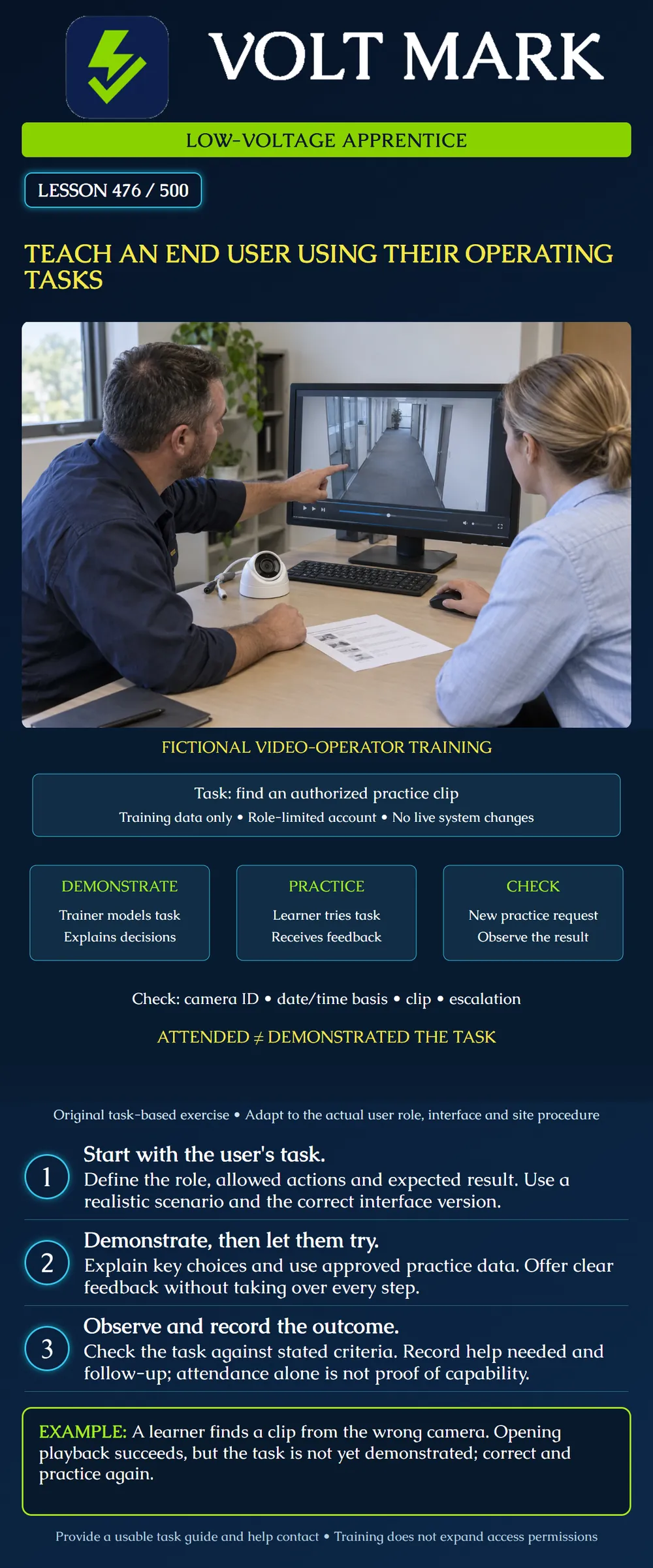
Prepare a short low-voltage system training session around an end user's authorized operating task and document what the learner can demonstrate.
The example uses a fictional video operator finding a practice clip. It is not a tutorial for a specific product, permission to access real recordings or a substitute for required specialist training. Use authorized training data and a suitable training environment. Site roles, product instructions and approved operating procedures determine real actions.
For the classroom exercise, the user must locate the requested practice recording for camera CAM-012 on a stated date and time basis, confirm it is the intended clip and explain how to request help if it is unavailable.
The goal is narrower than “learn the video system.” It identifies an observable result and keeps the session focused. The operator is not being trained to change network settings, delete recordings, modify retention or administer accounts.
CDC's Quality Training Standards connect learning objectives with relevant activities, learner assessment, feedback and follow-up support. [1] Those are general instructional principles. Applying them here does not claim CDC endorsement or that VoltMark has passed the CDC's complete quality standard.
Confirm the learner's role and existing familiarity with the task. Determine whether the difficulty comes from knowledge, unclear instructions, missing access or a malfunctioning system. More explanation will not repair missing recording data or grant an unavailable permission.
Check the interface version and language used by the learner. Prepare readable task materials that match that interface. A guide for a different release can teach the wrong sequence even if the product name is the same.
Arrange the training account, practice data and instructor support in advance. The example supplies a controlled practice request, not a real incident or customer recording. Follow privacy and site handling rules for any actual training materials.
The trainer models the approved task on the training system. Explain how to select the intended camera and how the system displays dates and times. State the time basis supplied in the request and resolve any ambiguity instead of assuming it.
Show how to confirm that the selected result matches the request. Opening playback is only an intermediate action. The camera, time interval and content must be consistent with the authorized practice task.
Explain the limit of the user's role. If the clip is missing, the operator should use the prescribed support path. They should not change recording settings, bypass permissions or experiment with administrative controls to complete the exercise.
Give the learner control of the practice task while the trainer observes. Allow them to use the approved task guide if that resource is expected to be available during normal operation.
Record the help provided. A task completed after the trainer names every control is different from an independently completed task. Neither result should be described vaguely as “trained” without explaining what was observed.
Offer specific feedback. In the example, “You selected CAM-021; this request names CAM-012” identifies the error more clearly than “You did it wrong.” Return to the relevant decision and provide another opportunity to practice.
Do not embarrass a learner for needing help. The purpose is to identify and address the gap before a real operational need arises.
After coached practice, provide a different authorized training request with known expected results. Observe whether the learner selects the correct source, interprets the time basis, finds the intended clip and follows the help process when needed.
Use criteria agreed before the assessment. For this exercise, all four listed elements must be demonstrated for this particular task check. This is a classroom criterion, not a national certification rule.
If the learner selects the wrong camera but successfully opens a recording, the interface action succeeded while the task failed. Do not award a complete task result based solely on an intermediate screen.
A missing-clip scenario should use controlled training data. Do not delete real recordings or interrupt a production system to create a teaching moment.
The training record should identify the learner role, system or training environment, interface version, date, trainer, objective, observed result, assistance provided and follow-up action as appropriate.
Separate attendance from assessment. Attendance shows participation. A demonstrated task provides more specific evidence, within the conditions actually observed. Neither automatically establishes competence for every operation on the system.
In a supplemental example, six users attend. Four complete the task without prompts, one completes it with coaching and one has not yet been assessed. Record those three categories instead of saying “all six demonstrated independent operation.”
A sign-in sheet or completion acknowledgement should not imply tests or tasks that were never performed. Preserve the actual assessment record under the site's training process.
Give the learner a concise task guide with the applicable version, expected outcome, common decision points and approved help route. Include relevant screenshots only when authorized and suitable for the intended audience.
Avoid exposing credentials or sensitive site details in a guide. Direct users to the approved access process. Training materials do not grant new privileges or replace required authorization for actions such as exporting recordings.
Keep the guide accessible in the user's work context. If they may need it during a network outage, consider the site's approved offline support arrangement. Confirm that the help contact is a real maintained route rather than an obsolete person's name copied from an old manual.
Schedule additional practice or instruction where the task was not demonstrated. If the cause was an interface problem or permission issue, assign it to the responsible support role instead of treating it as a learning failure.
Revisit affected instructions after an authorized software or workflow change. A previously demonstrated task may need new guidance if controls, roles or operating procedures change.
For fire alarm, access-control, nurse-call or other critical systems, use the required system-specific training and authorized simulation arrangements. Do not generalize this video exercise into permission to trigger alarms, unlock doors or suppress events.
Write one operating-task objective for the fictional video operator. Create a practice request and four observation criteria. Record a learner who selected the wrong camera, describe the feedback, and identify what must be observed during the next attempt.
Answer: No.
Answer: No; it must match the authorized request.
Answer: No.
Answer: No; record the assistance actually provided.
Answer: Four; one required coaching and one was not assessed.
[1] CDC, Quality Training Standards, February 24, 2025: https://www.cdc.gov/training-development/php/qts/index.html Opened October 1, 2026. Used for general objective-aligned engagement, assessment, feedback and support principles. No CDC endorsement, accreditation or complete quality-standard compliance is claimed.
Original fictional low-voltage training exercise. Supplemental count checked: 4 independent + 1 coached + 1 unassessed = 6 attendees.
The learner opens a recording from CAM-021 when the practice request specifies CAM-012. Record successful playback navigation but failed source selection. Give specific feedback about the ID mismatch, then assess a fresh authorized request. In the six-user example, record four independent performances, one coached performance and one unassessed attendee. Attendance does not supply the missing independent demonstration.
Mistake: Teaching every menu instead of the user's assigned operating task. Correction: Start with the required outcome, role limits and a matching practice request, then demonstrate only the relevant decisions.
Mistake: Awarding a task pass because playback opened for the wrong camera. Correction: Compare the selected camera, date, time basis and clip against the request before judging completion.
Mistake: Reporting a coached attempt as independent performance. Correction: Record the actual prompts and require a fresh task check under the stated assessment conditions.
Texas journeyman, 15 questions, scored by topic against the 70% mark. No card, and no account needed to start.
Free study material for low-voltage apprentices. This is a national foundation course: requirements differ by state and by local jurisdiction, and a practice that is common in one place is not a rule everywhere. Nothing here is a licence, a certification, or authority to work unsupervised, and completing it does not count as apprenticeship hours or continuing-education credit. Check the codes adopted where you are working, the licensing authority for that work, and your employer's safety programme. VoltMark is not affiliated with, endorsed by, or sponsored by NFPA, OSHA, NICET, BICSI, FOA, or any state or local licensing authority.

Electrician licensing exam prep: practice questions, timed exam simulations, and step-by-step help finding every answer in the NEC.